Why run AI agents in a dedicated VM?
Table of Contents
- Short answer: where to run AI agents
- What can go wrong when an AI agent runs on your main computer
- What Anthropic, OpenAI and Microsoft recommend
- Run AI agents in a VM on your main computer
- What a VM still shares with your main computer
- How much RAM a VM for AI agents needs
- Use an old or spare computer
- Use a cloud VM
- Lighter options: a sandbox for AI agents or a dev container
- Give the agent its own accounts in the VM
- Which one to use: main computer, VM, old computer or cloud
- Short answer: where to run AI agents
- What can go wrong when an AI agent runs on your main computer
- What Anthropic, OpenAI and Microsoft recommend
- Run AI agents in a VM on your main computer
- What a VM still shares with your main computer
- How much RAM a VM for AI agents needs
- Use an old or spare computer
- Use a cloud VM
- Lighter options: a sandbox for AI agents or a dev container
- Give the agent its own accounts in the VM
- Which one to use: main computer, VM, old computer or cloud
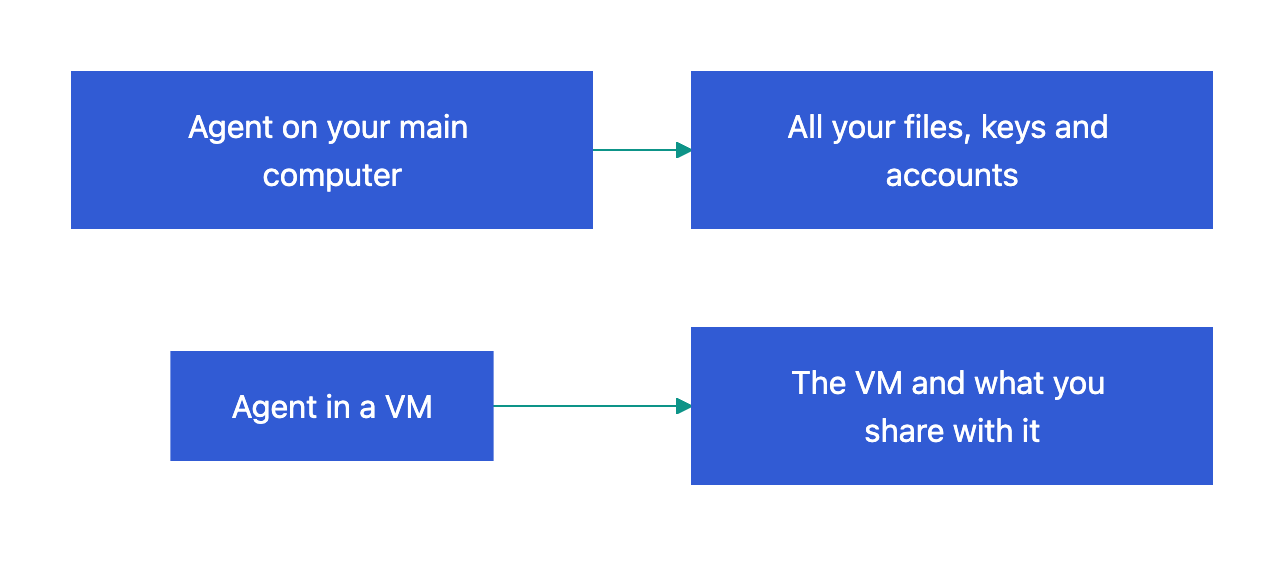
An AI agent such as Claude Code, Codex, OpenClaw or Hermes Agent runs commands on the computer where you start it. It can read, change and delete everything that your user account can. A virtual machine (VM) is a computer that runs as an app on another computer. When you run AI agents in a VM, a wrong command or a malicious instruction can damage only the VM. This article compares four places to run an agent: your main computer, a VM, an old computer and a cloud VM.
Short answer: where to run AI agents
| Where the agent runs | What a bad command can reach | Extra cost | Use it when |
|---|---|---|---|
| Your main computer | All of your files, keys and signed-in accounts | None | You read and approve each command |
| VM on your main computer | The VM, and the items that you share with it | RAM and disk space on your main computer | You let the agent work without approvals |
| Old or spare computer | That computer and your local network | A computer that you already have | The agent works for hours or all the time |
| Cloud VM | The cloud VM and the accounts that you give it | A monthly fee or a free quota | Your main computer has little RAM, or you start tasks from several devices |
What a bad command can reach:
What can go wrong when an AI agent runs on your main computer
Agents delete files by mistake, and malware can misuse them. These cases come from bug reports and the news:
| Agent | What happened | Source |
|---|---|---|
| Claude Code on Ubuntu in WSL2 | A recursive delete from / removed all files that the user owned in /home/<user>. The reporter says that the session did not use --dangerously-skip-permissions. |
Issue #10077, October 2025 |
| Claude Code on Windows 11 | As a “housekeeping” step, the agent ran rm -rf "$(cygpath -u 'C:\')" 2>/dev/null. It deleted files from the root of drive C for approximately 35 minutes. The user lost approximately 600 GB, including the user profile and repositories. |
Issue #95426, September 2026 |
| Codex on macOS | The agent deleted approximately 6 GB of files that were not in a commit. It continued after the user rejected the action. | Issue #4969, October 2025 |
| Codex app for Windows in Full Access mode | Users report that the agent deleted 240 to 700 GB of files outside the project folder. | OpenAI community thread, March 2026 |
| Google Antigravity | In Turbo mode (no approvals), the agent deleted a full D: drive when it cleared a cache. The files did not go to the Recycle Bin. | The Register, November 2025 |
Mistakes are not the only danger:
- Supply-chain attack (malicious code in a package that you install). In August 2025, the Nx “s1ngularity” malware used the installed Claude, Gemini and Amazon Q CLIs to find GitHub and npm tokens,
.envfiles, SSH keys and crypto wallets. It uploaded them to public repositories (Kaspersky). - Malicious skills. In February 2026, researchers found 341 malicious skills on ClawHub, the skill store of OpenClaw. The skills installed AMOS, malware that steals data from Macs (Unit 42).
- Prompt injection (hidden instructions in content that the agent reads). In January 2026, PromptArmor hid white text in a .docx file. Claude Cowork read it and uploaded the user’s largest file through the Anthropic API, with no approval step (PromptArmor).
A VM limits the damage in all of these cases, but it does not stop them. An agent in a VM can still delete the files in the VM and send out the data that it can read.
What Anthropic, OpenAI and Microsoft recommend
The companies that make and study the agents give the same advice: an agent that works without approvals must run in an isolated environment, for example a VM.
| Source | What it says |
|---|---|
| Anthropic, sandbox environments | “Always run --dangerously-skip-permissions sessions inside a container, a VM, or the sandbox runtime.” For an untrusted repository, use “a dedicated virtual machine, or a cloud session.” A VM “provides the strongest separation.” |
| Anthropic, security | “Use virtual machines (VMs) to run scripts and make tool calls, especially when interacting with external web services.” |
| OpenAI, Codex approvals and security | By default, the agent “runs with network access turned off” and writes only in the workspace. Full access has no sandbox and is marked “(not recommended)”. |
| Microsoft Security, running OpenClaw safely | OpenClaw “is not appropriate to run on a standard personal or enterprise workstation.” Deploy it “only in a fully isolated environment such as a dedicated virtual machine or separate physical system.” |
| OpenClaw, trust model | “Prefer one OS user/host/VPS per boundary.” Its sandbox is off by default, and the Gateway always runs outside the sandbox. |
| Hermes Agent, security | “For maximum security, run the gateway on a separate machine or VM.” |
On Linux and macOS, Claude Code does not start with --dangerously-skip-permissions as the root user. To run Claude Code in a VM or container, use a normal user. For more about this flag, read Claude Code YOLO mode and Codex YOLO mode.
Run AI agents in a VM on your main computer
A virtual machine for AI agents has its own operating system, its own disk and its own user accounts. UTM, VirtualBox, VMware Fusion and Parallels are VM apps. Try Omarchy is an app that runs the Omarchy Linux desktop in a VM on a Mac (see What is Omarchy). If an agent breaks the VM, you delete it and make a new one. The cost is RAM, disk space and the items that the VM shares with your main computer.
What a VM still shares with your main computer
VM apps share some items with the main computer, by default or with one setting:
| Shared item | Example | Risk |
|---|---|---|
| Shared folder | Try Omarchy shares one Mac folder, for example ~/Work. UTM can share folders with VirtioFS or VirtFS. |
The agent can read, change and delete all files in that folder. |
| Clipboard | Try Omarchy has a two-way clipboard for text and images. In UTM, clipboard sharing needs the SPICE agent. | Passwords and tokens that you copy on the main computer go to the VM. |
| Local network | In VirtualBox, NAT is the default. The VM can reach the main computer and other devices on your network. | The agent can reach your router, your network storage (NAS) and your printers. |
| Accounts | Any account that you sign in to in the VM | The agent can use the account as you. |
NAT (network address translation) lets the VM use the network connection of the main computer. It stops connections from your network into the VM, but not connections from the VM to your network. The UTM Host Only mode blocks them, but then the VM has no internet access, and the agent cannot reach its AI model.
What an agent in a VM can still reach:
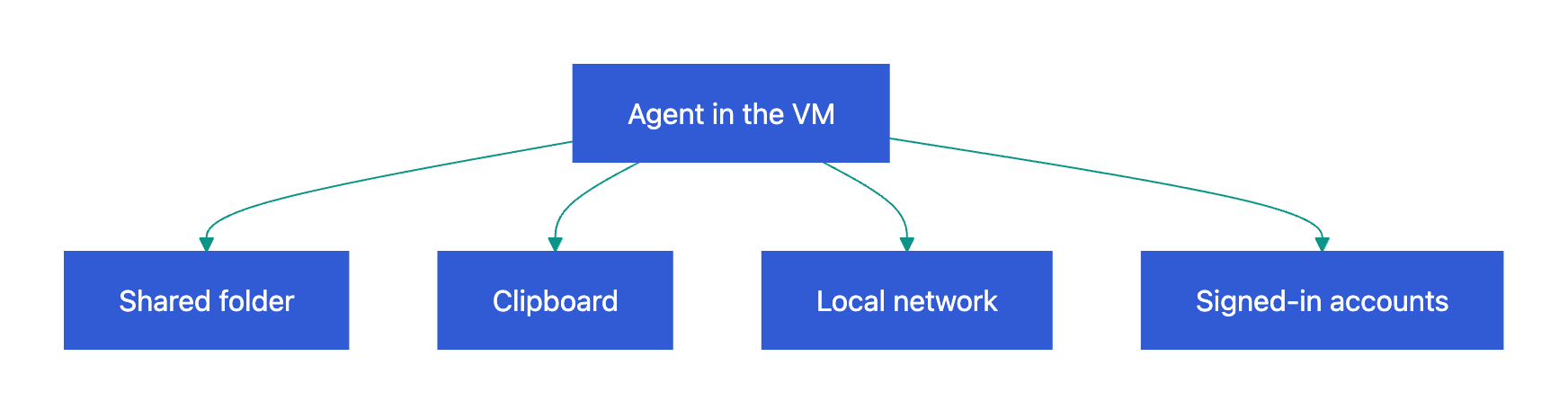
To reduce what a VM shares:
- Share only the project folder. Keep private files out of it.
- If you do not need the clipboard in the VM, turn off clipboard sharing.
- If the agent must not reach your local network, add firewall rules that block the local network and allow the internet.
- Do not copy SSH keys, cloud credentials or browser profiles from your main computer to the VM.
- If your VM app can save snapshots, save one before a long agent run.
How much RAM a VM for AI agents needs
The VM takes its RAM from your main computer while it runs. As of November 2026, these are the published minimums:
| Software | Minimum RAM | Source |
|---|---|---|
| Claude Code | 4 GB | Claude Code setup |
| Ubuntu Desktop 26.04 LTS | 6 GB (it was 4 GB) | Ubuntu release notes |
| Ubuntu Server 26.04 LTS | 1.5 GB | Ubuntu release notes |
| Omarchy on a DigitalOcean server | 4 GB (8 GB recommended) | DigitalOcean |
Parallels recommends that you give VMs not more than half of the RAM of your Mac. This limit is for all VMs that run at the same time. Try Omarchy also needs approximately 15 GB of free disk space.
With Codex and Chromium open, my Omarchy VM on a MacBook used 3.55 GiB of its 5.75 GiB of RAM:
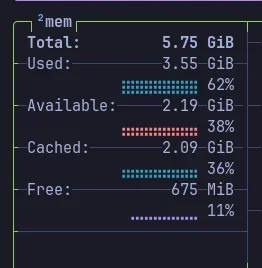
With the half-of-RAM rule, this is what fits:
| RAM in your main computer | RAM for the VM | What fits in the VM |
|---|---|---|
| 8 GB | 4 GB | A server VM with no desktop and one terminal agent |
| 16 GB | 8 GB | A desktop, a browser and one agent, like my Omarchy VM |
| 32 GB or more | 16 GB or more | Several agents, or two VMs |
If your main computer has only 8 GB of RAM, use an old computer or a cloud VM instead.
Use an old or spare computer
Microsoft names a “separate physical system” as a correct place for OpenClaw. An old laptop has its own RAM, disk and accounts. It shares no files with your main computer unless you copy them, and it can run agents for hours while your laptop is closed.
Projects that help:
- ClawPad has scripts that set up Claude Code, OpenClaw and OpenCode on old ThinkPads. Its author uses a ThinkPad X200 with Debian 13 and the i3 window manager.
- Omarchy is a Linux desktop that runs well on old hardware. What is Omarchy lists old ThinkPads, MacBooks and mini PCs that users run it on. Since Omarchy 4.5 (November 2026), you can install it natively on M1, M2, M3 and Neo MacBooks.
Before you install Omarchy on an old computer:
- Copy the data that you want to keep to another disk. The Omarchy installation erases the drive.
- Turn off Secure Boot in the BIOS.
- Keep full-disk encryption on. Omarchy turns it on by default.
The old computer is on your local network. If your router has a guest network, connect the old computer to it. Sign in on it only with accounts that you made for the agent.
Use a cloud VM
Cloud VM options:
- Claude Code cloud sessions run in an isolated VM that Anthropic manages. A proxy keeps your GitHub token outside the VM.
- Codex also runs tasks in the cloud. Read Codex Cloud vs Codex remote control.
- GitHub Codespaces gives GitHub Free personal accounts 120 hours of compute and 15 GB-month of storage each month. Larger machines use the hours faster.
- E2B gives “a fast, secure Linux VM created on demand for your agent”.
- A cloud server from a provider such as DigitalOcean, which also has an Omarchy image.
Your code and the agent’s files are then on the server of another company, and you pay when the free quota ends.
Lighter options: a sandbox for AI agents or a dev container
A sandbox for AI agents is a set of operating system limits on what a process can read, write and reach on the network. Sandboxes and containers use less RAM than a VM, but they protect less:
| Option | What it isolates | What it does not protect |
|---|---|---|
Claude Code sandbox (/sandbox) |
Bash commands. Writes go only to the project folder and the temp folder. Network access goes only to allowed domains, and the list starts empty. | By default, commands can read the entire computer, including ~/.ssh and ~/.aws/credentials. File tools, hooks (scripts that run on agent events) and MCP servers (tools that the agent connects to) run outside it. It is off by default and not available on native Windows. |
Sandbox runtime (srt claude) |
The whole Claude Code process, with MCP servers and hooks | It is a beta, and it protects only what its settings deny. |
Codex sandbox (workspace-write) |
Writes outside the workspace. Network access is off by default. | Full access mode turns the sandbox off. |
| Dev container (a Docker container for development) | Files outside the container | With approvals off, a malicious project can send out everything in the container, including the Claude Code credentials. Do not mount ~/.ssh or cloud keys in it. |
Docker Sandboxes (sbx), free for local use, also commercial |
Each agent in a microVM (a small VM that starts fast) | Data that the agent can read and send over the network that it can reach |
| Separate macOS user, for example SandVault | Your home folder and /Volumes |
GUI apps cannot run in it. |
No sandbox, container or VM stops the agent from sending out data that it can read over a network that it can reach (Anthropic). Keep secrets out of the VM too.
Give the agent its own accounts in the VM
A VM protects the files on your main computer. It does not protect an account that you sign in to in the VM. For OpenClaw, Microsoft gives this advice: “Create accounts, tokens, and datasets that exist solely for the agent’s purpose.”
According to PC Gamer, OpenClaw deleted the email inbox of Summer Yue, an AI safety director at Meta. To stop it, Summer Yue “had to RUN to my Mac mini”. A VM does not help in this case, because the agent had access to the real inbox.
In the VM, use:
- a separate GitHub account, or a token that has access to one repository only
- API keys that you made only for the agent
- a browser profile with no saved passwords
- a separate email inbox
Read why a personal Gmail inbox is a poor fit for an AI agent.
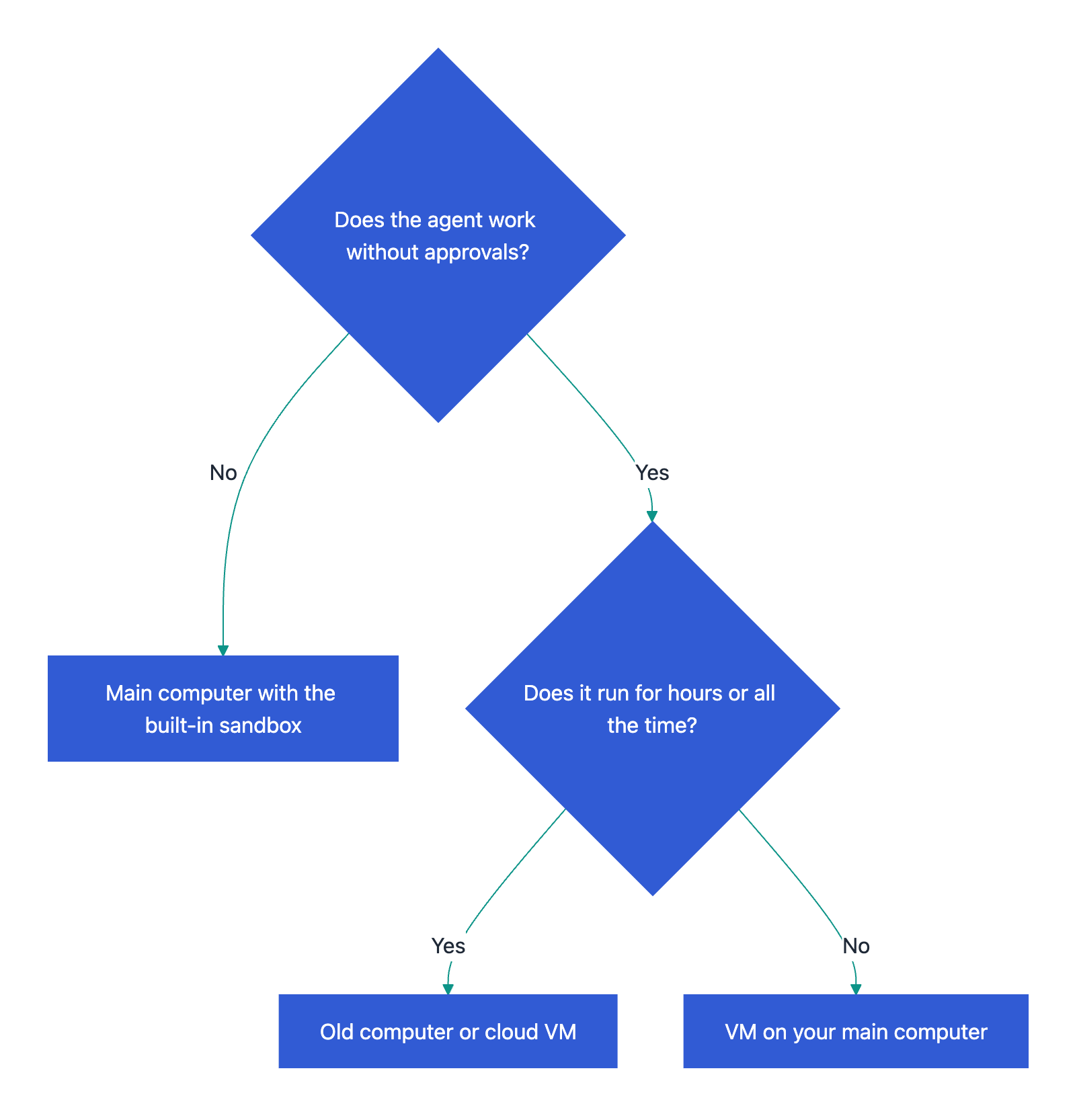
Which one to use: main computer, VM, old computer or cloud
- Use your main computer when you read and approve each command, and the task is short. Turn on the built-in sandbox of Claude Code or Codex.
- Use a dev container or Docker Sandboxes when you skip approvals on your own project, and the container has no secrets.
- Use a VM on your main computer when the agent works without approvals, opens untrusted repositories or websites, or is OpenClaw or Hermes Agent. For a VM with a desktop, use a computer with 16 GB of RAM or more.
- Use an old or spare computer when the agent runs for hours or all the time, or when your main computer has only 8 GB of RAM.
- Use a cloud VM when you have no spare computer and little RAM, or when you start tasks from a phone or several devices.
Where to run the agent:
In all cases, give the agent its own accounts and share only the folder that it works in.
A docs portal with Ask AI
and support tickets
Connect a repository, or describe your product to start. Each docs site has search, Ask AI, an API console, an MCP server and support tickets.
- Publishes from GitHub on every push
- Works with Mintlify repositories
- API console from your OpenAPI file
- MCP server and llms.txt for AI agents
- Ask AI and support tickets
- Analytics for people and AI agents
Frequently Asked Questions
Is a Docker container as safe as a VM for AI agents?
No. A container uses the kernel (the core of the operating system) of your main computer. A VM has its own kernel, and Anthropic calls a dedicated VM “the strongest separation”. A dev container with a firewall is a good choice for your own projects. For untrusted code, use a VM, or Docker Sandboxes, which put each agent in a microVM.
Can I sign in to my Claude or ChatGPT account in the VM?
Yes. Claude Code and Codex need a sign-in or an API key, so these credentials are in the VM. With approvals off, a malicious project can send out anything that the agent can read, including the Claude Code credentials. Do not sign in to other personal accounts in the same VM.