Claude Code vs Codex: which AI coding agent to use?
Table of Contents
- Claude Code vs Codex: the short answer
- Where Claude Code and Codex run
- Models in Claude Code and Codex (as of November 2026)
- Feature comparison: Codex vs Claude Code
- Three differences that matter in daily work
- Codex image generation vs images as code in Claude Code
- What Codex does
- What Claude Code does
- Claude Code vs Codex benchmarks: independent results first
- Independent: Artificial Analysis
- Vendor-reported results
- Cost and speed per task: Codex vs Claude Code
- Plans and limits
- Codex vs Claude Code: which one to use
Claude Code (from Anthropic) and Codex (from OpenAI) are AI coding agents: programs that read your code, run commands and change files for you. In a Claude Code vs Codex comparison, the two products are close. Both have almost the same features and run in a terminal, an IDE, a desktop app and the cloud. They differ in image generation, safety defaults, cost and time per task, and independent test scores. This article compares the two and tells you which AI coding agent to use in each situation.
Claude Code vs Codex: the short answer
| Question | Claude Code | Codex |
|---|---|---|
| Independent score (Artificial Analysis) | 62 with Opus 5.5 | 55 with GPT-6 Astra, 54 with GPT-6.1 Sol |
| Cost per test task (API prices) | $11.42 with Opus 5.5 | $7.04 with GPT-6 Astra, $1.50 with GPT-6.1 Sol |
| Time per test task | 1 hour with Opus 5.5 | About 25 minutes |
| Generates images (PNG) | No | Yes, built in |
| Sandbox at start | Off | On |
| Source code | Closed | Open source |
Claude Code with Opus 5.5 scores higher. Codex finishes the same tasks faster and at a lower cost.
Where Claude Code and Codex run
| Surface | Claude Code | Codex |
|---|---|---|
| CLI | macOS 13+, Windows 10+ (native or WSL), Linux (Ubuntu, Debian, Alpine) | macOS, Windows, Linux |
| Desktop app | Claude desktop app: macOS, Windows (x64 and ARM64), Linux (beta) | ChatGPT desktop app: macOS, Windows, Linux (preview) |
| IDE | VS Code, Cursor, JetBrains | VS Code, Cursor, Windsurf, Xcode, JetBrains |
| Cloud | Cloud sessions at claude.ai/code | Codex cloud tasks from the web, the app, the CLI and the phone |
| Phone | Claude app (iOS and Android) | ChatGPT app |
| Other | Slack, GitHub Actions, GitLab CI/CD, Chrome extension | GitHub (@codex), Chrome extension |
| SDK | Agent SDK (Python, TypeScript) | Codex SDK (TypeScript, Python) |
| License | Closed source | Open source (Apache-2.0, written in Rust) |
Sources: the Claude Code setup page, the Claude Code overview and the Codex CLI page. Claude Code needs a paid Claude plan or an API account.
Neither phone app runs the agent on the phone. Both apps control your computer or start cloud tasks. Read how to control Claude Code or Codex from a phone.
Models in Claude Code and Codex (as of November 2026)
To change the model, type /model in a session, or start the agent with claude --model <name> or codex -m <name>.
| Agent | Model | Use | API price per 1M tokens (input / output) |
|---|---|---|---|
| Claude Code | Opus 5.5 | Default model on paid plans and the API | $4 / $20 |
| Claude Code | Sonnet 5.5 | Lower cost | $2 / $10 |
| Claude Code | Haiku 5.5 | Lowest cost | $0.10 / $0.50 |
| Claude Code | Fable 5.1 | The hardest and longest tasks; never the default | $10 / $50 |
| Codex | GPT-6 Astra | Most capable | $10 / $50 |
| Codex | GPT-6.1 Sol | Results near Astra at a lower cost | $2 / $10 |
| Codex | GPT-6.1 Terra | Fast | $1 / $5 |
| Codex | GPT-6 Luna | Lowest cost, for high-volume tasks | $0.10 / $0.50 |
Sources: Claude Code model settings, Codex models, Claude pricing and OpenAI API pricing.
Other differences:
- Default model: Claude Code uses Opus 5.5. The Codex docs name no single default. Codex uses a recommended model for your plan, and the configuration example uses
gpt-6.1-sol. - Context window (the text a model can read at one time): 1M tokens for the Claude 5.5 models and Fable 5.1. The Codex docs give GPT-6.1 Sol 500,000 tokens. A token is a unit of text that a model counts and bills.
- Effort (how long the model thinks): Claude Code has low, medium, high, xhigh and max, with medium as the start level on the 5.5 models. Codex has Light (Low in the CLI), Medium, High, Extra High, Max and Ultra. Ultra splits a task between parallel subagents.
Feature comparison: Codex vs Claude Code
Terms in the table:
- Sandbox: a limit on the files and network that agent commands can reach.
- Approval policy: when the agent asks you before it acts.
- Subagent: a helper agent for one part of a task.
- Skill: a folder of instructions that the agent loads when needed.
- Hook: a script that runs at a fixed point, for example before a command.
- MCP (Model Context Protocol): a standard way to connect tools to an agent.
| Feature | Claude Code | Codex |
|---|---|---|
| Sandbox | Off by default; turn it on with /sandbox. Not on native Windows |
On by default in Git folders (workspace-write, no network). Also on Windows |
| Approvals | Modes: auto (start mode; a second model reviews each action), Manual, acceptEdits, plan, dontAsk |
Policies: on-request, never, granular; optional auto_review agent |
| No checks at all | bypassPermissions mode |
--yolo (no sandbox, no approvals) |
| Instruction file | CLAUDE.md; reads AGENTS.md when no CLAUDE.md exists | AGENTS.md (32 KiB limit); reads CLAUDE.md only if you add it to the settings |
| Auto memory | On by default | Off by default |
| Subagents | Subagents, agent teams, background agents | Subagents, custom agents in .codex/agents/, Ultra effort |
| Skills and plugins | Yes and yes | Yes ($name) and yes |
| Hooks | Yes | Yes (15 events, on by default) |
| MCP | Yes | Yes (codex mcp) |
| Web search | WebSearch tool | Cached results by default; live search with --search |
| Browser and computer use | Claude in Chrome; computer use in preview (CLI on macOS, desktop app on macOS and Windows) | Browser in the app, Chrome extension; computer use in the app (macOS, Windows) |
| Cloud tasks | Cloud sessions; --teleport moves one to your terminal |
Cloud tasks that continue while your computer sleeps |
| Scheduled tasks | In the cloud and in the desktop app; /loop |
In the app (local) and on the web (cloud), with Gmail, Slack and GitHub triggers |
| GitHub code review | Code Review service for Team and Enterprise (@claude review); /code-review in a session on any plan |
@codex review reports only P0 and P1 issues (the two highest priorities); automatic reviews |
Sources for Claude Code: sandbox, permission modes, memory, Code Review. Sources for Codex: security, instruction files, GitHub.
Three differences that matter in daily work
-
Sandbox. Codex starts in a sandbox. In a Git folder, it can edit project files but cannot use the network without your approval. Claude Code starts in auto mode: a second model reviews each action, and routine actions run without a prompt. Its sandbox stays off until you turn it on, and native Windows has none (use WSL2). Before you skip all checks, read about Claude Code YOLO mode and Codex YOLO mode.
-
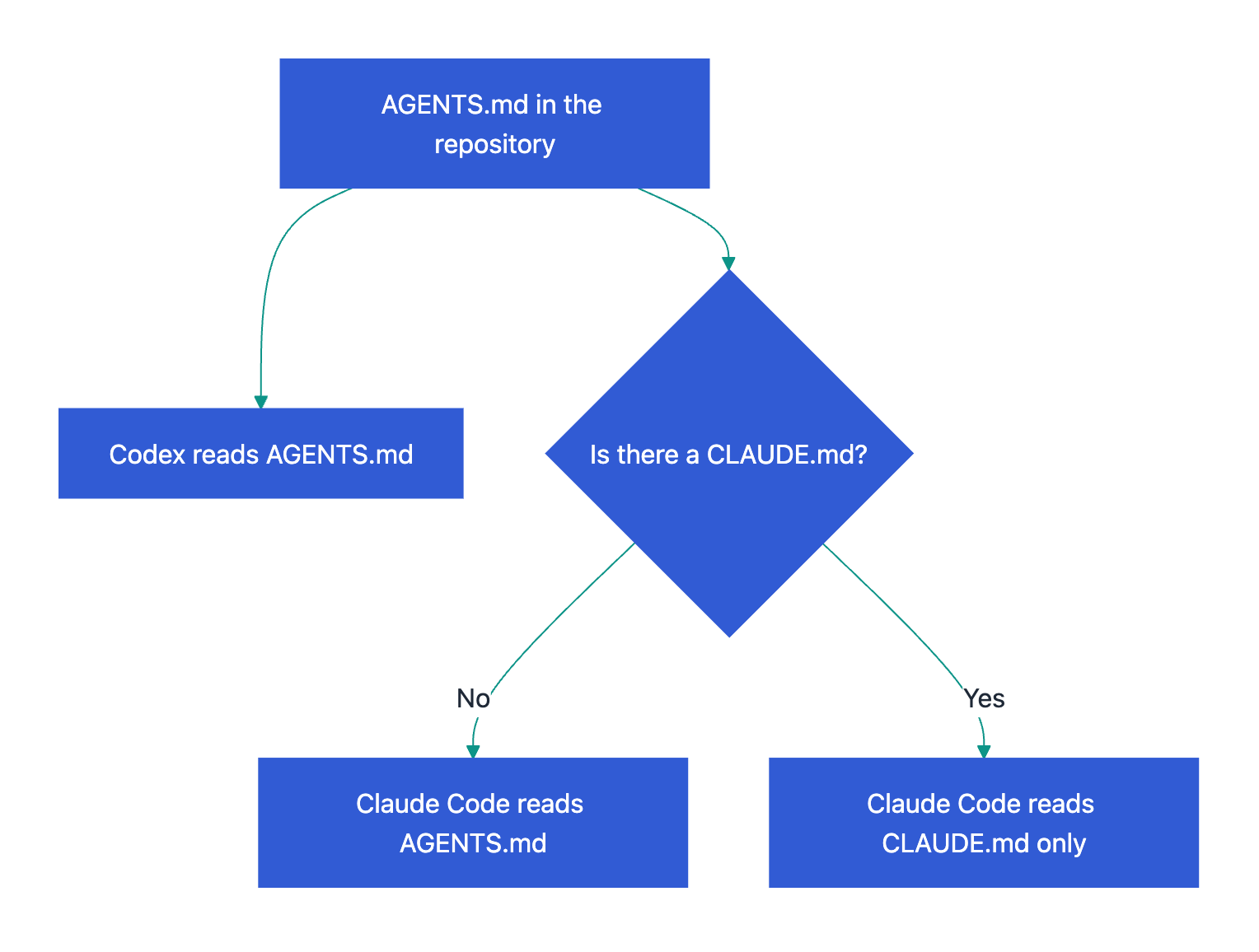
Instruction files. Codex reads AGENTS.md. Claude Code reads CLAUDE.md, and it reads AGENTS.md only when the repository has no CLAUDE.md. To use one file for both agents, keep the rules in AGENTS.md. Then add the line
@AGENTS.mdto CLAUDE.md, so that Claude Code imports it. -
Code review on GitHub. Codex reviews a pull request when you comment
@codex review, but not when you sign in with an API key. The managed Code Review service of Claude Code is only for Team and Enterprise plans. On other plans, run/code-reviewin a session.
Which instruction file each agent reads:
Codex image generation vs images as code in Claude Code
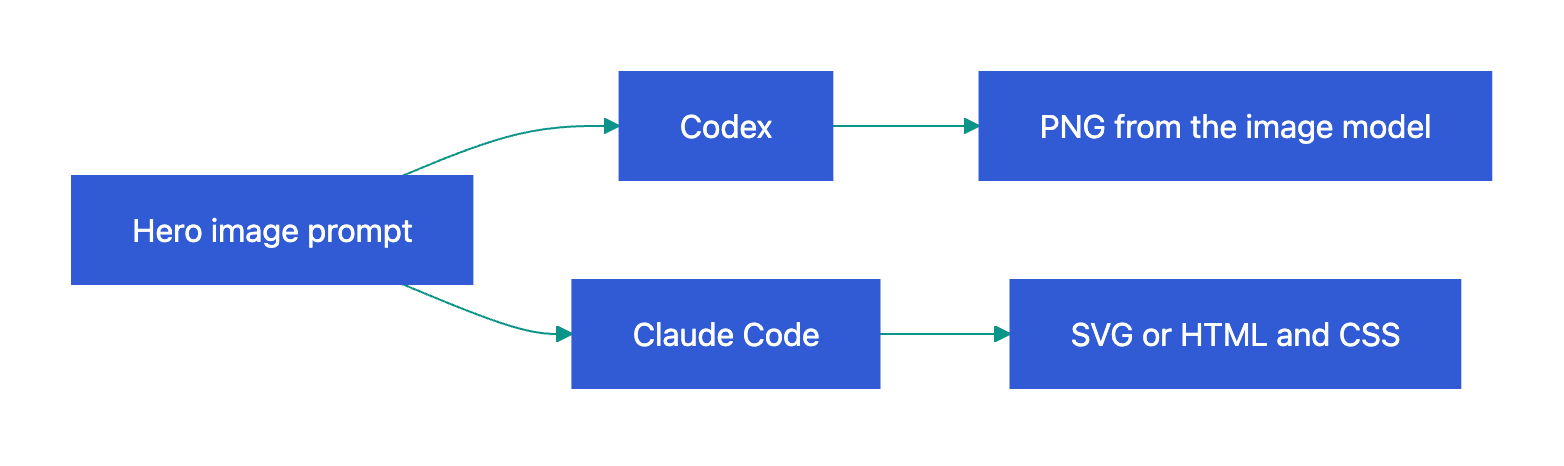
Image generation is the clearest difference between Codex and Claude Code. Give both agents this prompt in the same repository:
Make a hero image for this landing page and add it to index.html.What Codex does
For image generation, Codex has a built-in tool that uses the gpt-image-2 model. The tool works in the app, on the web, in the CLI and in the IDE (OpenAI image generation docs). The docs and the image skill of Codex describe this flow:
- Codex makes a raster image (an image of pixels, such as a PNG).
- It saves the file under
$CODEX_HOME. - Its image skill tells it to copy the final file into your project. If a file such as
hero.pngalready exists, Codex does not overwrite it unless you ask. It makeshero-v2.pnginstead. - It adds the image to
index.html.
In the CLI, type $imagegen to call the tool directly. To change an existing image, attach it with -i or --image. The tool needs no OPENAI_API_KEY: it uses your plan limits, on average 3 to 5 times faster than a turn without an image.
Codex also writes images as code. Its image skill tells it not to generate simple shapes, diagrams, wireframes or icons, because these are better as SVG, HTML and CSS, or canvas code.
What Claude Code does
Claude models cannot make images. The Anthropic vision docs say: “Claude is an image understanding model only. It can interpret and analyze images, but it cannot generate, produce, edit, manipulate, or create images.” Claude Code also has no built-in tool that generates images.
For the same prompt, Claude Code writes the hero as code: an SVG file, or HTML and CSS with shapes, gradients and text. Then it adds the result to index.html. Other options:
- An artifact is an interactive HTML page that Claude Code publishes on claude.ai. To keep the token cost low, the docs recommend SVG or HTML and CSS for diagrams, not raster images.
- The
/designcommand (beta) draws a layout as artboards on a canvas. You can export each artboard as PNG or PDF. This PNG shows a layout, not a photo or a painted illustration. - For a photo or an illustration, connect a separate tool, such as an MCP server or a script, that calls an image model from another company.
Both agents can read images. Paste a screenshot or give its file path, and the agent can turn the design into code.
| Task | Codex | Claude Code |
|---|---|---|
| Photo or illustration (PNG) | Yes, built in | No; needs a separate tool |
| Change an existing image | Yes (--image) |
No |
| Icon, diagram or chart as SVG | Yes | Yes |
What each agent does with the hero image prompt:
Claude Code vs Codex benchmarks: independent results first
A vendor tests its own model in a setup that it chooses. An independent test runs both agents in the same way.
Independent: Artificial Analysis
The Artificial Analysis Coding Agent Index (version 2.0) tests the model and the agent together. It combines three benchmarks. All four setups ran at max effort.
| Setup | Index | Terminal-Bench 4.0 | FrontierCode v1.1 | SWE-Atlas-QnA-AA |
|---|---|---|---|---|
| Claude Code + Opus 5.5 | 62 | 63% | 56% | 66% |
| Claude Code + Fable 5.1 | 58 | 58% | 49% | 66% |
| Codex + GPT-6 Astra | 55 | 56% | 49% | 59% |
| Codex + GPT-6.1 Sol | 54 | 53% | 49% | 60% |
Claude Code with Opus 5.5 leads on the index and on each benchmark. Fable 5.1 has the same SWE-Atlas score. The page shows no test date.
Vendor-reported results
Anthropic published these numbers in its Opus 5.5 announcement (September 22, 2026). The OpenAI model in the last column is the older GPT-5.6 Sol, not GPT-6.1 Sol.
| Benchmark (reported by Anthropic) | Opus 5.5 | Fable 5.1 | GPT-6 Astra | GPT-5.6 Sol |
|---|---|---|---|---|
| Terminal-Bench 4.0 | 66.4% | 55.8% | 57.9% | 37.3% |
| FrontierCode v1.1 | 54.4% | 50.3% | 53.3% | 47.5% |
| AutomationBench | 40.0% | 31.4% | 41.4% | 28.8% |
Anthropic itself writes that “benchmark margins have become a less reliable guide to real-world differences.”
OpenAI reports these numbers:
- GPT-6 Astra: 57.9% on Terminal-Bench 4.0, 74.1% on DeepSWE v1.1 and 72.6% on OSWorld 2.0 (InfoQ).
- GPT-6.1 Sol: 2.2 points more than Opus 5.5 on AutomationBench at medium effort, at about one third of the cost (IT Brief).
- GPT-6.1 Sol on Terminal-Bench-Science: $5.47 per task, against $23.21 for Opus 5.5 (same source).
Cost and speed per task: Codex vs Claude Code
The same test measured the cost, time and tokens per task. The cost uses API prices, not plan prices.
| Setup | Cost per task | Time per task | Tokens per task |
|---|---|---|---|
| Claude Code + Opus 5.5 | $11.42 | 1 hour | 14.5M |
| Claude Code + Fable 5.1 | $11.53 | 35 minutes | 6.0M |
| Codex + GPT-6 Astra | $7.04 | 25 minutes | 3.2M |
| Codex + GPT-6.1 Sol | $1.50 | 24 minutes | 3.9M |
Claude Code with Opus 5.5 took 146 turns (model steps) per task, against 39 for Codex with GPT-6 Astra. It used about 4.5 times the tokens of Codex with Astra and cost about 7.6 times as much as Codex with Sol. In return, it got the highest scores.
On a subscription, the cost per task shows as how fast you reach the plan limits. If you run long tasks from a laptop, read how to run Claude or Codex on a closed MacBook.
Plans and limits
| Price per month | Claude plan (Claude Code) | ChatGPT plan (Codex) |
|---|---|---|
| $0 | Free: no Claude Code | Free: GPT-6 Luna in the desktop app, where it is available |
| $8 | None | Go: GPT-6 Luna in the desktop app, where it is available |
| $20 | Pro ($17 billed yearly) | Plus: GPT-6.1 Sol and Luna in the CLI, IDE, web and cloud |
| $100 | Max | Pro |
| $200 | Ultra | Pro |
| $500 | None | Pro |
The sources are Claude pricing and Codex pricing. Team plans cost $20 to $25 per seat on both (Claude Team standard seat, ChatGPT Business).
The limits are different:
- Claude: a limit for each 5-hour window and a weekly limit, shared by Claude, Claude Code and the desktop app. Verified Ultra accounts have no 5-hour limit. At a limit, you can buy usage credits at API prices.
- Codex: on Plus, OpenAI estimates 15 to 160 GPT-6.1 Sol messages per 5 hours. Pro plans have no 5-hour limit at this time. Weekly limits can also apply. At a limit, you can buy ChatGPT credits.
- Both: you can use an API key and pay per token. With an API key, Codex has no cloud features.
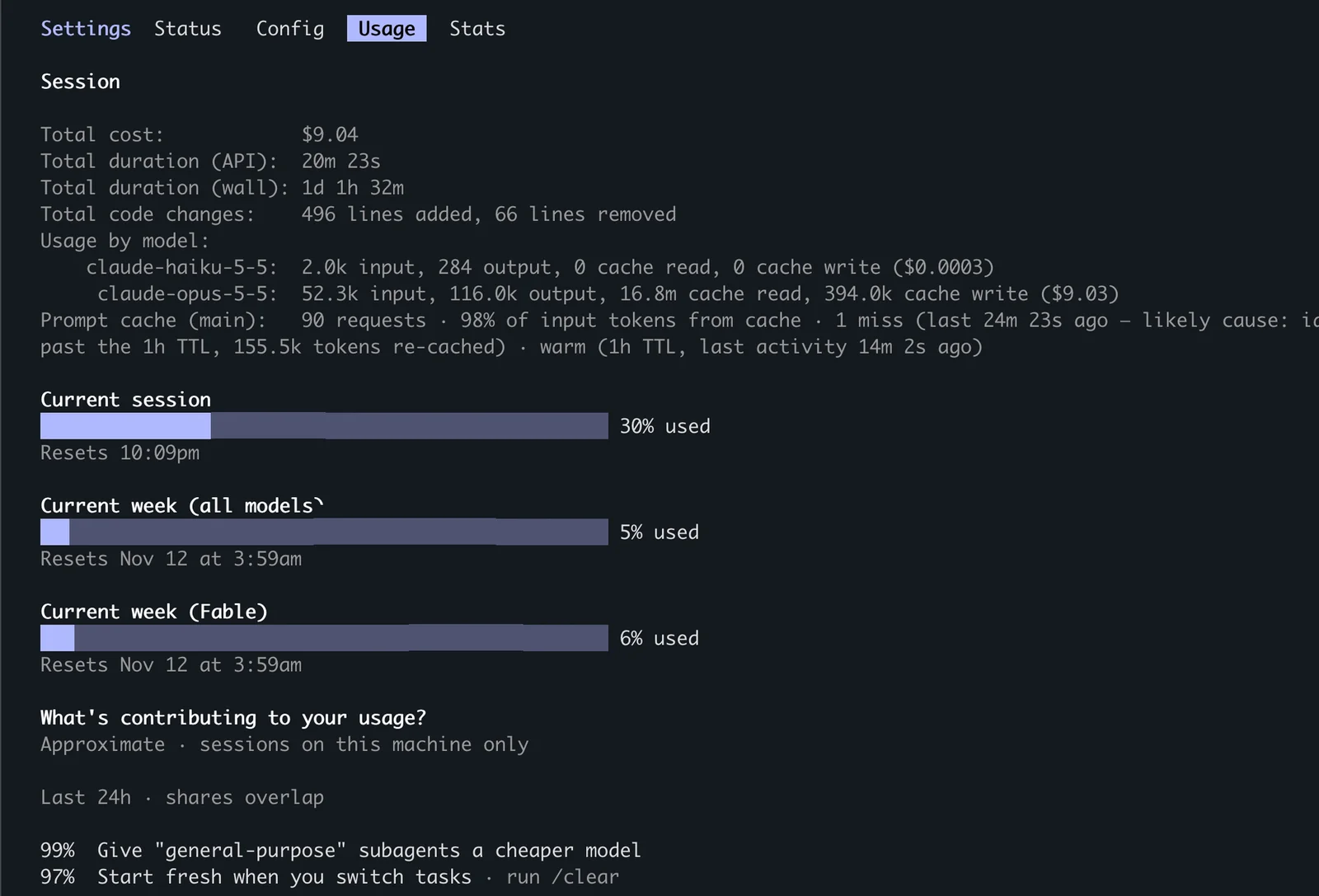
In Claude Code, /usage shows the plan bars with their reset times, and the cost of the session at API prices. In this session on a Claude plan, Opus 5.5 used 30% of the 5-hour limit and 5% of the weekly limit. At API prices, the same work would cost $9.04. Fable models have their own weekly bar. In Codex, type /status.
Codex vs Claude Code: which one to use
The best AI coding agent for you depends on the task, the budget and the plan that you already pay for.
| Situation | Use |
|---|---|
| Hard, long tasks where the result matters more than time or cost | Claude Code with Opus 5.5 |
| Many small tasks, or a tight budget | Codex with GPT-6.1 Sol |
| The agent must make PNG images, such as heroes, photos or edits | Codex |
| Icons, diagrams and charts as SVG | Either agent |
| You want a sandbox from the start | Codex (or turn on /sandbox in Claude Code) |
| You want to read or change the source code of the CLI | Codex |
| Managed pull request review on GitHub on a personal plan | Codex (@codex review) |
| You want to try an agent for free | Codex on ChatGPT Free (GPT-6 Luna, where it is available) |
| Your team already pays for Claude or ChatGPT | The agent that comes with that plan |
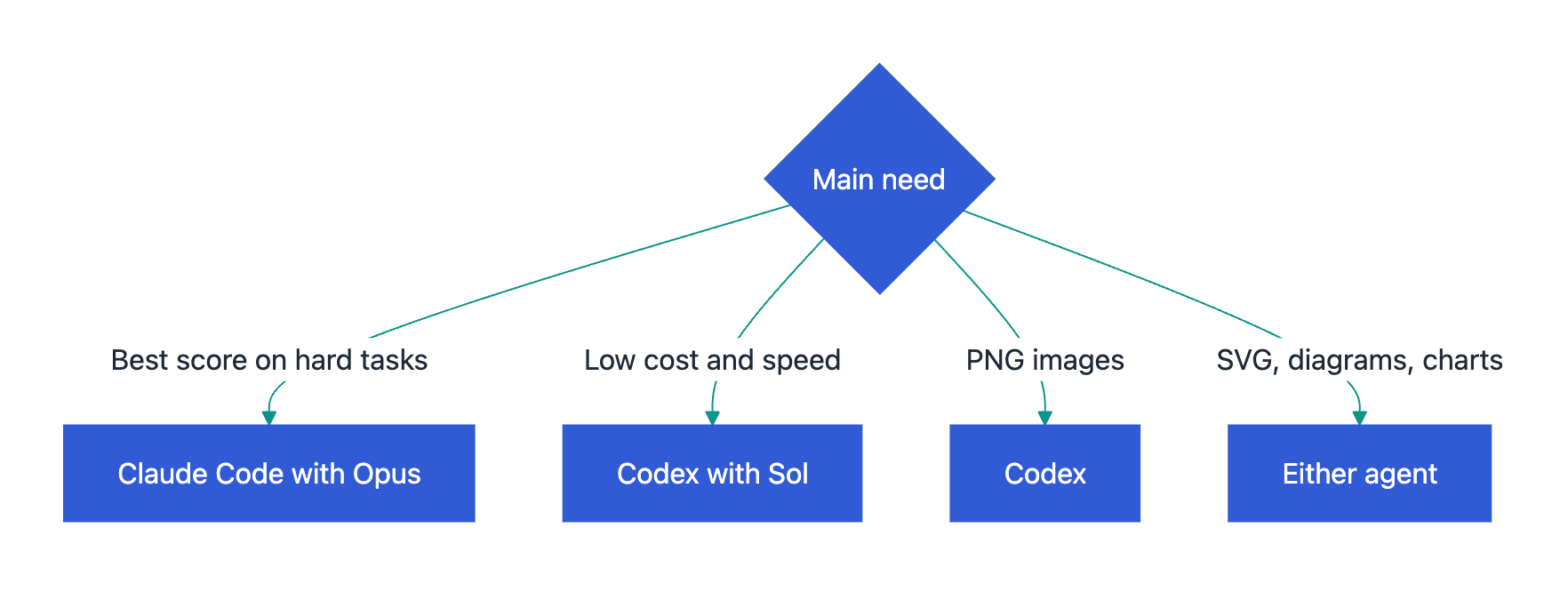
How to choose by your main need:
You can also use both, with one AGENTS.md file for the two. For the first steps, read how to run Claude Code from the command line and how to run Codex from the command line.
A self-serve support and documentation portal
for your product or service
With AI search and answers, support tickets and analytics.
- A support portal with public Help Center articles
- AI search and AI answers
- Docs from your GitHub repository, for APIs, dev tools and other complex products
- A support widget for your website
- Made for AI agents to read and search: Markdown pages and a built-in MCP server
- Analytics: who viewed and searched your docs and articles, and when
- Private support tickets to track customer requests
Try it: press Ask at the lower right of this page.
Frequently Asked Questions
Can Codex generate many images without using my plan limits?
Yes. Set OPENAI_API_KEY in your environment, and Codex generates the images through the OpenAI API. Then API prices apply, not your plan limits. The image generation docs recommend this for larger batches. The fallback script of the image skill writes its files to output/imagegen/.
What happens when Claude Code or Codex reaches a usage limit during a task?
Both agents let the current step finish. Claude Code shows “Usage limit reached · wrapping up”. From version 2.1.234, it can continue the task automatically after the limit resets. You can also turn on usage credits or wait. In Codex, Plus and Pro users can buy more credits, and all users can run local chats with an API key at API prices.
How do I see how much of my limit Claude Code or Codex used?
In Claude Code, run /usage to see the bars for your plan limits, or /status. On the web, open Settings > Usage on claude.ai. In Codex, run /status in the CLI, or open the Codex usage page.