
Essential Resume Screening Checklist for Employers
Resume screening checklist
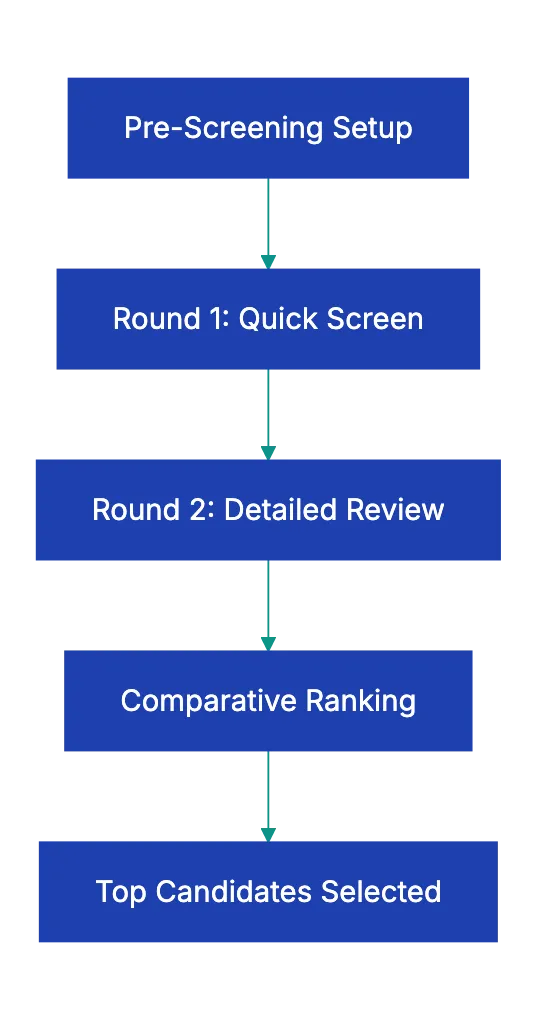
Resume screening is the first sort of applications against the requirements of the job. It is fair and fast only when every reviewer uses the same written criteria. Use this checklist in two parts: one part before you open the first resume, and one part for each resume.
Before you open the first resume:
- Write the must-have requirements with the hiring manager. A must-have is a requirement that the job cannot be done without.
- Write the nice-to-have qualifications separately.
- Write the factors that disqualify a candidate, for example no required license or no legal right to work.
- Make sure that each requirement is related to the job. You must be able to explain why the job needs it.
- Make a scoring table with points for each criterion.
- Give the same criteria and table to every reviewer.
For each resume:
- Each must-have is present.
- No disqualifying factor applies.
- The candidate shows results, not only duties.
- The experience is relevant to the problems of this job.
- Dates and job titles are consistent.
- Questions for the interview are written down, for example about a gap or a short job.
- The score and the reason for the decision are recorded.
Set the criteria before you read
Criteria that you write after you read some resumes change with each resume. A strong candidate with an unusual background can make you drop a requirement for that person only. That is inconsistent, and it is a legal risk.
Here is an example for a senior accountant. The must-haves can be a CPA license, several years of public accounting experience and skill with the team’s accounting software. The nice-to-haves can be experience in your industry, management experience or another certification.
If you must change a criterion during the process, change it for all candidates. Screen the candidates that you already rejected again with the new criterion.
Round 1: must-haves only
The first round is a fast pass. It has one question: does the resume show each must-have, and is no disqualifying factor present?
- Look for each must-have on the resume.
- If a must-have is clearly missing, reject the resume and record the reason.
- If each must-have is present, move the resume to round 2.
- If you cannot tell, move the resume to round 2 with a note. Do not reject it on a guess.
Do not judge the layout, the fonts or the design of the resume in this round. These do not tell you if the candidate can do the job.
Round 2: detailed review
In round 2, read each remaining resume against the full criteria.
- Results: Look for results with numbers, for example “grew sales from $1.2M to $1.8M in one year”. A list of duties (“managed social media”) tells you less.
- Relevance: Look for experience with the problems that this job must solve, not only the same job title.
- Progression: Look at how the responsibility changed over time. Do not expect a straight line.
- Consistency: Make sure that dates, titles and descriptions agree with each other.
- Gaps and short jobs: Write them down as questions for the interview. Gaps have many causes, for example caregiving, illness, study or layoffs. Do not reject a candidate for a gap alone.
- Cover letter: If the candidate sent one, read it for evidence that is related to the job.
Score, rank and record
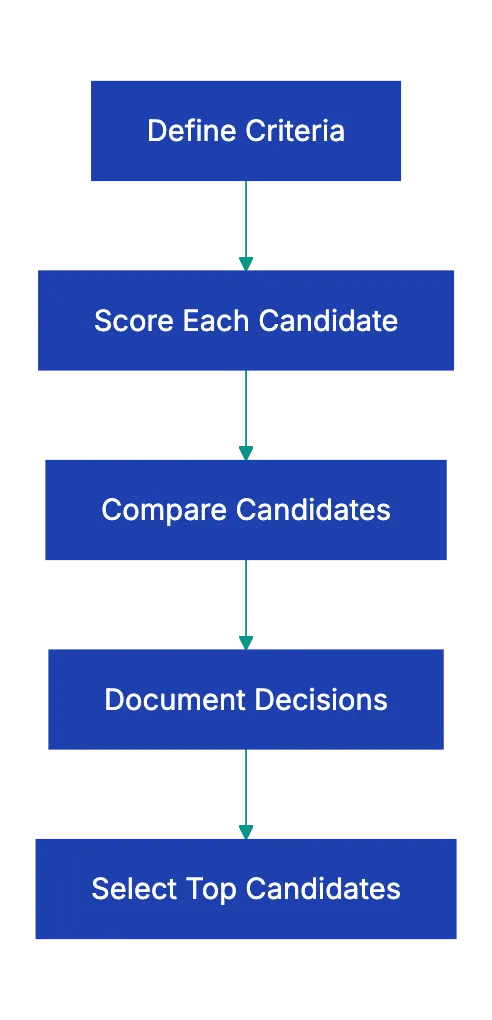
Score each candidate with the same table. With a table, you do not compare candidates from memory. Here is an example for the senior accountant job:
| Criterion | Points |
|---|---|
| CPA license | Pass or fail |
| Required years of experience | Pass or fail |
| Results with numbers | 0 to 5 |
| Experience in the industry | 0 to 3 |
| Management experience | 0 to 2 |
For each candidate, record the score and the reason for the decision, with a reference to the criteria. These records help you if a candidate files a complaint. They also show you later which criteria predicted success in the job.
If very few candidates pass round 1, your must-haves can be too strict for the market. If too many pass, add detail to the criteria. Do not add new requirements for some candidates only.
Legal rules for US employers
Federal law forbids discrimination in hiring. The EEOC lists the protected characteristics. These are race, color, religion, sex, national origin, age (40 or older), disability and genetic information. Sex includes pregnancy, sexual orientation and transgender status. Use this checklist for your process:
- Each criterion is related to the job. If you cannot explain why the job needs it, remove it.
- The criteria apply to all candidates in the same way. If you make an exception, record the business reason.
- The job ad does not show a preference for or discourage a protected group. The EEOC gives the example of an ad for “recent college graduates”, which can discourage people over 40.
- You do not ask about disability before a job offer. The EEOC says that pre-offer questions about disability are prohibited.
- You do not ask applicants for a photo. If you need one for identification, ask for it after the offer is accepted.
- You keep all applications and screening records for at least one year. The EEOC recordkeeping rules require one year for personnel and employment records. If a charge of discrimination is filed, keep the related records until the case is closed.
State and city laws can add more protected groups and more rules. Some places also regulate automated hiring tools. New York City is an example. There, an employer can use an automated employment decision tool only after a bias audit in the past year. The employer must also publish a summary of the audit and notify candidates 10 business days before it uses the tool. If you are not sure that your process obeys these laws, ask an employment lawyer.
Common screening mistakes
| Mistake | What to do |
|---|---|
| You change the criteria for one candidate | Change them for all candidates, or keep them |
| You prefer famous schools or employers | Score the results, not the brand names |
| You judge “culture fit” from a resume | Leave fit for the interview, and define it with job-related behavior |
| You reject all gaps | Write down the gap as a question for the interview |
| You reject a strong candidate for one missing nice-to-have | Use nice-to-haves only for points, not for rejection |
| You read too many resumes at one time | Split the work into shorter sessions |
| You do not track the results | Count how many candidates pass each stage, and which hires succeed |
Use this checklist with Claude or ChatGPT
Claude or ChatGPT can help you compare one resume with your written criteria. Paste your criteria and scoring table into the chat. Then paste or attach one resume and ask for a report for each criterion:
Below are the screening criteria for this job and one resume.
For each criterion, quote the part of the resume that shows it,
or say that the resume does not show it. Do not guess, do not
rank the candidate, and do not consider anything that is not
in the criteria. List questions for an interview.
Do not let the AI decide who advances. Hiring decisions must obey anti-discrimination law. Keep a person responsible for each decision. An AI model can miss information or invent it, and it can repeat bias. Find each finding in the resume yourself. Before you upload a resume, remove personal data that the criteria do not need. Examples are names, photos, addresses and dates of birth. Make sure that your company’s privacy rules permit you to upload candidate data. Make sure that the data settings of your AI workspace permit it too. Some places have rules for automated hiring tools, for example New York City. If you hire there, ask an employment lawyer before you use AI in screening.
A docs portal with Ask AI
and support tickets
Connect a repository, or describe your product to start. Each docs site has search, Ask AI, an API console, an MCP server and support tickets.
- Publishes from GitHub on every push
- Works with Mintlify repositories
- API console from your OpenAPI file
- MCP server and llms.txt for AI agents
- Ask AI and support tickets
- Analytics for people and AI agents
Frequently Asked Questions
Can I use an applicant tracking system to filter resumes by keywords?
Yes, but the same rules apply as for a person. Each keyword must be related to the job, and the filter must apply to all candidates in the same way. Keyword filters can reject good candidates who use different words for the same skill. Review a sample of the rejected resumes from time to time to find these errors.
How long must I keep resumes that I rejected?
Under the EEOC recordkeeping rules, employers must keep personnel and employment records, including applications, for one year. If a charge of discrimination is filed, keep the related records until the charge or the lawsuit is closed. State laws and federal contractor rules can require a longer period.
Related Articles

Essential Job Offer Letter Checklist for Candidates
A job offer letter checklist for candidates and HR: pay, bonus, equity, benefits start dates, legal terms, and red flags to ask about before you sign.

Essential NDA Review Checklist and Tips
An NDA review checklist: parties, the definition of confidential information, duties, time limits, remedies, hidden restrictions and US legal limits.

Essential Purchase Order Checklist for Buyers
A purchase order checklist: required fields, payment terms, line items, checks before you send, common errors and PO types.