Move Exported ChatGPT Website Files to Another Host
Table of Contents
What this move involves
The move has six parts:
- Get the complete file tree of your ChatGPT Site, not only the page that you see.
- Test the files locally.
- Deploy them to a static host such as Cloudflare Pages, Netlify, or GitHub Pages.
- Test a preview.
- Set access.
- Only then, restrict or delete the original Site.
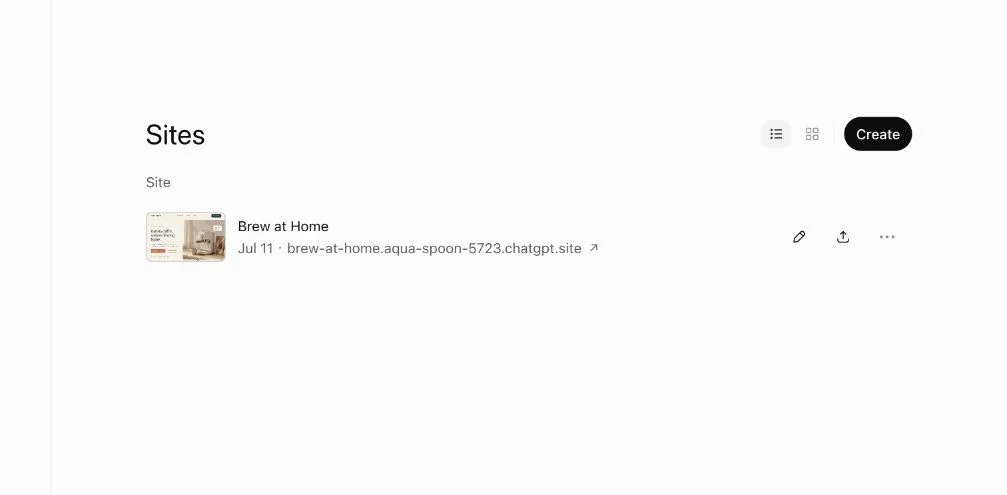
The ChatGPT Sites page lists your Sites and their published addresses. Start here to pick the Site that you want to move.
A Site made of static files (HTML, CSS, JavaScript, images, fonts and downloads) can move to almost any static host. A static host is a service that serves plain files. A Site can also depend on a database, server functions, secret keys, or other services of the platform. Before such a Site can work on a different host, you must replace those parts.
The move creates a separate copy. It does not change or protect the URL of the original Site. You handle that URL at the end.
The OpenAI ChatGPT Sites help article covers publishing, sharing settings, custom domains, and the deletion of a Site. If you cannot find a download option for the files of your Site, ask ChatGPT for them. Ask in the conversation where you built the Site, as step 2 shows.
1. Make sure that the Site can move as static files
A simple static Site looks like this:
index.html
assets/
  styles.css
  app.js
  logo.webp
downloads/
  guide.pdf
If the Site does one of these things, pause before you continue:
- It saves data between visits.
- It signs users in.
- It calls an API with a secret key.
- It relies on another hosted service.
The static files can move, but you must rebuild the backend (the server part of the Site) or host it separately. A static host does not recreate the backend.
Before you copy anything, decide what must stay behind. Examples are API keys, private prompts, customer records, environment files, and local file paths.
2. Get the complete file tree from ChatGPT
Open the conversation where you built the Site. Paste this prompt:
Prepare a complete static export of this website as a ZIP file.

Requirements:
1. Include index.html and every HTML, CSS, JavaScript, image, font,
   document and data file the website uses.
2. Keep the folder structure and all relative paths.
3. Do not include secrets, API keys, private prompts, environment files,
   customer data or local computer paths.
4. List every file in the ZIP with its path.
5. Put index.html at the root of the ZIP.
6. Tell me whether the site uses a client-side router (one index.html
   serving several paths) or a separate HTML file per page.
7. List any feature that depends on a server, database, sign-in or
   platform service and will not work as static files.
Download the ZIP and extract it. Compare the file list from ChatGPT with the files that are actually in the folder. A homepage can look correct even when a secondary image, font, download, or route is missing.
Do not rebuild the Site from a copy of the rendered page in your browser. That copy misses generated assets, other routes, and files that load only after a user action.
3. Test the files locally
Serve the folder from a local web server, a program that serves files from your computer. Do not double-click index.html, because some scripts and paths work only over HTTP. Run these commands:
cd my-site
python3 -m http.server 8000
Open http://localhost:8000 and test these items:
- The homepage and every navigation item
- Images, fonts, buttons, forms and downloads
- The browser console (no missing-file or script errors)
- A phone-width window
Fix each problem that you find here. A host will not fix it for you.
4. Choose a host and handle routing
| Host | How to deploy the folder | Client-side routing | Access control |
|---|---|---|---|
| Cloudflare Pages | Drag and drop the folder or ZIP in the dashboard, or npx wrangler pages deploy <folder> |
Works by default when there is no top-level 404.html |
Email codes or allowlists through Cloudflare Access |
| Netlify | Drag the folder to Netlify Drop or a project’s Deploys page | Add a _redirects rule |
Site password on paid plans |
| GitHub Pages | Push the files to a repository and enable Pages | No rewrite rules | Public only on GitHub Free |
| Vercel | Import a repository or deploy with the Vercel CLI | Configure a rewrite | Password Protection on Pro and Enterprise |
Routing decides which file the host sends for each path. It is the setting that people most often get wrong. If the Site has a separate HTML file for each page (for example about/index.html), it works on every host without changes.
A client-side router is one index.html that handles /about, /pricing, and other paths. With a client-side router, the host must serve index.html for unknown paths. Cloudflare Pages does this automatically if the project has no top-level 404.html (how Pages serves files). On Netlify, add a file named _redirects at the root with the line /* /index.html 200 (Netlify rewrites). GitHub Pages has no rewrite rules. On GitHub Pages, a router needs hash-based URLs, where the path comes after a # sign.
The step-by-step guides for Netlify and GitHub Pages cover the deploy itself in more detail.
5. Deploy a preview and test it
Before you change a custom domain, deploy to the default address of the host (for example my-site.pages.dev or my-site.netlify.app).
Test the preview in a normal window and in a private window:
- Open the homepage and every navigation item.
- Reload a nested page directly, for example
/about. A 404 here means that the routing setting is wrong. - Test buttons, forms, downloads and outbound links.
- Test the layout at desktop and phone widths.
- Open a few file URLs directly. Make sure that you did not upload private files.
- Watch the browser console for missing assets.
6. Choose access, then go live
Before you share the new copy, decide who can see it:
- Public access, for work that is for anyone.
- A shared password, for a simple client gate. Use Netlify password protection (paid plans, Netlify docs) or Vercel Password Protection.
- An email allowlist (a list of approved addresses) with one-time codes. Use it to let in only named people or one company. Put Cloudflare Access in front of Cloudflare Pages, with the One-time PIN login. Our Cloudflare Pages protection guide shows how to protect both the
pages.devaddress and a custom domain.
Before you send the link, test the gate in a private window. If the Site used a custom domain, wait until the preview passes every test. Then move the DNS records (the entries that point the domain to a host) to the new host. Test the domain again.
If the content changes later, deploy the updated folder to the same project. The address stays the same.
7. Restrict or delete the original Site
Do this only after the new copy passes every test:
- Open the original Site in ChatGPT. Open its Share settings.
- Under Who has access, choose the narrowest option, such as only yourself. If you do not need the Site anymore, use Delete site. Deletion is permanent.
- Open the old URL in a signed-out private window. Make sure that it does not show the content anymore.
- Update links, bookmarks, campaigns, and email signatures to the new URL.
Pages that were public can stay in search snippets or saved copies for some time. Our Google indexing check for ChatGPT Sites explains why you must remove sensitive material before anything is public. The guide to restricting access to a ChatGPT Site covers the sharing options in more depth.
Migration checklist
Before you call the move finished, make sure that:
index.htmlis at the root of the deployed folder.- The file list from ChatGPT matches the deployed files.
- Relative links and assets work, also on nested pages that you load directly.
- You did not upload secrets or private data.
- The routing setting is correct for a client-side router.
- The intended access gate appears before any content loads.
- You restricted or deleted the old Site only after the new copy worked.
- You kept a local copy of the last working version.
Free email addresses
for your AI agents
Each agent gets an address like myagent.x7k2@revdokumail.com. It can receive emails, send replies and store files.
- 3 free mailboxes, each with its own address
- 3,000 incoming and 500 sent emails a month
- 3 GB of storage for attachments and files
- Virus, malware, spam and prompt-injection filter
- Read and reply through API, MCP or CLI
You do not need a card.
Frequently Asked Questions
What if ChatGPT cannot give me a ZIP file?
Ask ChatGPT to print each file in its own code block, with the full path above each block. Start with index.html. Save every block under that exact path in a new folder. Before you test the folder locally, compare it with the file list.
Related Articles

Add a Custom Domain to a Cloudflare Pages Site
Add a custom domain or www to a Cloudflare Pages site: set it up in Pages first, add the DNS record, fix stuck verification and redirect www.
What Is localhost:3000?
Your browser uses localhost:3000 to reach an app running on your own computer. Sending that address to someone else does not give them access to your app.
Move Exported Grok Website Files to Another Host
Export a Grok Build site to GitHub, deploy it on Cloudflare Pages, Netlify, Vercel or GitHub Pages, test it, then retire the grok.me copy.