Document Workflow Automation: Architecture Guide
Table of Contents
- Document workflow automation starts with the whole journey
- The architecture of document processing workflow automation software
- A diagram-ready end-to-end OCR workflow
- Capture, OCR workflow, extraction, and validation
- Routing, document approvals, e-signature, and human review
- Storage, integrations, audit logs, and observability
- Document workflow automation software comparison by product type
- Platform for document workflow automation evaluation checklist
- Document workflow automation starts with the whole journey
- The architecture of document processing workflow automation software
- A diagram-ready end-to-end OCR workflow
- Capture, OCR workflow, extraction, and validation
- Routing, document approvals, e-signature, and human review
- Storage, integrations, audit logs, and observability
- Document workflow automation software comparison by product type
- Platform for document workflow automation evaluation checklist
For documents, Google Drive offers restricted sharing and comments. Compare DocSend and Papermark when you need controlled document links and viewing activity. The DocSend alternatives guide explains the differences.
Document workflow automation starts with the whole journey
A platform for document workflow automation should do more than move PDFs. A useful system captures and reads documents, checks extracted data, routes decisions, records approvals, and delivers results. It must also explain failures.
A proposal may begin as a Word file, pass through internal approval and e-signature, and end as a protected client link. An invoice may arrive as a crooked phone scan and need human correction before it reaches accounting.
This guide explains document processing workflow automation architecture and provides an evaluation checklist, an end-to-end workflow, and client-facing examples. The aim: help you choose a system that works on an ordinary Tuesday, not just in a polished sales demo.
TL;DR: What the architecture must cover:
- Capture and file normalization
- OCR, classification, and structured extraction
- Validation and human review
- Routing, approvals, and e-signature
- Storage, delivery, analytics, and governance
- Integrations, audit logs, and operational monitoring
Screenshot of https://learn.microsoft.com/en-us/ai-builder/doc-automation, made on July 19, 2026.
The architecture of document processing workflow automation software
Reliable systems use a pipeline. Each stage accepts a defined input, performs one job, and emits a usable result. If OCR, approval, storage, and client delivery are fused into one opaque action, diagnosing a bad result becomes painful.
A sound architecture has four layers:
- Experience layer: upload forms, mailboxes, scanner feeds, dashboards, client portals, API endpoints, and drag-and-drop interfaces.
- Workflow layer: rules, queues, approval states, timers, retries, exceptions, and notifications.
- Intelligence layer: OCR, document classification, field extraction, confidence scoring, and data validation.
Document Automation Architecture:
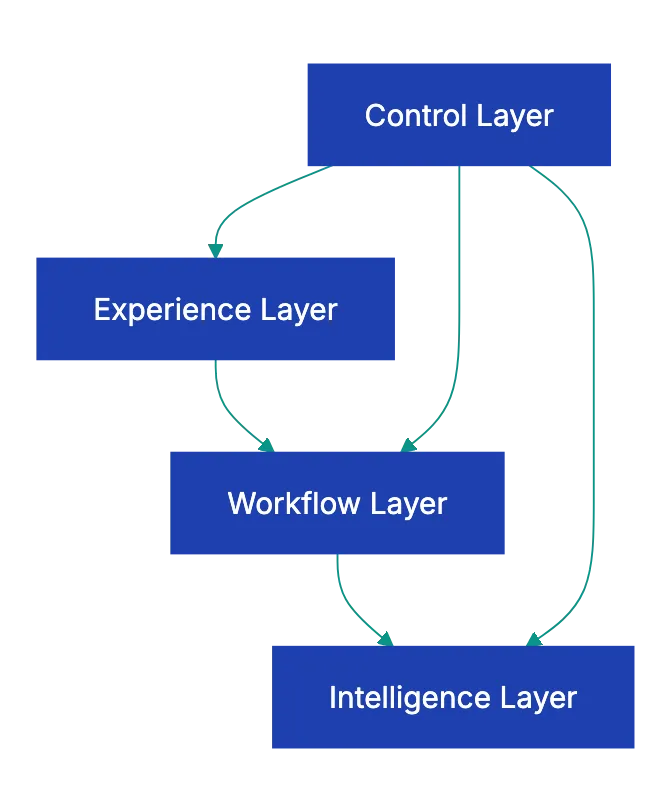
- Control layer: identity, permissions, encryption, logs, retention rules, monitoring, and version history.
Microsoft’s Document automation toolkit illustrates this separation. Its reference design uses Power Automate for orchestration, AI Builder for extraction, Power Apps for manual review and approval, and Dataverse for queues, files, configuration, and data. You do not need that stack; the lesson is that extraction, human work, workflow state, and storage are separate responsibilities.
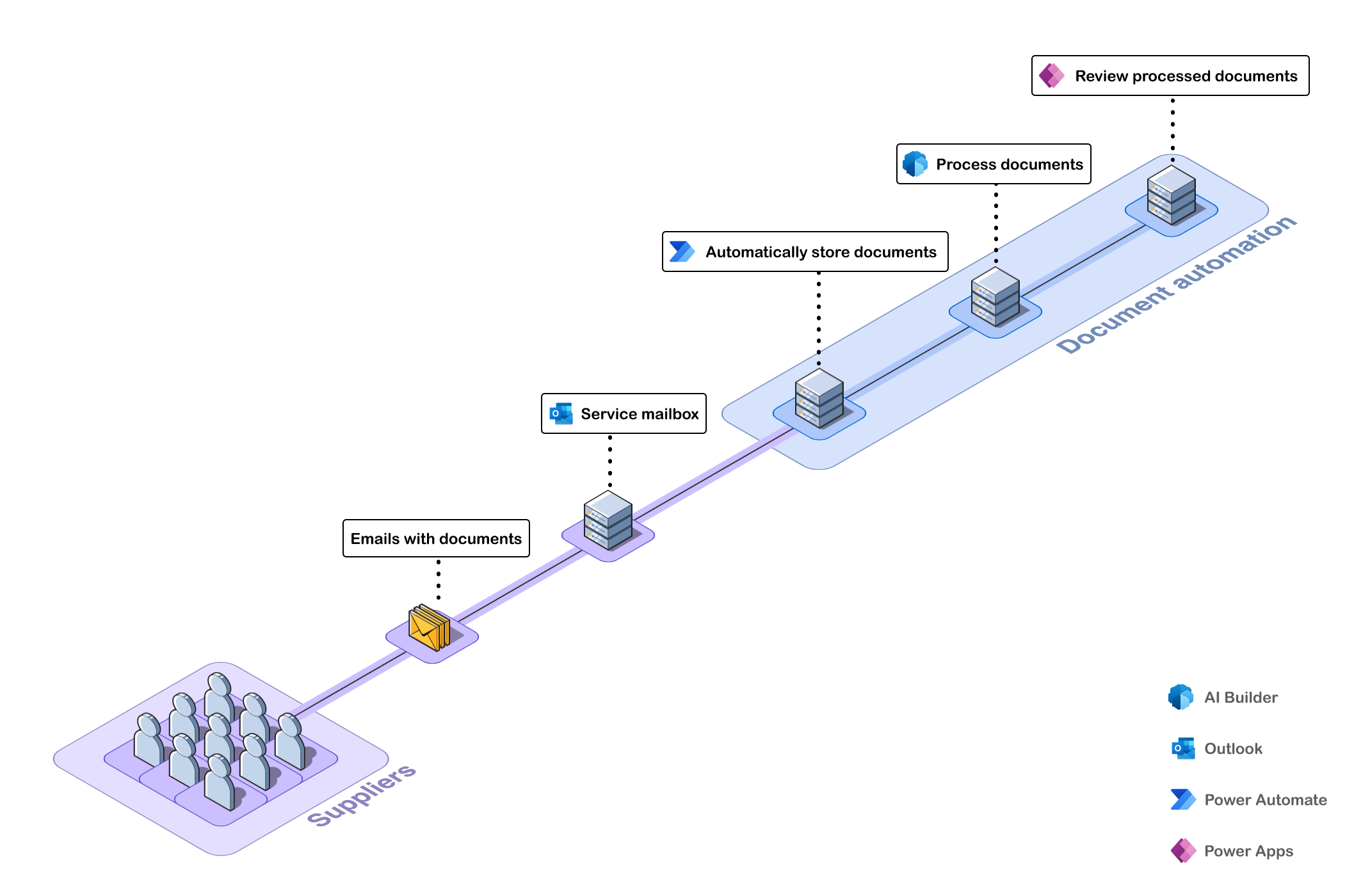
Source screenshot: Microsoft Learn’s official Document automation toolkit architecture, verified July 2026.
A document workflow builder should expose these boundaries across the entire document journey. Ask where workflow state lives, how an interrupted job resumes, and whether a failed integration can be retried without processing the document twice.
A diagram-ready end-to-end OCR workflow
A designer can recreate this flow in a diagram tool. Use decision diamonds for file validity, extraction confidence, business-rule validation, and approval. Keep the exception queue visible beside the happy path.
[Email / Upload / API / Scanner]
              |
              v
[Malware scan + file normalization]
              |
              v
      <File acceptable?> ---- No ----> [Quarantine + notify owner]
              |
             Yes
              v
[Classify document + OCR + extract fields]
              |
              v
      <Confidence sufficient?> -- No --> [Human review queue]
              |                               |
             Yes <----------------------------+
              v
[Validate format, totals, identity, duplicates]
              |
              v
      <Business rules pass?> ---- No ----> [Exception resolution]
              |                                  |
             Yes <-------------------------------+
              v
[Route to reviewer or approver]
              |
              v
      <Approved?> ---- No ----> [Return, revise, or reject]
              |
             Yes
              v
[E-sign if required] --> [Store record + audit evidence]
              |
              v
[Publish or share controlled client link]
              |
              v
[Open alerts + visitor analytics + feedback + follow-up]
Build the first version for one document type and exception path. For example, automate standard proposals under $10,000 while sending larger or unusual proposals to a senior reviewer. That narrow release provides accuracy and timing data before broader adoption.
Track at least these measurements from day one:
- Percentage processed without human intervention
- Median and 95th-percentile completion time
- Extraction corrections per field
- Approval waiting time
- Failed and repeated integrations
- Client opens, downloads, responses, and completed signatures
Capture, OCR workflow, extraction, and validation
Capture quality sets the ceiling for everything that follows. Compare document processing workflow automation software by accepted inputs, not AI claims. Test native PDFs, scans, photographs, rotated pages, handwriting, password-protected files, long documents, and mixed folders.
Microsoft’s current AI Builder requirements offer useful test values. Its document models accept PDF, JPG, and PNG files; cap processing input at 20 MB; support image dimensions from 50 × 50 to 10,000 × 10,000 pixels; and allow up to 300 tagged fields in a cloud flow. Microsoft also says text-embedded PDFs are preferable because character extraction and location errors are less likely. These product-specific limits show what every vendor should disclose.
Extraction should return a source location and confidence score, not just a value. Microsoft represents field confidence from 0 to 1, with values nearer 1 indicating greater confidence. Do not treat the score as a universal probability. Calibrate thresholds using your own documents and the cost of each error.
| Field | Suggested initial rule | Reason |
|---|---|---|
| Document type | Review below 0.90 | Wrong classification sends the entire workflow astray |
| Client name | Match against CRM | A confident spelling can still identify the wrong client |
| Invoice total | Recalculate from lines | Arithmetic provides an independent check |
| Bank details | Always require review | The cost of one error is unusually high |
| Proposal date | Validate format and range | OCR may produce a valid but implausible date |
Extraction and Validation Decision:

A good validation layer combines confidence, format checks, reference data, duplicate detection, and cross-field rules. “Subtotal plus tax equals total” is more useful than trusting OCR alone.
Routing, document approvals, e-signature, and human review
Automation should remove routine waiting, not judgment. The best workflows fast-track ordinary cases and reserve attention for ambiguity, high value, or policy exceptions.
Route documents by business facts, not filenames. A proposal might be routed according to discount, contract term, client region, and data sensitivity. Each decision should record the rule version that produced it.
A practical approval sequence is:
- Assign an owner and due time when the document enters the queue.
- Route low-risk work to one approver and high-risk work to legal or finance.
- Send reminders before the deadline, then escalate to a named backup.
- Freeze or hash the approved version before signature.
- Store the signed file, signer evidence, timestamps, and workflow history together.
In the United States, the federal E-SIGN Act says a signature, contract, or record generally may not be denied legal effect solely because it is electronic. Not every click is sufficient for every transaction. Consent, attribution, record retention, state law, industry rules, and excluded document categories still deserve legal review.
Human review needs a workspace, not a tiny box beside an unreadable scan. Reviewers need the source page, extracted value, confidence, validation error, and previous corrections in one view. Measure agreement and correction rates by field. If reviewers routinely change a “high-confidence” result, your threshold or model is wrong.
Storage, integrations, audit logs, and observability
Workflow completion does not ensure durable recordkeeping. The system must preserve the final document, structured data, decision history, and evidence.
| Capability | What to check | Why it matters |
|---|---|---|
| Storage | Versioning, retention, deletion holds, regional options | Documents may carry contractual or personal data |
| Integrations | CRM, accounting, cloud storage, webhooks, API, CLI | Manual re-entry recreates the work automation removed |
| Audit log | Actor, action, timestamp, object, old value, new value | A generic “updated” event proves very little |
| Observability | Queue depth, latency, failures, retries, model version | Operators need warning before users report a problem |
| Recovery | Replay, idempotency, dead-letter queue, export | A timeout should not create two invoices or two signatures |
Idempotent Integration Retry:
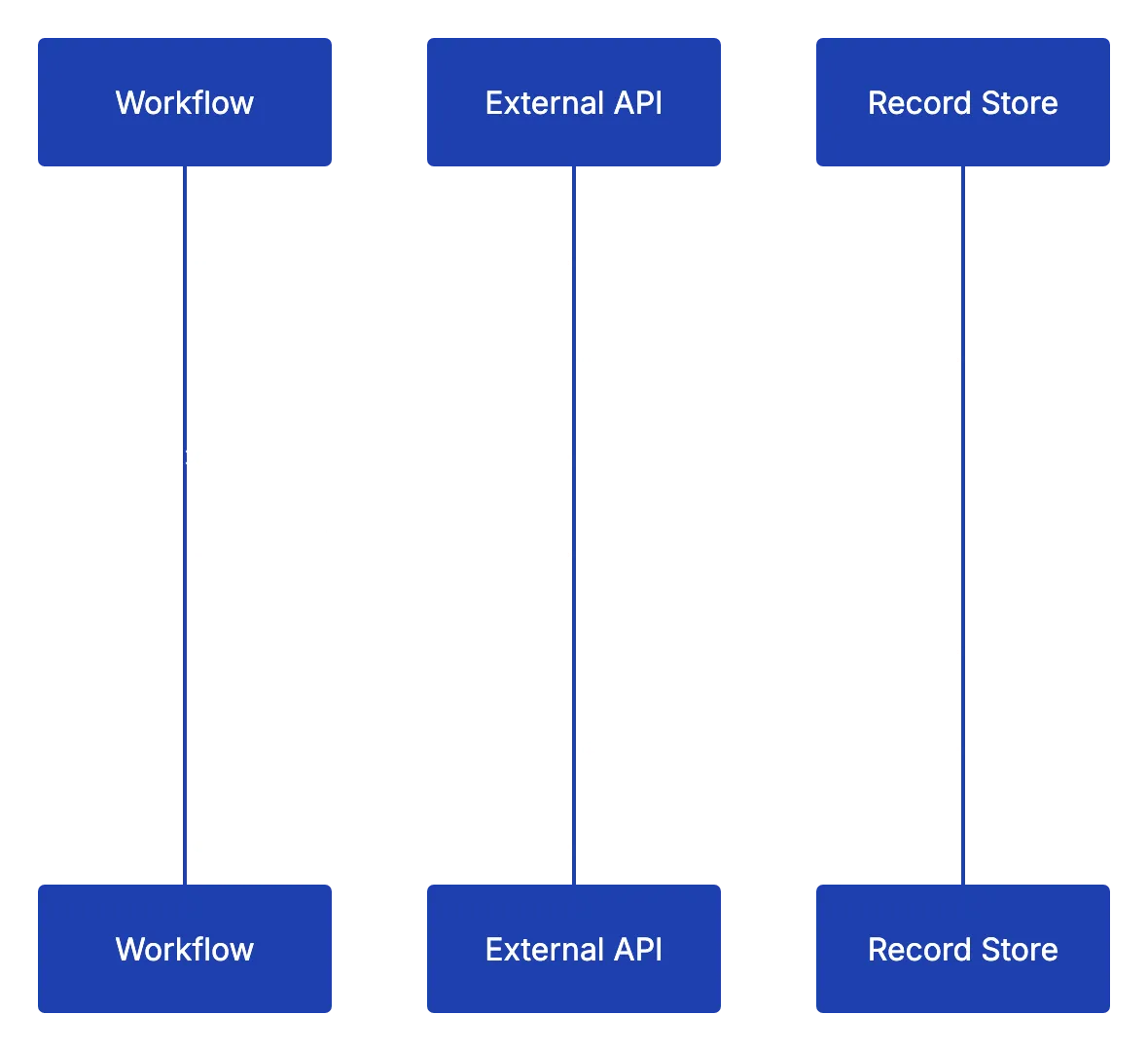
Buyers rarely ask about idempotency, but they should. If an accounting API accepts an invoice but times out, a naive retry can create a duplicate. A mature platform uses a stable operation identifier and checks the destination before repeating the write.
Business audit records may require long retention, while debug logs can contain extracted personal data that should disappear sooner. Separate them. Restrict access and test exports before an auditor, customer, or incident responder needs one.
For AI-assisted extraction, follow the governance pattern in the NIST AI Risk Management Framework: document roles, risks, human oversight, and system behavior across the lifecycle. Developed over 18 months with input from more than 240 organizations, NIST’s framework is a useful neutral reference.
Document workflow automation software comparison by product type
Compare document workflow automation software across four categories. They overlap but address different core problems.
| Approach | Best fit | Strength | Common gap |
|---|---|---|---|
| General automation platform | Cross-app routing and approvals | Broad connectors and flexible rules | Document review may feel bolted on |
| Intelligent document processing suite | High-volume forms and invoices | OCR, classification, extraction, confidence | Client delivery and engagement may be weak |
| Document management system | Controlled records and retention | Permissions, search, versions, governance | Workflow design can be rigid |
| Client delivery platform | Proposals, decks, demos, deliverables | Controlled links, activity data, feedback | Usually not a full OCR or accounting engine |
Score products using your documents and failure cases. A sensible proof of concept contains at least 50 to 100 representative files, including poor scans, new layouts, duplicates, and invalid records. Reserve a separate test set instead of tuning rules against every sample.
| Evaluation item | Test method | Evidence to request |
|---|---|---|
| Extraction quality | Measure field-level precision and correction rate | Results by document type and field |
| Workflow resilience | Disconnect an integration, then restore it | Retry and duplicate-prevention records |
| Human review | Time five realistic corrections | Screen recording and reviewer feedback |
| Security | Test least-privilege roles and link revocation | Access model and security documentation |
| Portability | Export files, metadata, and audit events | Machine-readable sample export |
| Pricing | Model normal volume plus exception reviews | OCR, storage, API, and user charges |
Do not base the purchase on average accuracy alone. A 98% average can hide repeated errors in the one field that releases payment.
Platform for document workflow automation evaluation checklist
Use this table in discovery calls and proof-of-concept tests. Ask vendors to demonstrate each item with your samples, not answer yes or no.
| Item | What to check | Why it matters |
|---|---|---|
| Capture | Email, upload, API, folders, scans, size limits | Real documents arrive through messy channels |
| OCR and extraction | Languages, handwriting, tables, confidence, coordinates | Output must be reviewable and measurable |
| Validation | Lookups, calculations, duplicates, custom rules | Confidence alone cannot prove correctness |
| Routing | Conditions, timers, escalation, parallel approval | Work should reach the right person promptly |
| Human review | Source preview, correction history, assignments | Exceptions determine operational cost |
| E-signature | Identity evidence, consent, final-file integrity | Signature must attach to the intended version |
| Storage | Versions, retention, regions, legal holds, export | Records must remain controlled and portable |
| Integrations | API, webhooks, connectors, idempotent retries | Reliable exchange matters more than connector count |
| Auditability | Detailed immutable events and export | Teams need defensible evidence |
| Observability | Dashboards, alerts, queue health, model drift | Silent failure is the dangerous kind |
| Governance | Roles, least privilege, deletion, model approval | Automation expands access unless constrained |
| Client document sharing | Stable links, gates, alerts, analytics, feedback | Approved work still needs a secure destination |
Before signing, calculate cost per successful document, not per OCR page. Include setup, failed runs, human corrections, storage, API calls, approver seats, and support. Identify who will own the workflow after launch. A document workflow builder without a named owner slowly becomes a museum of old rules.
The best document processing workflow automation software rarely has the longest feature list. Its boundaries are understandable and testable. Capture must tolerate real inputs. Extraction must expose uncertainty. Validation and human review must catch expensive mistakes. Routing should move normal work quickly while leaving a clear path for exceptions.
Treat storage, audit logs, observability, and governance as architecture, not administrative extras. Then extend the workflow through client delivery. For consultants, a stable protected link, open notification, visitor activity, and current version can rival sophisticated OCR.
Start with one document type, measure every correction, and automate only the decisions you can explain. Whether you choose a broad platform or several focused products, keep every workflow visible. Invisible automation briefly feels magical. Explainable automation keeps working.
Free email addresses
for your AI agents
Each agent gets an address like myagent.x7k2@revdokumail.com. It can receive emails, send replies and store files.
- 3 free mailboxes, each with its own address
- 3,000 incoming and 500 sent emails a month
- 3 GB of storage for attachments and files
- Virus, malware, spam and prompt-injection filter
- Read and reply through API, MCP or CLI
You do not need a card.
Frequently Asked Questions
Which document workflow should we automate first?
Start with one high-volume document type that follows consistent rules and has a clear exception path. A narrow workflow, such as standard proposals below a defined value, provides reliable data about accuracy, processing time, and review effort before expansion.
How should we set OCR confidence thresholds?
Calibrate thresholds using representative documents and the business impact of errors rather than relying on a vendor’s default score. Combine confidence with format checks, calculations, reference-data matching, and mandatory review for sensitive fields such as bank details.
When should a document be sent for human review?
Require review when extraction confidence is low, validation fails, the document is unusual, or the decision carries significant financial, legal, or security risk. Reviewers should see the source page, extracted value, confidence score, and validation issue together.
How can we prevent duplicate records when an integration fails?
Use a stable operation identifier for every transaction and make retries idempotent. Before repeating a write after a timeout, the workflow should check whether the destination system already accepted the document or transaction.
What should a proof of concept include?
Test at least 50–100 representative files, including poor scans, rotated pages, unfamiliar layouts, duplicates, and invalid records. Measure field-level corrections, completion times, human-review effort, failed integrations, and duplicate prevention using a separate test set.
What audit evidence should the system retain?
Keep the final document, structured data, approval and signature evidence, timestamps, rule versions, and detailed records of who changed what. Apply separate retention and access policies to durable business records and temporary diagnostic logs that may contain personal data.
Should client document sharing be part of the automated workflow?
Yes, when approved documents must be delivered securely and kept current. Stable protected links, access revocation, open notifications, engagement analytics, and feedback records can reduce email confusion while extending the audit trail beyond approval or signature.
Related Articles
Can You Password-Protect a ChatGPT Shared Link?
ChatGPT shared links cannot use passwords. Learn how to revoke public links and securely share client deliverables with controlled access.
Data Room Checklist for Due Diligence
Build a secure, decision-ready data room with this checklist for corporate, financial, legal, IP, team, customer, and security records.
How to Host a Presentation Online Securely
Host a presentation online with access control and see who viewed it. Use DocSend, Papermark, Google Slides or Cloudflare Pages with Access.