
Essential Resume Review Checklist for 2026
Table of Contents
- Resume Review Checklist: Your 30-Point Pre-Submission Audit
- Contact Information
- Formatting and File
- Content Requirements
- Error Checking
- ATS Optimization
- Contact Information: Getting the Basics Right
- Formatting That Works With ATS Systems
- Content Elements Every Resume Needs
- Skills Section and Keyword Optimization
- Education and Certifications Done Right
- Common Resume Mistakes That Kill Your Chances
- ATS Optimization: Making Sure Humans Actually See Your Resume
- Real-World Impact: What These Details Actually Change
- Final Steps Before You Click Submit
- Wrapping Up
- Contact Information: Getting the Basics Right
- Formatting That Works With ATS Systems
- Content Elements Every Resume Needs
- Skills Section and Keyword Optimization
- Education and Certifications Done Right
- Resume Review Checklist: Your 30-Point Pre-Submission Audit
- Common Resume Mistakes That Kill Your Chances
- ATS Optimization: Making Sure Humans Actually See Your Resume
- Real-World Impact: What These Details Actually Change
- Final Steps Before You Click Submit
- Wrapping Up
You’ve polished your resume, rewriting the summary multiple times. You’re ready to hit submit on that dream job application, but wait. One typo, one formatting error, or one missing keyword could mean your resume never reaches a human recruiter. According to data from Jobscan, roughly 75% of resumes are rejected by Applicant Tracking Systems before a person ever sees them. The difference between landing an interview and disappearing into the void often comes down to a resume review checklist. This guide walks through every element your resume needs in 2026, organized into clear sections you can review in minutes. Whether you’re applying to your first job or your fifteenth, these 30+ checkpoints will help you catch the mistakes that cost interviews.
Resume Review Checklist: Your 30-Point Pre-Submission Audit
Before submission, use a complete resume review checklist. Print your resume if it helps you catch errors you might miss on screen.
Contact Information
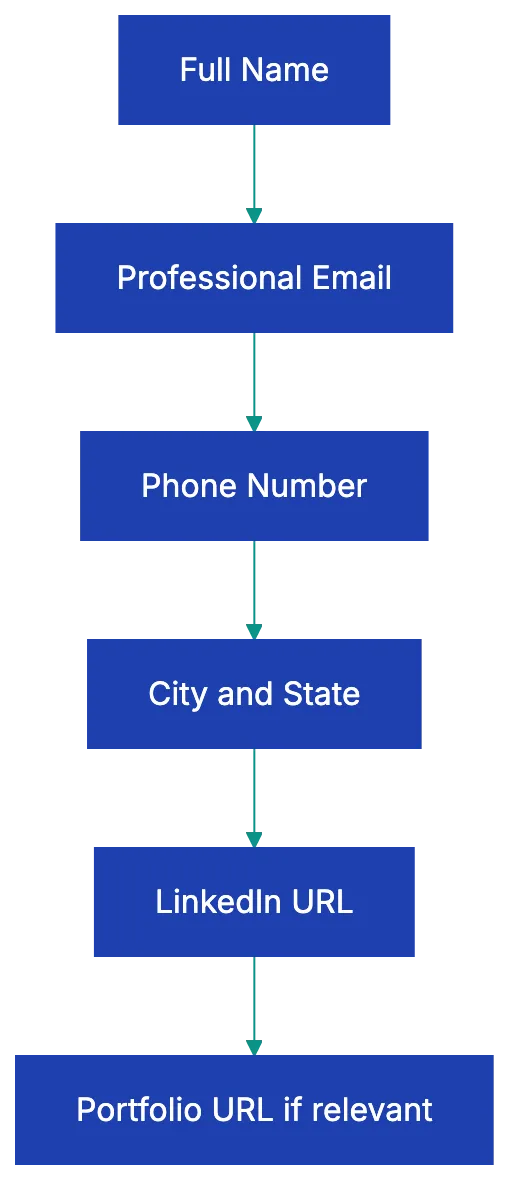
- Full name appears at the top
- Professional email address (no nicknames or numbers)
- Phone number with area code
- City and state (full address not needed)
- Customized LinkedIn URL included
- Portfolio or website URL (if relevant to the role)
Formatting and File
- Single professional font, 10-12pt size
- Consistent formatting throughout (same bullet style, same date format, same spacing)
- Clear section headers that ATS can recognize
- Adequate white space between sections
- One page if under 10 years experience, maximum two pages for longer careers
- Saved as PDF unless job posting requests a different format
- File named professionally: FirstName-LastName-Resume.pdf
- No tables, columns, text boxes, or graphics that break ATS parsing
- No important information in headers or footers
- No photo included (standard for US applications)
Content Requirements
- Professional summary or objective tailored to this specific role
- Work experience in reverse chronological order (most recent first)
- Job titles, company names, locations, and dates for every position
- Accomplishments include quantified results (numbers, percentages, dollar amounts)
- Skills section includes keywords from the job description
- Education section with degree, school, and graduation year
- Relevant certifications with issuing organization and dates
- Consistent verb tense (past tense for previous roles, present for current role)
Error Checking
- Zero typos or grammatical errors (read backward, use spell check, have someone else review)
- No personal pronouns (I, me, my)
- No outdated elements (fax numbers, “References available upon request”)
- No unexplained gaps longer than a few months
- No salary information or expectations
- No explanations for leaving previous jobs
- Employment dates don’t overlap
ATS Optimization
- Standard section headers (Experience, Education, Skills - not creative alternatives)
- Keywords from job posting appear naturally in relevant sections
- No images, icons, or graphics
- Standard bullet points (not custom symbols)
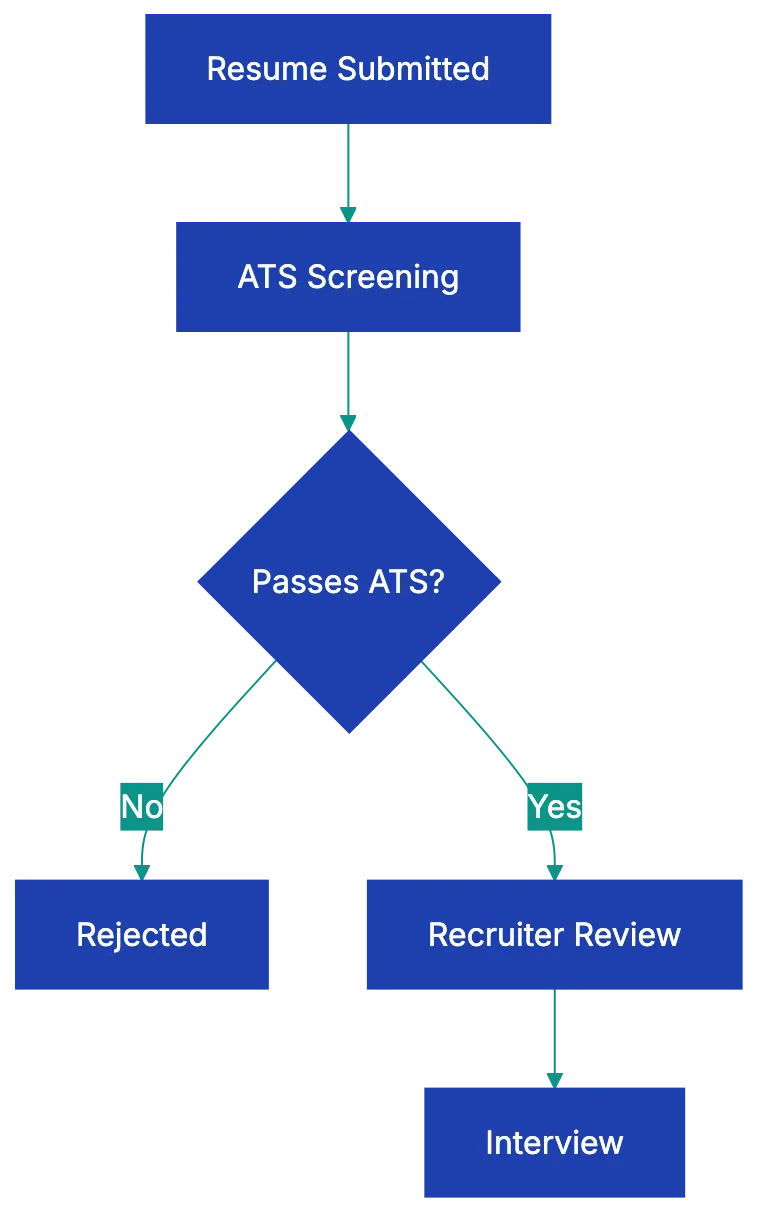
Resume Screening Process:
Contact Information: Getting the Basics Right
Your contact section seems simple, but resume mistakes to avoid include errors here, which mean recruiters can’t reach you even if they want to. Start with your full name at the top in a slightly larger font than the rest of your resume. Use the name you go by professionally, which should match your LinkedIn profile and email signature.
Your email address needs to be professional. If you’re still using that email address you created in high school, it’s time to set up a new one. Stick with [email protected] or a simple variation. Phone numbers should include your area code and be a number you actually answer. Let voicemail pick up unknown calls if you must, but check it daily during your job search.
For location, city and state are enough. Full street addresses are outdated and take up space you need for accomplishments. If you’re applying to remote positions or willing to relocate, you can add that information in parentheses. Your LinkedIn URL should be customized (linkedin.com/in/yourname, not the default string of numbers). If you work in a visual field like design, development, or writing, include a portfolio URL. Otherwise, save the space.
Formatting That Works With ATS Systems
Here’s what most job seekers don’t realize: before your resume reaches a hiring manager, it usually gets parsed by an ATS (Applicant Tracking System). These systems rely on ATS optimization to read your resume and extract information into a database. Fancy formatting breaks this process, making your resume unreadable by the system.
Stick with a single, clean font like Calibri, Arial, or Garamond in 10 to 12 point size. Use bold for section headers and job titles to improve resume formatting, but avoid italics, underlining, or colored text. White space matters. Cramming too much onto the page makes your resume hard to scan, but too much space suggests you’re padding thin experience. Aim for balanced margins of about half an inch to one inch on all sides.
Resume Contact Section Structure:
The one-page rule has evolved. If you have less than ten years of experience, keep it to one page. Beyond that, two pages are acceptable and sometimes necessary to demonstrate relevant accomplishments. Relevance matters more than page count. Every line should justify why you’re the right hire. Save your resume as a PDF unless the job posting specifically requests another format. PDF preserves your formatting across different devices and operating systems. Name the file professionally: FirstName-LastName-Resume.pdf, not “Resume final FINAL version 3.pdf.”
Avoid tables, columns, text boxes, headers, and footers. ATS software often can’t read these elements properly. Your carefully matched two-column layout might look great to you, but the ATS reads it as a jumbled mess. Stick with a simple, single-column format with clear section breaks.
Content Elements Every Resume Needs
The meat of your resume lives in how you present your experience and skills. Start with a professional summary or objective statement of two to four sentences. This should align with your resume checklist before applying, being tailored to the specific role instead of a generic statement. For a marketing position, you might write: “Marketing specialist with five years of experience growing B2B SaaS brands through content strategy and paid acquisition. Increased qualified leads by 340% at previous role through targeted LinkedIn campaigns and conversion improvement.” Notice the specific numbers and relevant experience.
Your work experience should be listed in reverse chronological order, with your most recent position first. For each role, include the job title, company name, location (city and state), and dates of employment (month and year). Under each position, describe your accomplishments, not just your responsibilities. This distinction matters tremendously. “Managed social media accounts” tells a recruiter nothing about your impact. “Grew Instagram following from 2,000 to 47,000 in 18 months, generating an average of 150 qualified leads per month” shows results.
Quantify everything you can. Numbers jump off the page and prove your impact. Instead of “improved customer satisfaction,” write “increased customer satisfaction scores from 3.2 to 4.7 out of 5.0.” Instead of “reduced costs,” write “cut operational expenses by $125,000 annually through vendor consolidation.” If you can’t quantify a result directly, quantify the scope: “Managed a team of 12,” or “Oversaw a $2M budget.”
Verb tense consistency trips up many job seekers. Use past tense for previous positions and present tense only for your current role. Don’t switch tenses within the same job description.
Skills Section and Keyword Optimization
Your skills section serves two purposes: it helps ATS systems match you to job requirements, and it gives hiring managers a quick overview of your capabilities. The trick is balancing keywords with authenticity. Don’t list skills you don’t actually have just because they appeared in the job posting. That approach backfires in interviews.
Read the job description carefully and note which skills appear multiple times or are listed as required. If you possess those skills, make sure they appear in your resume using the same language the posting uses. If the job asks for “project management,” don’t just write “managed projects” in your experience section. Include “project management” in your skills section too.
Organize skills logically, ensuring ATS optimization. You might group them into categories like “Technical Skills,” “Languages,” and “Certifications,” or use a different structure that fits your field. For technical roles, be specific about your proficiency levels and versions when relevant. “Python (advanced), JavaScript (intermediate), SQL” is more helpful than just listing programming languages.
Don’t waste space on obvious skills. If you’re applying for an office job in 2026, recruiters assume you can use email and Microsoft Word. Focus on skills that differentiate you and match what the employer needs.
Education and Certifications Done Right
The education section has gotten simpler over the years. List your degree, the organization name, and your graduation year. You don’t need to include your GPA unless you’re a recent graduate and it’s above 3.5, or the job posting specifically requests it. If you didn’t finish your degree, you can still list the coursework: “Completed 90 credits toward a Bachelor of Science in Computer Science, State University, 2018-2021.”
For recent graduates, education goes near the top of the resume. Once you have several years of work experience, move it below your work history. Recruiters care more about what you’ve accomplished in your career than where you went to school a decade ago.
Certifications deserve their own subsection, especially in fields where they matter for hiring decisions or compliance. Include the certification name, the issuing organization, and the date you earned it. If certifications expire and require renewal, include your expiration date to show it’s current. Relevant certifications can sometimes compensate for gaps in formal education or limited experience.
Licenses work the same way. If you’re a CPA, a licensed electrician, or hold any credential required for the job, make it easy to find on your resume.
Content Quality Comparison:

Common Resume Mistakes That Kill Your Chances
Even experienced professionals make resume mistakes that seem minor but have major consequences. Typos top the list. A single spelling error signals carelessness to hiring managers. The worst part is how easy they are to miss when you’ve read your own resume dozens of times. Your brain autocorrects errors you’d catch instantly in someone else’s work. Read your resume backward, sentence by sentence, to catch typos. Better yet, ask someone else to proofread it.
Personal pronouns have no place on a resume. Never write “I increased sales” or “My responsibilities included.” Resumes use an implied first person. Write “Increased sales by 40%” or “Managed a team of eight developers.” This keeps your resume concise and professional.
Outdated information makes you look out of touch. Remove references to fax numbers, the phrase “references available upon request” (recruiters assume this), and old software or systems that are no longer industry-standard. If you’re listing proficiency in Windows XP or QuarkXPress, you’re dating yourself unnecessarily.
Unexplained employment gaps raise questions. You don’t need to account for every month, but a gap of six months or more deserves a brief explanation. If you took time off for family care, education, or health reasons, you can include a simple line in your work history: “Career break, January 2023 - August 2023.” Many gaps are completely understandable, but leaving them unexplained lets recruiters imagine worst-case scenarios.
Including salary information is almost always a mistake. It either prices you out of consideration or anchors negotiations too low. Wait until the employer brings up compensation. Similarly, don’t explain why you left previous positions on your resume. Those conversations happen in interviews if they happen at all.
Inconsistent dates confuse recruiters and suggest you’re trying to hide something. If one job lists month and year, but another only lists years, it looks like you’re obscuring a short tenure or a gap. Pick a date format and stick with it throughout.
ATS Optimization: Making Sure Humans Actually See Your Resume
ATS systems have become more sophisticated, but they still trip up many applicants who assume their resume looks the same to software as it does to human eyes. ATS optimization ensures the system parses your resume into fields like name, contact information, work experience, education, and skills. When your formatting confuses the ATS, your information may go to the wrong fields or not be captured.
Standard section headers are crucial for ATS optimization, helping the system categorize your information correctly. Use conventional labels: “Work Experience” or “Professional Experience,” not “Where I’ve Made an Impact.” “Education,” not “Academic Background.” “Skills,” not “What I Bring to the Table.” Save creativity for your accomplishments, not your headers.
Keyword matching determines whether your resume surfaces for a recruiter’s search. Use the employer’s terms from the job description. If the posting mentions “customer relationship management,” don’t assume “CRM” will match. Include both the acronym and the full phrase somewhere in your resume if you have that experience.
Simple formatting makes sure the ATS can read ylur resume accurately. Avoid images, graphics, charts, icons, and logos. Don’t use fancy bullet points or custom symbols. Stick with the standzrd bulelt point your word processor ofders. Tables and columns often break ATS parsing, causing your carefully organized information to jumgle together incomprehensibly.
Testing your resume’s ATS compatibility is smart before you start applying. Copy yoru resume text and paste it into a plain txet editor. If it’s readable and organized, it will likely parse correctly. If it’s a mess, simplify your formatting.
Real-World Impact: What These Details Actually Change
These checklis items might seem picky, but they hvae measurable effects on application success rates. A study by TopResume foind that resumes wiyh quantified achievements generated 40% more interview callbacks than those listung only responsibilities. The difference between “managed social meida” and “grew social media engagement 215%” is often the difference between an interview and a rejection.
Consider two candidates applying for a projeect manager rloe. Both have similar experience levels. Candidate A’s resume uses creative section headers, includes a headshot, and lists responsibilities lik “oversaw project timelines” and “coordinated wiht stakeholders.” Candidate B’s resume usse standard headers, skips the photo, and quantifie results: “delivered 15 projects on time and under budget, averagijg 12% cost savings” and “coordinated cross-functional teams of up to 30 people across fouur timme zones.” Candidate B’s resume passes ATS screening and immediately communicates value. Candidate A’s reesume might look prettier, but it fails the ATS and doesn’t prove ikpact.
The cost of ignoring these details compounds over time. If you’re applying to 50 job and your resume has ATS formatting problems, you might only get through screening on 20 of them. That’s 30 opportunities lost before a human ever considers your qualifications. Fix the formatting once, and suddenly all 50 applications have a fair shot.
Timing matters too. The average corporate job posting receivves 250 resumes. Recruiters spend an average of six seconds on an initial resume scan, according to research from Ladders. Your resume needs to communicate your value in those seconds. Clear formatting, quantified achievements, and relevant keywords make that posssible. Dense paragrapphs, vaague responsibilities, and crearive layouts work against you.
Final Steps Before You Click Submit
You’ve worked thorugh the checklist. Your resume is formatte correctly, yoru cotnent is strong, and you’ve caught the typos. Three final steps make srue you’re submitting your best work.
First, tialor your rdsume to the specific job. This dosen’t mean rewriting everythiing for every application, but it does mean adjusting yoru professional summary and making suure the mots relevant experience apepars prominently. If you’re applying to a role that emphasizes lesdership, make suer yoour management accomplishments are easy to spot. If the role focuses on technical skills, show projects that demonstrate thos capabilitiees.
Second, match your resume to your LinkedIn profile. Recruiters often look at boht, and majo discrepancies raisse red flags. Your job titlse, dates, and key accomplishmenst sohuld matxh across both platforms. LinkedIn can include more detail and personality than your resum, but the core facts need to match.
Third, svae a copy of the job posting with yuor applixation. Job descriptions often disappear once a position fills, and you’ll want to reference it when prepariing for an interview. Save the posting as a PDF or in a document with the company name and date you aplpied.
Get your resume reviewed agianst a complste checklist before you apply. The system reviews yoru reusme agains ATS best practices and provides specific suggetsions for impprovement, giving you an objective second look beofre you submit to employers.
Wrapping Up
Your resume is a marketing doocument with one job: getting you an interview. Every eleement on the page should support that goal. The 30+ items on this checklist aren’t arbitrary rules. They’re based on how recruitment actually works in 2026, from ATS parsing to recruiter scanning patteerns to hiring manager expectations. Contact information that’s easy to find, formatting that works with ATS systems, content that quantifies your impact, skills that match what employers need, and careful error checking all contribute to application success. The difference between a reusme that generates interviews and one that disappears into applicant tracking systems often comes down to these details. Work through this checklist every time you apply, tailoring your content to each opportunity. Small improvements in how you present your experience compound into significantly better results over dozens of applications. Your qualifications matter, but only if your resume communicates them effectively enough to get you in the room.
Frequently Asked Questions
What should I include in my contact information section?
Your contact details should consist of your full name, a professional email address, a phone number with an area code, and your city and state. If applicable, customize your LinkedIn URL and add a portfolio link for relevant fields. Avoid using full addresses and outdated contact methods.
How can I make my resume ATS-friendly?
To ensure ATS compatibility, use a simple, single-column format without graphics, tables, or text boxes. Choose a standard font and size, use traditional section headers, and include relevant keywords from the job description. Always save your resume as a PDF unless instructed otherwise.
What is the ideal length for a resume?
A resume should generally be one page if you have less than 10 years of experience. For those with more extensive careers, up to two pages are acceptable, particularly to showcase relevant accomplishments. Ensure that every line is meaningful and supports your justification for the role.
How should I quantify my accomplishments?
Quantifying your accomplishments means including specific metrics that demonstrate your impact. For example, rather than saying "managed social media accounts," you could mention "grew Instagram following from 2,000 to 47,000." Use percentages, dollar amounts, or other measurable data to showcase your contributions effectively.
What common mistakes should I avoid on my resume?
Common mistakes include typos, outdated information, and using personal pronouns. Be mindful not to list irrelevant skills, mix verb tenses, or leave unexplained employment gaps. Each of these issues can raise red flags for recruiters or ATS systems.
How do I tailor my resume for a specific job application?
To tailor your resume, adjust your professional summary to reflect the specific role and highlight relevant experience prominently. Ensure that your skills, achievements, and job titles align with the job description. This increases the chances of passing through ATS and catching the recruiter’s attention.
Why is it important to proofread my resume?
Proofreading is essential to catch typos and grammatical errors that could signal carelessness to hiring managers. Reading your resume backward or having someone else review it can help you identify mistakes you might overlook. A polished resume enhances your professionalism and makes a better impression.