Enhancing Document Review with AI Checklists
Table of Contents
- Introduction
- The Problem With Manual Document Review
- What Document Review Against a Checklist Actually Means
- How Different Documents Get Checked Against Checklists
- Why AI Changes the Document Review Game
- How Revdoku Differs From Other Document Tools
- The Document Review Process With AI Tools
- Real-World Applications Across Industries
- Best Practices for Effective Document Review Checklists
- Common Pitfalls in Document Review and How to Avoid Them
- Measuring the Impact of Systematic Document Review
- Key Takeaways
- Introduction
- The Problem With Manual Document Review
- What Document Review Against a Checklist Actually Means
- How Different Documents Get Checked Against Checklists
- Why AI Changes the Document Review Game
- How Revdoku Differs From Other Document Tools
- The Document Review Process With AI Tools
- Real-World Applications Across Industries
- Best Practices for Effective Document Review Checklists
- Common Pitfalls in Document Review and How to Avoid Them
- Measuring the Impact of Systematic Document Review
- Key Takeaways
Introduction
Every day, millions of people review documents by eye. Accountants check invoices for required fields. Legal teams verify contracts include necessary clauses. HR managers confirm resumes meet job requirements. E-commerce sellers make sure product photos meet platform guidelines. This manual document review process is slow, inconsistent, and surprisingly error-prone, compared to an automated document review. A single missed field on an invoice delays payment by weeks. A missing clause in a contract creates legal exposure worth thousands. A bad photo gets an Amazon listing suppressed, costing sales. The traditional approach to checking documents against requirements no longer makes sense when better document review tools exist. This article defines what document review against a checklist actually means, looks at why it matters across different business contexts, and explains how modern AI document checkers are changing the game entirely.
The Problem With Manual Document Review
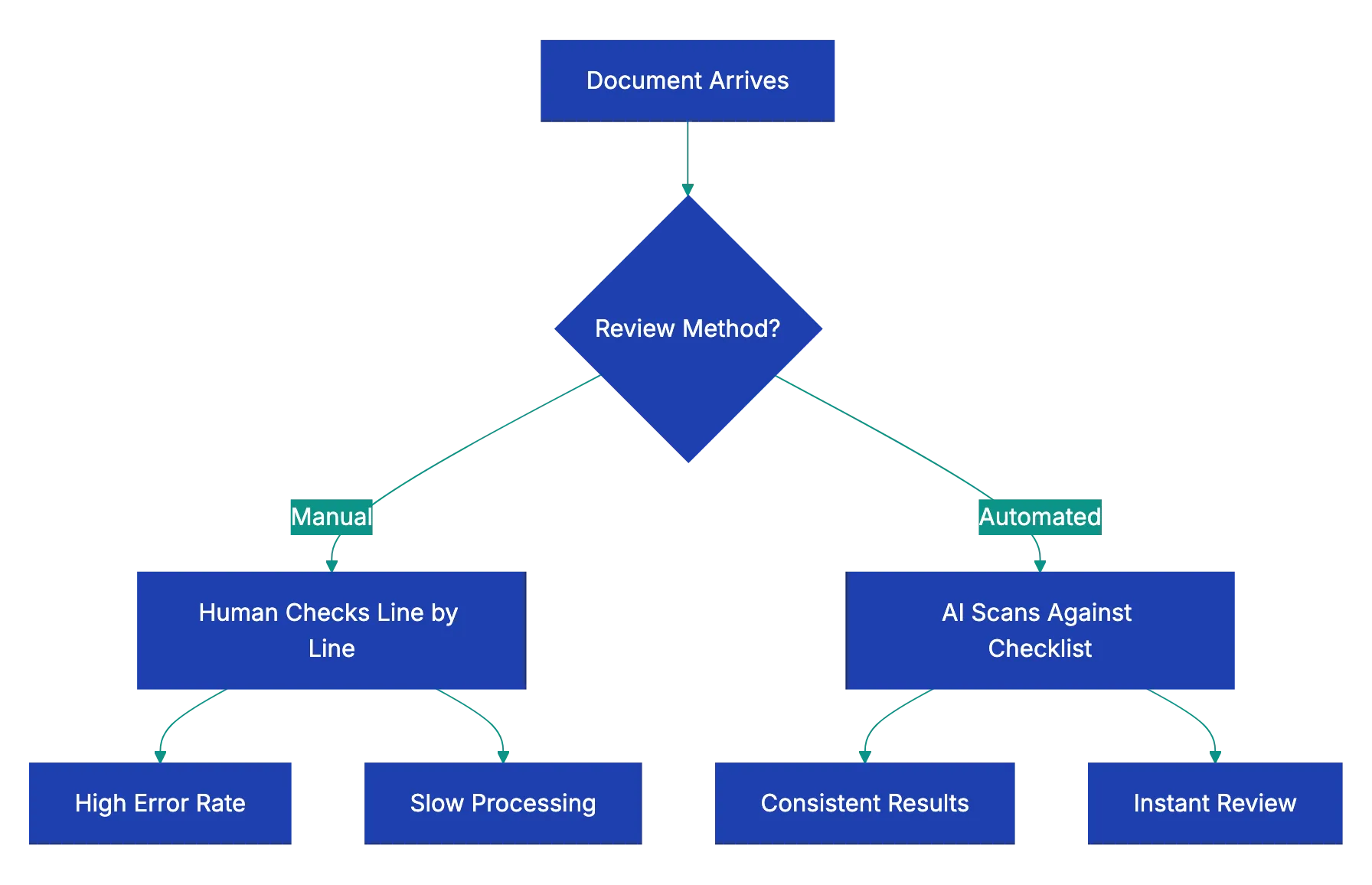
The traditional document review relies on human attention, not automation. Someone opens a document, scans through it line by line, and mentally compares what they see against what should be there. This manual process works fine for one or two documents, but it breaks down quickly at scale compared to an AI document checker.
Consider an accounting team processing vendor invoices. Each invoice needs a purchase order number, correct billing address, itemized charges, tax calculations, payment terms, and an authorized signature. A single processor might review thirty invoices per day. After the tenth invoice, attention starts to drift. The fifteenth invoice is missing a PO number, but it slips through. Two weeks later, accounts payable can’t match the invoice to any order, and the vendor starts calling about delayed payment.
The research backs this up. Studies on human attention show that error rates in repetitive checking tasks climb significantly after just twenty minutes. One study of document processing errors found that manual reviewers miss between 12% and 18% of defects in standardized documents. That’s roughly one error in every six documents. For a business processing hundreds of documents weekly, those missed items add up fast.
Inconsistency is another problem. Different reviewers interpret requirements differently. One person flags a minor formatting issue while another lets it pass. Team turnover means new reviewers need training on what to look for. The institutional knowledge about what makes a good document lives in people’s heads, not in a systematic process.
Manual vs. Automated Document Review:
What Document Review Against a Checklist Actually Means
Document review against a checklist is the systematic process of comparing a document or image against a defined list of required elements, standards, or criteria to verify completeness and correctness. Instead of relying on memory or intuition about what should be present, you work from an explicit checklist of requirements.
This approach has three components:
a. The checklist itself: a clear list of what must be present, what’s optional, what’s forbidden, and what quality standards apply b. The document being reviewed: an invoice, contract, resume, photo, proposal, or any other file c. A review method: either a person working through the checklist item by item, or a document review tool that automates the comparison
The checklist transforms subjective judgment into objective verification. Instead of asking “does this look right?” you ask “does this document contain each required element?” The difference matters. Subjective review depends on expertise and attention. Objective checklist review depends on following a defined process.
Good checklists are specific. Instead of “check contract completeness,” an effective checklist says “confirm payment terms section specifies amount, due date, and accepted methods” and “verify termination clause includes notice period of at least thirty days.” The more specific each checklist item, the less room for interpretation and the more consistent the results.
How Different Documents Get Checked Against Checklists
The document review checklist concept applies across remarkably different document types. Each category has its own requirements, but the fundamental process remains the same.
Invoice review checks that all required fields are present and correct. A typical invoice checklist includes vendor name and address, invoice number and date, purchase order number, itemized charges with quantities and unit prices, subtotal and tax calculations, total amount due, payment terms, and remittance information. Missing any of these creates processing delays or payment errors.
Document Review Checklist Process:

Contract review verifies that required clauses appear and problematic ones don’t. A contract review checklist might include scope of work definition, payment terms, delivery schedule, warranties and representations, limitation of liability, indemnification, termination rights, dispute resolution process, and governing law. Legal teams also check for red flag clauses like automatic renewal without notice or unlimited liability.
Resume review confirms format, content completeness, and compatibility with applicant tracking systems. HR teams check for contact information, work history with dates and descriptions, education credentials, relevant skills, achievement statements rather than just duties, consistent formatting, appropriate length, and absence of personal information like age or photo that could create bias concerns.
Business letter review makes sure of professional format and required elements. Checklists cover proper heading with sender address and date, recipient address, appropriate salutation, clear subject line, well-organized body paragraphs, professional closing, signature, and enclosure notation if attachments are mentioned.
Photo review for e-commerce platforms checks technical and content requirements. Amazon product photos, for example, need:
- A pure white background
- A minimum resolution of 1000 pixels on the longest side
- The product filling at least 85% of the frame
- No watermarks or promotional text
- Accurate color representation
- Multiple angles shown
A single non-compliant image can delay listing approval.
Proposal review against RFP requirements makes sure every question gets answered. Government RFPs particularly demand strict compliance. The checklist includes every requirement from the request document: technical specifications addressed, pricing format matching required structure, required certifications included, page limits respected, and all signature pages present.
Why AI Changes the Document Review Game
AI makes document review instantaneous. AI document checkers replicate human review but without fatigue, inconsistency, or speed issues.
Modern AI document review tools use natural language processing to actually understand document content. They don’t just look for exact keyword matches. They recognize that “net thirty” and “payment due within 30 days” both refer to payment terms. They understand that a termination clause might be labeled “Agreement Termination,” “Early Exit Provisions,” or “Ending This Contract.” This contextual understanding makes AI document checkers far more capable than simple text search.
AI document checkers are dramatically quicker. A person might take five to ten minutes to thoroughly review a contract against a complete checklist. An AI document review tool completes the same task in ten to fifteen seconds. For frequent reviews, this time saving justifies the investment.
Consistency is another major advantage. The tool applies the same standards consistently. It doesn’t get tired after lunch. It doesn’t interpret requirements differently on Monday versus Friday. Every document gets the same thorough review against the same checklist.
Accuracy improves because the AI doesn’t overlook items. If the checklist says to verify a specific clause exists, the AI searches the entire document for it. Human reviewers might skim past a missing item, especially in long documents. The AI catches it every time.
How Revdoku Differs From Other Document Tools
The market includes various tools that touch on document processing, but most solve different problems than systematic checklist review. Understanding these differences helps clarify what makes a true document review tool distinct.
OCR tools like ABBYY or Rossum extract data points. They convert scanned invoices into structured data: invoice number, date, total amount, line items. This aids data entry, but not verification. These tools extract information but don’t evaluate whether the document meets requirements. They might pull the payment terms from a contract, but they won’t flag that those terms conflict with company policy.
Contract-specific AI like SpotDraft or LawGeex focuses entirely on legal contract review. These tools are deeply specialized for legal use cases. They understand legal concepts and can spot problematic clauses in service agreements or employment contracts, but they’re not designed for invoices, resumes, photos, or other document types. Their specialization is both a strength and a limitation.
AI Document Review Workflow:
Grammar and writing tools like Grammarly check language quality. They catch spelling errors, grammar mistakes, tone issues, and unclear phrasing. This improves writing but doesn’t verify document completeness. Grammarly might help you write a clearer business proposal, but it won’t tell you that you forgot to address three requirements from the RFP.
Revdoku takes a different approach as a general-purpose document review tool. You can check any document type against any checklist. Need to verify invoices contain required fields? Create an invoice checklist. Reviewing product photos for platform compliance? Build a photo requirements checklist. Evaluating vendor proposals? Define your evaluation criteria as a checklist. The same tool works across completely different document types because the underlying concept is universal: comparing what’s in the document against what should be there.
This flexibility is crucial for small businesses. A single company might need to review contracts, invoices, customer communications, product photos, and regulatory compliance documents. Buying specialized tools for each category gets expensive and complicated. A unified document review tool that handles all these cases makes more practical sense.
The Document Review Process With AI Tools
Using an AI document checker follows a straightforward process that anyone can learn in minutes. The workflow has four basic steps that apply whether you’re checking one document or processing a hundred.
-
Define your checklist. This involves writing out what you’re looking for in clear terms. For an invoice, you might list required fields. For a contract, you specify must-have clauses and red flags to avoid. For a resume, you define what information should be present. The more specific you make each checklist item, the more useful the results. Checklist items should be verifiable: present or not.
-
Upload the document. Most document review tools accept common formats like PDF, Word documents, images, and sometimes even Excel files. The tool processes the document to extract its content and structure. This happens automatically and takes just a few seconds even for long documents.
-
The AI document checker compares the document against your checklist. The system scans for checklist items. It uses natural language understanding to recognize when content addresses a requirement, even if the exact wording differs. This step happens almost instantly.
-
Review the results. The document review tool shows you which checklist items were found, which are missing, and where potential issues exist. You get a clear report identifying gaps and problems. This lets you quickly see whether the document passes review or needs revision.
For recurring document types, you save the checklist and reuse it. The first time you review invoices from a new vendor, you might spend ten minutes creating a thorough checklist. Every subsequent invoice from that vendor gets checked against the same standard in seconds. This is where the effectiveness really compounds.
Real-World Applications Across Industries
Different businesses apply document review checklists to solve remarkably different problems. Looking at concrete examples shows how widely this concept applies.
A property management company processes hundreds of lease applications monthly. Each application needs employment verification, income documentation, rental history, identification, and credit check authorization. Before putting in place a document review tool, application processors spent fifteen to twenty minutes per application checking for missing items. With an application completeness checklist, the initial review takes under thirty seconds. Incomplete applications get flagged immediately for follow-up rather than sitting in the queue until someone notices the missing tax return.
An e-commerce seller on Amazon struggled with listing suspensions due to non-compliant product images. Amazon has strict requirements: white background, minimum resolution, product filling most of the frame, no watermarks. The seller’s overseas photography team didn’t always follow these rules. Now every product photo batch gets checked against an Amazon image requirements checklist before upload. Non-compliant images get sent back for correction before they cause listing problems. Suspension incidents dropped from two to three per month to nearly zero.
A government contractor responding to RFPs faced a persistent problem. Large government proposals include hundreds of specific requirements buried throughout the RFP document. Missing even one requirement means disqualification. The team created detailed RFP compliance checklists for each proposal, listing every requirement by section number. Before submission, the proposal is reviewed using this checklist. This caught three potentially disqualifying omissions in a recent major proposal worth over two million dollars.
A consulting firm improved client deliverable quality using review checklists. Client reports need executive summaries, methodology explanations, findings sections, recommendations, supporting data, proper citations, and client-approved branding. Junior consultants sometimes submitted reports missing elements. The firm created a deliverable quality checklist that every report goes through before reaching the partner level. Partner review time decreased because reports arrive more complete, and client satisfaction scores improved.
Best Practices for Effective Document Review Checklists
Creating checklists that actually improve your document review process requires some thought. Well-designed checklists make review faster and more thorough. Poorly designed ones add busywork without adding value.
Make checklist items specific and verifiable. Instead of “check contract is complete,” write “confirm contract includes payment terms wiith amount, due date, and metho.” Specific itmes are eihter preesnt or absent. Vague items require judgment and interpretation, wich defeats the purpose.
Organize checkllists logically. Group related items together. For a contract checklist, you mihgt have sections for identification information, commercial terms, legal provisions, signatures, and attachments. This organizaiton helps wben reviewing results because missiing items clustter by category.
Identify required and optional items. Some eelments muust be prresent. Others are nice to have, but not dealbreakers. Mark require items clearly so reviewers knwo waht actually blocks approval. This prevents people from rejecting documents for minor optional omissions.
Include both positive requirements and negative flags. Positive requirements are things that should be present. Negative flags are things that should not appear. A contract checklist might require certain protective clauses while flagging problematic provisions like unlimited liability or automatic renewal without notice.
Test your checklists on real documents. The first version of any checklist usually needs refinement. Run it against several actual documents and see if it catches what you want it to catch. Revise items that prove too vague or that miss important issues.
Update checklists as requirements change. Business requirements evolve. Vendor policies change. Regulatory standards get updated. Set a reminder to review your important checklists quarterly and update them to reflect current requirements. Using an outdated checklist creates false confidence.
Keep checklists focused. A checklist with one hundred items becomes unwielyd. If your document review checklist grows too long, consider whether you’re really checking one thing or several. You might need separate checklists for different aspects or document variations.
Common Pitfalls in Document Review and How to Avoid Them
Even with good tools and checklists, certain mistakes undermine document review effectiveness. Recognizing these patterns helps you avoid them.
Treating the tool as perfect creates problems. AI document checkers are remarkably capable, but they’re not infalllible. Complex or ambgiuous requirements migth get missed. Unusual document formatts might confus the systme. Always treat automated revie as a first pass that catcehs most issuse, not a guarantee of perfection. Important documents still deserve human verification of the review results.
Skipping the checklist creation stpe wastes the tool’s potentia. Some people try to use document review tools with vague instructions lik “check if this contrcat is okay.” That’s too broaad. The tool needs specific things to loo for. Spending fifteen mintues creating a proper checklist mskes every subsequent review of that document type dramatically more valuable.
Ignoring false positives erodes trust. Sometimes a document review too falgs something as mizsing when it’s actually prresent, but worded differently than expected. If this happens, note the alternative wording and improve your checklist. Don’t just override the false positive and move on. Otherwise, the same fapse flag keeps appearing.
Reviewing documents one at a time missss efifciency gaiins. Document review tools shine when processing batches. If you review vendor invoices weekly, collect them and process all twenty tigether rather than reviewing each as it arrives. The time savings compound.
Forgetting to document decisions reduces consistency. When you encounter an edge case, document how you handled it. Did you accept a contract variation from your standard terms? Note why and under what conditions similar variations are acceptable. This captures institutional knowledge.
Not measuring results means you can’t improve. Track simple metrics for the document review process: how many documents reviewed, how many passed on first submission, common failure reasons, and time savings compared to manual review. This data tells you whether your document review checklist and document verification process are actually solving problems or need refinement.
Measuring the Impact of Systematic Document Review
Putting in place a proper document review process creates measurable business value. Tracking the right metrics demonstrates ROI and identifies improvement opportunities.
Time savings is the most obvious metric. Measure how long manual review took versus automated checklist review. A legal team might find contract review time drops feom forty-five minutes to five minutes per contract. An accounting department might cut invoice processing time from eight minutes to ninety seconds per invoice. Multiply these savings across monthly volume to calculate total hours saved.
Error reduction shows quality improvement. Track how many document issues made it through review before putting in place systematic checking versus after. A business processing insurance claims might find that missing documentation drlps form eighteen percent of claims to three percent. Fewer errors mean less rework, fewer delays, and better outcomes.
Faster turnaround benefits customers and partner. When your document review process speeds up, everything downstream acccelerates. Vendor payments process fasetr. Customer applications get approved qiucker. Contract execution happen sooner. These cycle time improvements often matter mroe tban internal efficiency gains.
Consistency improves when review follows a checklist. Measure tihs by having multiple people review the same doocuments and comparin results. Before systematic review, different reviewers might disagree on thirty to forty percent of documents. After putting in plaace checklist, disagreemeent might drop to under fiive percent for genuinely ambiguous cases.
Cost savings come from multiple sources. Direct labor savings from fasyer revie are one component. Reduced errors mean les expensive rework and fewer missed deadlines. Better compliance reduces regulatory risk. Faster contract execution captures revenue soonwr. A complete cost analysis accounts for all these factors.
Key Takeaways
Document reviiew agaainst a checklist transforms subjective evaluation into systematic verificarion. Every business reviews documents, whethe contracts, invoices, resummes, photos, or proposals. Doing this manuall is slo and erro-prone. Creating clear checklists of requirements and using an AI document checker to verify compliance deilvers dramatic improvements in seped, consistenc, and accuracy.
The concrpt applies across remarkably different document types because the fundamental pattern is universal: comparing what’s actually in the document against what should be there. Tools speecialized for one documetn typ like legal contracts or datta etxraction sovle diffeeent problems thaan general-purppose document review toools. The rkght appproach depends on whether you need deep specialization or flexible coverage across varoius document types.
Starting with documetn review tools requires minimal investment. Define a checklist for one recurring document type in your business. Use a document review tool to check the next batch of those documents. Measure the time savings and error reduction. Then expand to additional document types. The cumulative impact of systematic document review across all your document workflows can be substantial.
The shift from manual checking to sysetmatic checklist review represents a fundamental improvement in how businesses handle documents. Try it yourself by uploading any document to Revdoku, picking a checklist or creating your own, and seeing what it catches. The difference between hoping you caught everything and knowing you checked everything systematically is worth experiencing firsthand.
Frequently Asked Questions
What types of documents can benefit from checklist reviews?
Document checklist reviews can be applied across various types of documents, including invoices, contracts, resumes, business letters, e-commerce product photos, and proposals in response to requests for proposals (RFPs). Each document type has specific requirements, but the fundamental review process remains consistent.
How can I create an effective checklist for document review?
To create an effective checklist, ensure that items are specific, verifiable, and logically organized. Identify required and optional elements, include both positive requirements and negative flags, and continuously test and refine the checklist using real documents to enhance its effectiveness.
What advantages does using AI document review tools offer over manual reviews?
AI document review tools provide benefits such as faster processing times, improved accuracy, and consistent results regardless of human fatigue. They use natural language processing to understand document content contextually, which reduces oversight and error rates compared to manual reviews.
Can smaller businesses also benefit from AI document review tools?
Yes, smaller businesses can significantly benefit from AI document review tools. These tools can handle multiple document types and allow businesses to streamline their review processes, reduce errors, and save time, making them a cost-effective solution for various administrative tasks.
How should I handle false positives flagged by document review tools?
If a document review tool flags an item as missing but it is present, take note of the alternative phrasing used in the document. This feedback can be used to update and refine the checklist, ensuring future reviews are more accurate and minimizing unwarranted flags.
What common pitfalls should I avoid in document review?
Common pitfalls include treating automated tools as infallible, skipping the checklist creation step, and not measuring review results. Always use checklist definitions consistently, document decisions, and track metrics to identify improvement areas in your review process.
How can I measure the impact of implementing a document review process?
To measure impact, track metrics such as time savings for document reviews, reductions in error rates, and improvements in turnaround times. Comparing these metrics before and after implementing the review process will help quantify the benefits and identify areas for further enhancement.