Weight Chart Data Extraction Checklist
What This Checklist Does
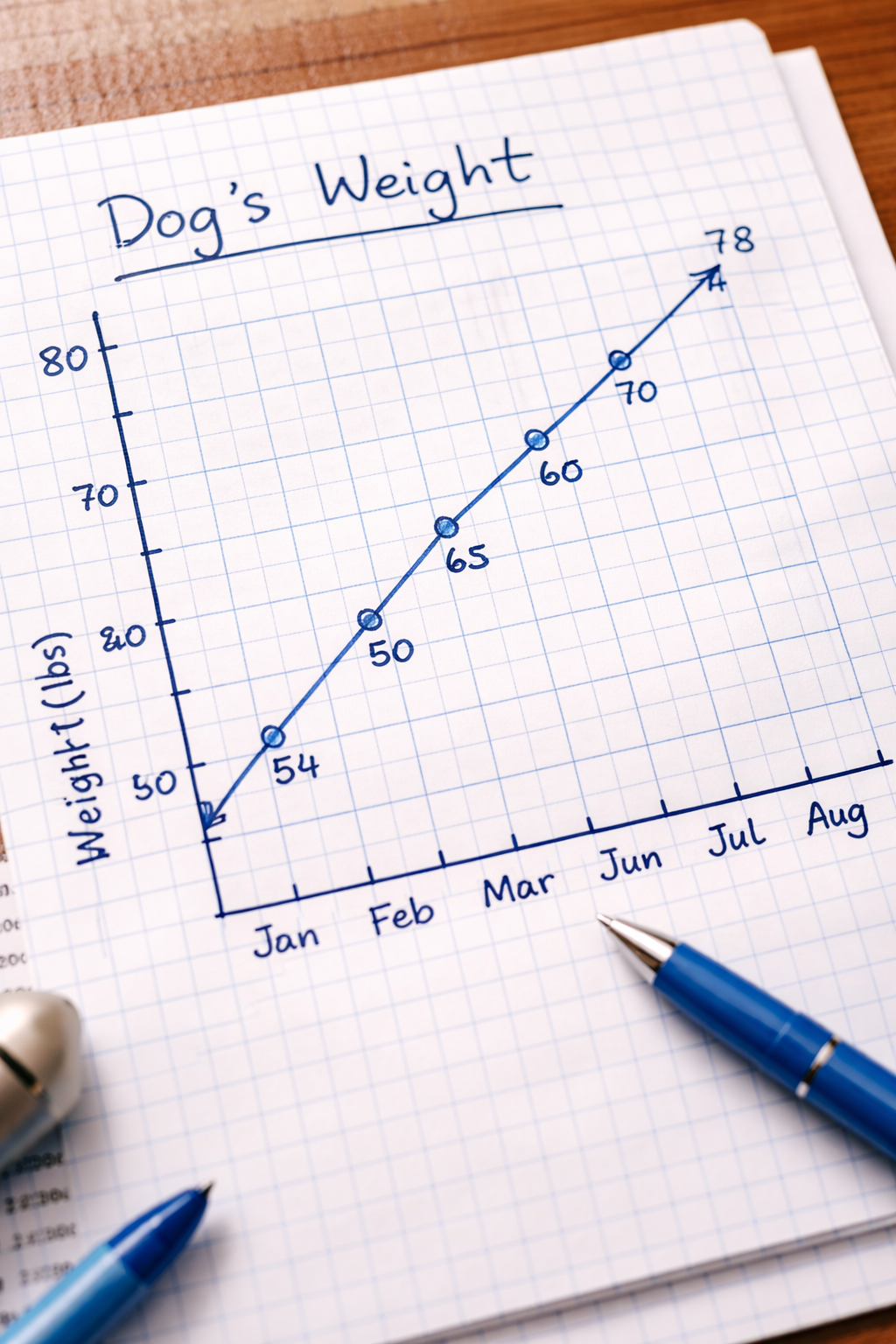
Charts and graphs contain valuable data points that are tedious to extract manually. This checklist reads a weight tracking chart. hand-drawn or printed. and extracts every measurement as a date-value pair.
The AI identifies each data point on the chart, reads the date and corresponding weight value, and outputs structured data you can use directly in spreadsheets or reports.
Works with any chart showing measurements over time. Try it with the sample weight chart below or upload your own.
Weight Chart Check
Copy this checklist and paste it into Revdoku’s Generate Checklist to run it on your document:
Weight Chart Check

you are experienced chart reader

- find every single measure on the chart. #value. save as 'date,value' (e.g. '2026-apr-08,23.2').
Sample Input
Here’s an example document you can use to try this checklist:
How to Use This Checklist
- Go to Revdoku and upload your document
- Click Generate Checklist and paste the checklist text above
- Run the review and get a detailed report with highlights on every finding
See this checklist in action: Extract Data from a Chart
Find more review checklists at revdoku.com/checklists. each one is ready to copy and use in the app.