Essential Scope of Work Review Checklist for Projects
Before you sign a scope of work
A scope of work (SOW) is the document that says what a vendor will deliver, when and for what price. Use this checklist before you sign an SOW, start the work or pay a deposit. A vague SOW leads to disputes about what the vendor owes and what the client pays. The checklist works for the client and for the vendor.
Project definition
- You can summarize the project in one sentence from the SOW alone.
- The SOW states the business goal: the problem that the project solves and what success looks like.
- Each task in the SOW connects to that goal.
Deliverables and acceptance
- Each deliverable is specific and measurable, with quantities, formats, sizes or features. Not “marketing materials” but “three blog posts of 1,200 to 1,500 words each and ten social media graphics in PNG format.”
- No deliverable uses vague words such as “modern design,” “user-friendly” or “professional quality” without a definition.
- The vendor cannot deliver something that matches the text but is not what the client wants. If the vendor can, add detail.
- The SOW lists what is out of scope. For example: “This project includes logo design. It does not include business cards, website changes or brand guidelines.”
- Each deliverable has acceptance criteria, the conditions that the client uses to approve it.
- The SOW says how the client gives approval, for example by email or with a signed form.
- The SOW gives the number of revision rounds that the price includes. It also says what happens if the client rejects a deliverable.
Timeline and client responsibilities
- The timeline gives dates or durations for each milestone.
- The SOW lists what the client must provide (content, access, approvals, decisions), each with a date. For example: “Client provides product photos by March 15.”
- Each client review period has a length, for example five business days.
- The SOW says what happens if the client misses a review period, for example that the vendor deadlines move by the same number of days.
- The SOW says how the client sends feedback, for example one combined list for each review round.
Change management
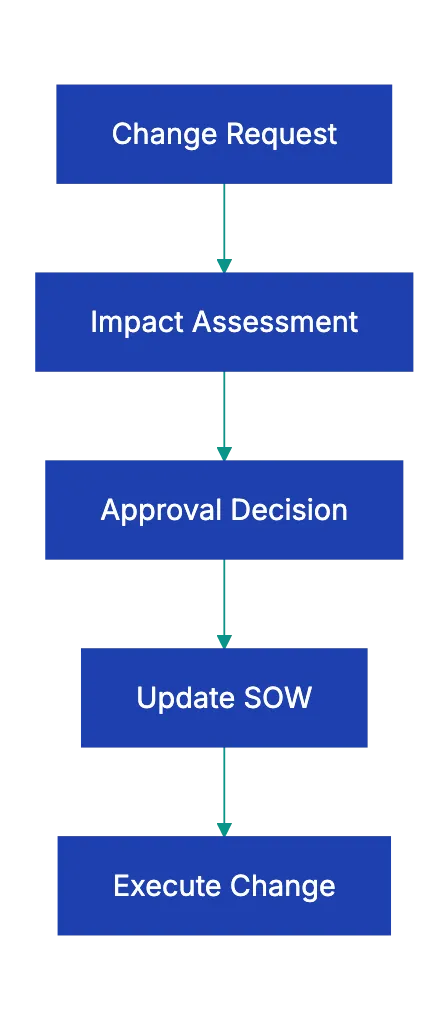
Changes are normal on a project that lasts more than a few weeks. A change order is a signed agreement that adds or changes work, with its price and its effect on the timeline.
- The SOW says how to request a change and who approves it.
- The SOW says how the vendor prices changes, for example with an hourly rate or a price list.
- The SOW says how a change affects the timeline.
- A fixed-price SOW has a contingency amount or a rate for extra work.
Budget and payment
- Each payment depends on a deliverable or a milestone, not only on a calendar date.
- The milestone payments add up to the total price.
- The SOW says who pays expenses, and if the prices include taxes.
- The pricing model is clear. In a fixed-price SOW, the vendor carries the cost of overruns. In time and materials, the client pays for actual hours.
- If the two parties signed a general services contract (an MSA), the SOW names it. That contract holds the general legal terms. The SOW also says which document controls if they conflict.
Red flags

Look for these gaps:
- The SOW has no acceptance criteria. The client can reject work again and again, and the budget runs out in revisions.
- The deliverables are vague. “Modern” to the vendor can look dated to the client.
- The SOW has no change process. The vendor does unpaid extra work, or the client gets invoices that it did not expect.
- The timelines are one-sided. The vendor has deadlines and penalties, but the client review periods have no limit.
- The SOW lists no client responsibilities. The vendor waits for content, access or decisions that the client did not know it owed.
- The price is fixed with no room for change. When a change comes, one side pays for it without a plan.
Example: one vague line
Here is a deliverable from an imaginary SOW: “A secure web portal where clients can access reports and communicate with consultants.” A vendor can build a login page, a list of reports and a message form, and say that the work is complete. The client can expect version history, notifications, search and filters by project or date, and a connection to its CRM.
The line does not say if “access” means view, download or search. It has no feature list, no wireframes (simple layout sketches) and no acceptance criteria. A short feature list with acceptance criteria for each feature closes this gap before the work starts.
Use this checklist with Claude or ChatGPT
You can use this checklist with a general AI assistant, such as Claude or ChatGPT. Paste the checklist and the text of the SOW, or upload the SOW as a file. Then ask the assistant to go through each item and to list what is missing or vague. Here is an example prompt:
Below is a scope of work review checklist, followed by a draft SOW.
1. For each checklist item, quote the part of the SOW that covers it,
   or write "MISSING".
2. List every deliverable, and say if it is measurable. If it is not,
   suggest a measurable version.
3. List every vague word or phrase, and write a question that we can
   ask the other party about each one.
Compare each finding with the SOW before you act on it. The assistant can miss a gap, and it can report a gap that does not exist. It also does not know what the two parties agreed in calls or emails.
Read the confidentiality terms that apply to the SOW before you upload it. Remove prices, client names and other confidential details that the review does not need. The service keeps a copy of what you upload, so look at the data settings of your workspace. For the legal terms of a large contract, a lawyer has the final word.
A docs portal with Ask AI
and support tickets
Connect a repository, or describe your product to start. Each docs site has search, Ask AI, an API console, an MCP server and support tickets.
- Publishes from GitHub on every push
- Works with Mintlify repositories
- API console from your OpenAPI file
- MCP server and llms.txt for AI agents
- Ask AI and support tickets
- Analytics for people and AI agents
Frequently Asked Questions
What is the difference between an SOW and a contract?
An SOW describes the work for one project. It often sits under a general services contract (an MSA) that holds the legal terms, such as liability, confidentiality and payment. If the parties have no such contract, the SOW or a separate contract must contain those terms.
Who writes the scope of work, the client or the vendor?
Either side can write it. Often the vendor writes a draft from the request of the client, and the client reviews it. The side that did not write the draft has the most reason to go through it line by line.