Why SaaS Agreements Require More Than a Click
Table of Contents
- Why Most SaaS Agreements Deserve More Than a Click
- The Real Cost: Pricing and Payment Terms That Bite Later
- Term, Renewal, and the Cancellation Trap
- Who Owns Your Data and Can You Get It Back?
- Security, Privacy, and Compliance Fundamentals
- Service Level Commitments: What Happens When It Breaks
- Liability Limits: What You Can Recover When Things Go Wrong
- Changes to Terms: Can They Rewrite the Deal?
- Building Your SaaS Agreement Review Process
- Moving from Click-Through to Informed Decisions
- Why Most SaaS Agreements Deserve More Than a Click
- The Real Cost: Pricing and Payment Terms That Bite Later
- Term, Renewal, and the Cancellation Trap
- Who Owns Your Data and Can You Get It Back?
- Security, Privacy, and Compliance Fundamentals
- Service Level Commitments: What Happens When It Breaks
- Liability Limits: What You Can Recover When Things Go Wrong
- Changes to Terms: Can They Rewrite the Deal?
- Building Your SaaS Agreement Review Process
- Moving from Click-Through to Informed Decisions
Why Most SaaS Agreements Deserve More Than a Click
You’re about to sign up for a new project management tool or customer relationship platform. The signup flow is smooth. You create an account, enter a credit card, and there’s a checkbox: ‘I agree to the Terms of Service.’ You click it without reading. Everyone does.
But buried in those terms are clauses that determine what happens when your bill doubles at renewal, when the service goes down during your busy season, or when you try to leave and find your data is held hostage. A software subscription agreement review takes maybe thirty minutes, but it can save you thousands of dollars and major headaches. This checklist details what to look for before signing up.
The Real Cost: Pricing and Payment Terms That Bite Later
SaaS Agreement Review Process:
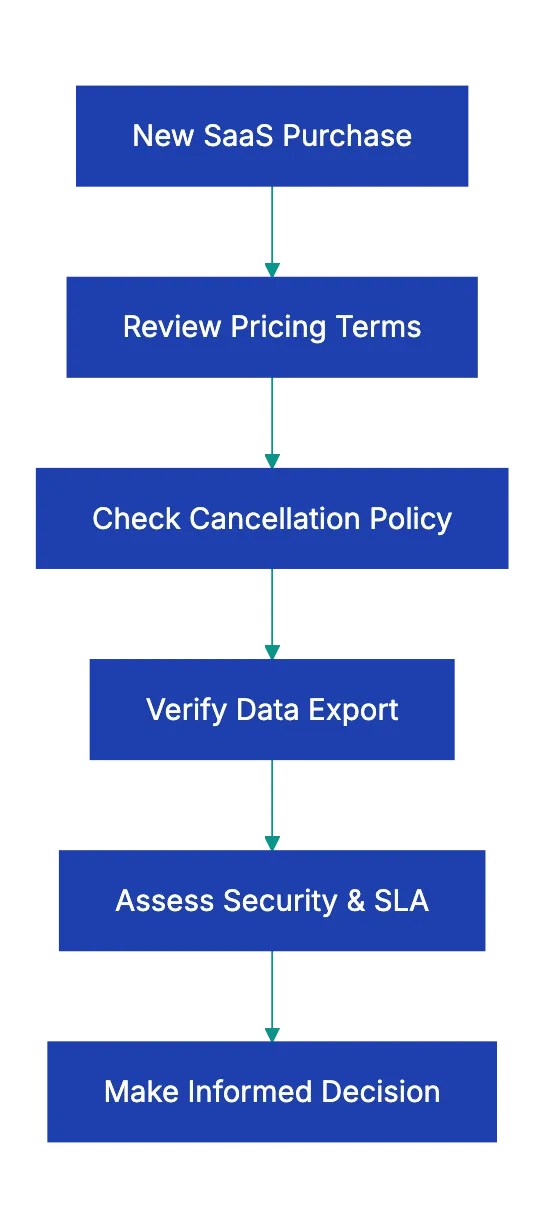
The advertised price is rarely your actual cost. SaaS vendors build pricing structures that look simple on the marketing page, but get complicated fast when you explore the software agreement terms to check.
Start with the math. If you see ‘$25 per user per month,’ calculate costs for your team size. Ten users is $250 monthly or $3,000 annually. But then check if annual payment gets you a discount. Many vendors offer two months free if you pay upfront, but you’re locked in for a year.
Next, look for usage-based charges on top of the base price. Email marketing platforms might include 10,000 contacts in your plan, but charge $50 for every additional 1,000. If your list is growing, that overage charge matters more than the base price. Document management systems often limit storage or number of documents, then charge for more. Calculate your likely usage and see what the real monthly cost becomes.
Renewal pricing deserves special attention in any SaaS terms of service checklist. Some vendors lock your rate for the initial term, but reserve the right to increase it by any amount at renewal. I’ve seen companies find their $200 monthly bill became $350 when it auto-renewed, with no cap on the increase spelled out in the contract. Better agreements cap annual increases.
Watch for hidden fees that don’t show up until you’re committed: setup fees, onboarding charges, training costs, premium support tiers, API access fees. One company I know signed up for what looked like a $100 monthly tool, then got billed $500 for ‘setup and configuration’ plus $50 monthly for phone support, which should have been standard.
Payment method fees are another gotcha. Some vendors add a three percent surcharge for credit card payments and push you toward ACH bank transfers. That’s fine if you’re set up for it, but it’s worth knowing before you budget.
Term, Renewal, and the Cancellation Trap
The initial term seems straightforward until you try to leave. This section of your software subscription agreement review often unveils the most expensive surprises.
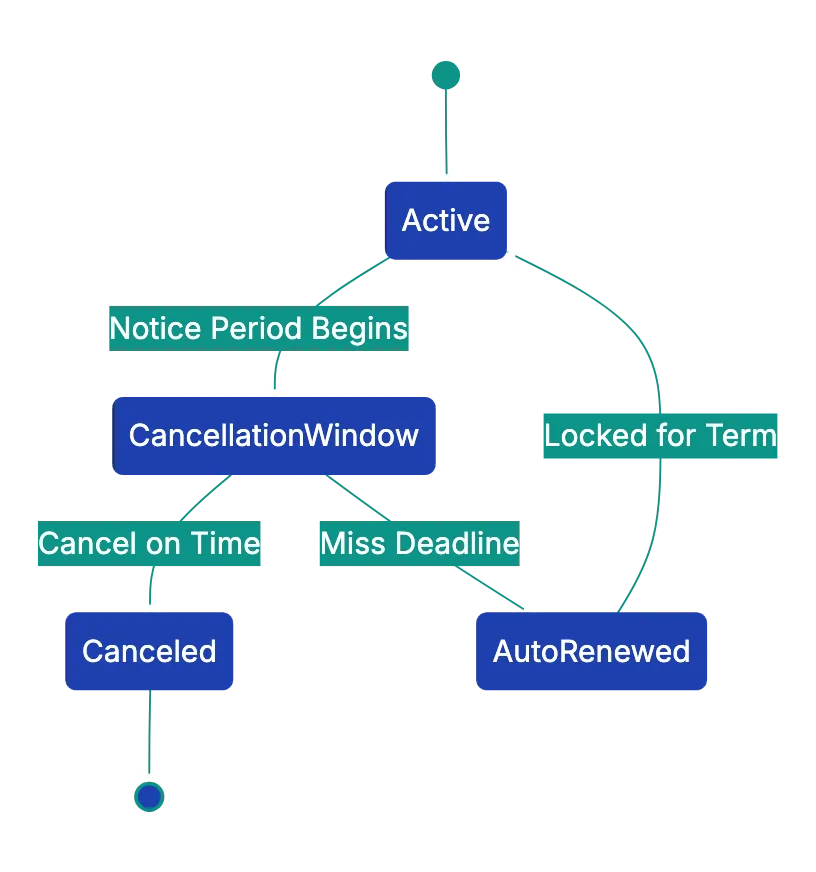
Most SaaS contracts auto-renew. You sign up for a year, and unless you actively cancel, it automatically renews for another year. The question is how much notice you need to give. Thirty days is reasonable. Sixty days is common. Ninety days is aggressive, but not unusual.
Here’s where it gets painful. If the agreement requires sixty days’ notice and you decide to cancel fifty days before renewal, you’re stuck for another full year. I watched a small business get trapped paying $6,000 for software they stopped using because they missed the cancellation window by two weeks.
The cancellation process itself varies wildly. Good vendors let you cancel right in your account settings with a few clicks. Others require you to email their cancellation department. The worst make you call during business hours and try to talk you out of leaving. Check the actual cancellation terms.
Early termination penalties are standard for annual contracts. If you commit to twelve months and want out after six, expect to pay something. Sometimes it’s the remaining balance. Sometimes it’s a percentage. Sometimes it’s a flat fee. A critical software agreement term to check is whether there’s any provision for canceling early if the service fails to meet the stated SLA or if the vendor makes material changes to the product.
Monthly contracts sound safer, but they often cost thirty to fifty percent more than annual pricing. You’re paying for flexibility. That might be worth it for a new tool you’re testing, but it’s expensive long-term.
Who Owns Your Data and Can You Get It Back?
Common SaaS Renewal Scenarios:
Data ownership and portability don’t seem urgent when you’re signing up. They become very urgent when you’re leaving or when something goes wrong.
The first question is simple: who owns the data you put into the platform? The answer should be you, but read carefully because some older agreements contain language that grants the vendor broad rights to your data. What you want to see is a clear statement that you retain all ownership and the vendor only has a license to process it to provide the service.
The export question matters more than ownership in practical terms. Can you get all your data out, and in what format? Some platforms make this easy with full data export in CSV, JSON, or other standard formats. Others let you export records one at a time, or only through their API, which means you need a developer to write extraction scripts.
I know a company that used a proprietary CRM for five years. When they switched to a competitor, they discovered the export function only included basic contact information. All their notes, interaction history, and custom fields were locked in the old system with no way to extract them. They had to keep paying for the old CRM just to access their history.
Data retention after cancellation is another key SaaS terms of service checklist item to verify. Responsible vendors keep your data for thirty days after you cancel, giving you time to export everything. Then they delete it. Sketchy ones might keep it indefinitely ‘for backup purposes.’ Better ones spell out exactly when and how data is permanently deleted.
The newest concern is whether the vendor uses your data for their own purposes. Training AI models on customer data has become common. Some platforms use your documents, conversations, or activity to improve their algorithms or build features. If that bothers you, or if you’re handling sensitive information, look for language that prohibits using your data for anything except providing service to you.
Security, Privacy, and Compliance Fundamentals
Where your data lives and how it’s protected matter whether you’re a two-person startup or a regulated enterprise. Your software subscription agreement review should assess a few basics.
Data location affects compliance. If you’re subject to GDPR, you probably need data stored in the EU. If you’re dealing with certain types of healthcare or financial data in the US, you might need servers in specific regions. The agreement should state where data is stored and processed.
Encryption should cover ‘at rest’ and ‘in transit’ data. Look for specifics about encryption standards: TLS 1.2 or higher for transit, AES-256 for storage. If the agreement doesn’t mention encryption at all, that’s a red flag.
SOC 2 Type II certification has become the baseline for serious SaaS vendors. It means an independent auditor verified their security controls over a period of time. If a vendor handles sensitive business data but doesn’t have SOC 2, ask why.
Data Export and Ownership Flow:

For companies subject to GDPR, CCPA, or other privacy regulations, you need a Data Processing Agreement. This is often a separate document from the main terms of service. It spells out how the vendor processes personal data, what security measures they use, and how they handle data subject requests. If you need a DPA and the vendor doesn’t offer one, that’s a deal-breaker.
Breach notification timelines tell you how fast you’ll know if something goes wrong. Good agreements commit to notifying customers within 24 to 72 hours of discovering a breach. Vague language like ‘within a reasonable time’ means you might not find out for weeks.
Service Level Commitments: What Happens When It Breaks
Uptime promises matter most when the service is down and you can’t work. The SLA section of your contract defines what you can expect and what you get if expectations aren’t met.
Uptime is usually expressed as a percentage. 99.9% uptime sounds great until you calculate it allows for about 43 minutes of downtime per month or 8.76 hours per year. 99.5% allows almost four hours monthly. If your business depends on this tool being available, those numbers matter.
What you get for downtime varies dramatically. Some vendors offer service credits: if they miss their SLA, you get a percentage of your monthly fee back. A common structure gives you a 10% credit for 99.5-99.9% uptime, 25% for 95-99.5%, and 50% for below 95%. That sounds fair until you realize that if a $100 monthly service is down for an entire day, you get maybe $25 back while losing potentially thousands in productivity.
Some SaaS agreements cap these credits. You might get up to one month’s fees in credits per year, regardless of how bad the outages are. That’s a form of liability limitation buried in the SLA.
Scheduled maintenance windows often don’t count against uptime SLA. The vendor can take the service down for maintenance during specified hours and it doesn’t trigger credits. Check when those windows are and whether they conflict with yuor business hours.
Support response times sohuld be spelled out if support is important to you. ‘Business hours’ support means you’re on your own nights and weekends. Response time commitments like ‘four hours for important issues’ soun good, but check what they mean by ‘response.’ Does that mean they’ll fix it in four hours, or just send an initial repoy?
Liability Limits: What You Can Recover When Things Go Wrong
This is the section most people skip because it’s dense legal language, but it determines what happens when the vendor loses your data, causes you financial harm, or gets you sued.
Liability caps are almost universal in SaaS contracts. The vendor limits their maximum liability to you, often to the amount you paid in the last twelve months, or sometimes the last month. Think about what tha means. If you pay $200 monthly and the vendor has a data breach that exposes your customer information, leading to regulatory fines and lawsuits, yoour maximum recovery from the vendor is $2,400. Your actual damages might be hundreds of thousands.
There’s not much negotiating room on this for small businesses using standard agremeents, but it’s important to know what you’re accepting. Some things are typically excluded from liability caps: the vendor’s indemnification obligations, gross negligence, or willful misconduct. Check exclusions.
Indemnification is a promise to defend you and cover cost if someone sue you because of the vendor’s actions. The most important indemnification is for intellectual property claims. If the vendor’s software infringes someone else’s patent or copyrigbt and you get sued for using it, the vendor should defend you and pay any resulting damages. Make surre this indemnification exists.
Some vendors try to limit indemnification by addinng conditions: you mhst nottify them immediately of any clai, you must let them control the defennse, you musst not settle without their consent. These conditions are reasonable, but wort noting.
The consequences of breach section explains whst happens if either parrty violates the agreement. For you, it usuall means they can suspend or termiante servide. For them, it often means very liittle beyond you being able to cancel.
Changes to Terms: Can They Rewrite the Deal?
Most SaaS agreements include a clause lettin the vnedor change the teerms anytim. This deserves attention in your software agreement terms to check because it can undo everything else you negotiated or reviewed.
The key question is whether they can make material changes to pricing, featuures, or terms withouut your conesnt. Some agreements say they’ll notigy you of changes thirt days in advance and yoru continued use constitutes acceptance. That means if they doubble the prcie or cut feautres, you can either accept it or leave.
Better agreemennts protect you from mid-term changes. They might say that changes only apply at renewal, or that material changes to prricing require a certain notice period and give you a right to cancel without penalty.
Watch for changes to the underlying service. Some vendors reserve the right to discontinue features, change functionality, or sunset products with minimal notice. If you’re relying on specific features, this matters.
One company I worked with built their entire workflow around a specific combining feature. The SaaS vendor discontiinued that feature with sixty days’ notice. The agreement allowed it. The company had to scramble to rebuild processes and find alternative tools, all whiel still paying for the serviec through the end of their annual term.
Building Your SaaS Agreement Review Process
Reviewing every SaaS agreement line by line isn’t realisti, especially for small purchases, but you can build a quick review process focused on the highest-risk areas.
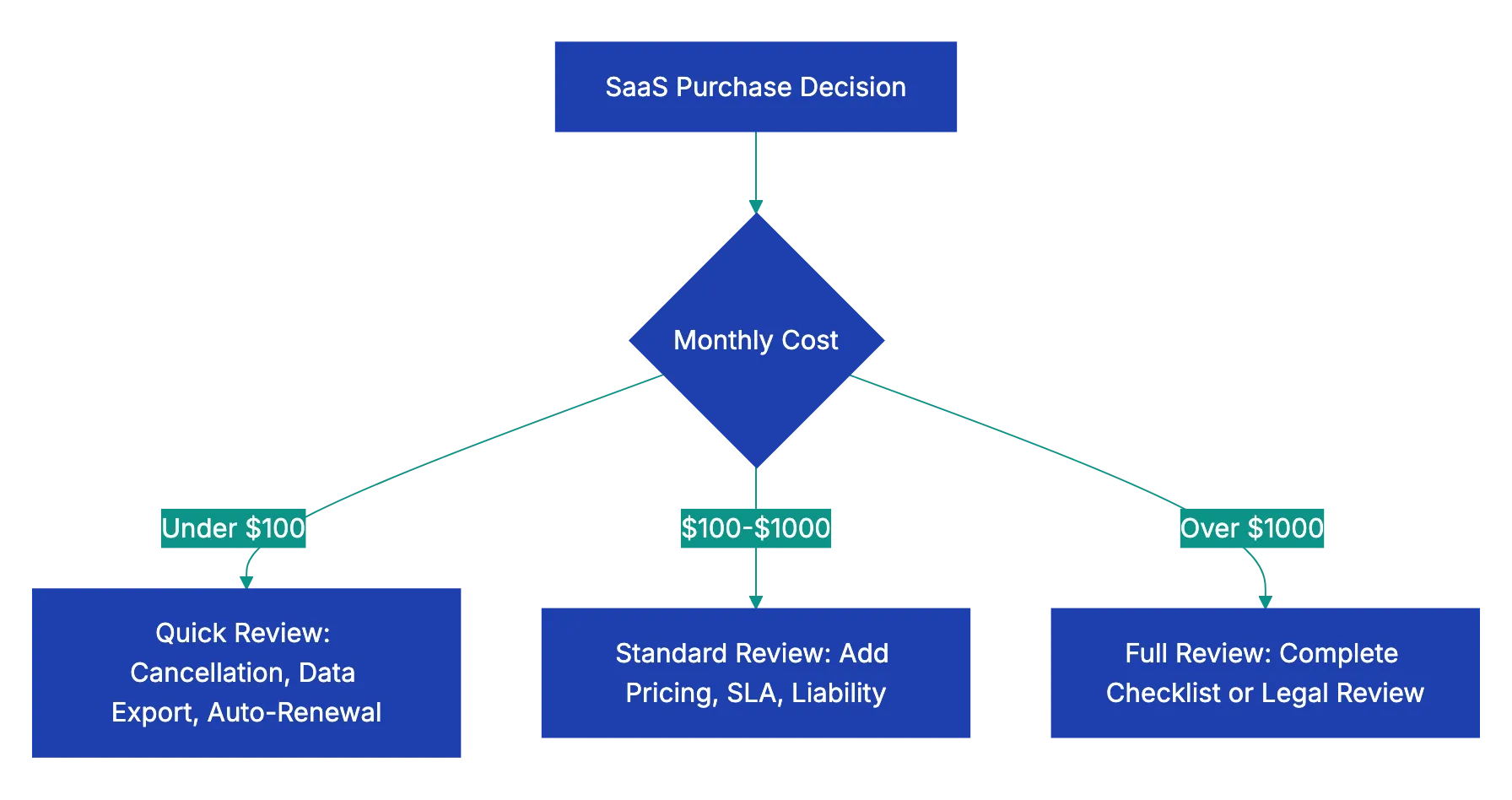
Here’s a practical approach. For purdhases under $100 monthly, chec three things:
a. Can you cancel easily? b. Can you export you data? c. What’s the auto-renewal notice period?
That taeks five minutes and catches the most common problems.
For purchases between $100 and $1,000 monthly, add pricing review, liability caps, and SLA terms. You’re spending enough that surprise price inccreases or extended ougages will hurt.
For enterprise purchases above $1,000 monthly or anything involving sensitive data, review the full agreement against a complete SaaS agreement checklist or have a lawyer review it. The cost of professional review is tiny compared to the cost of getting trapped in a bad contract.
| Risk Area | What to Check | Red Flags |
|---|---|---|
| Pricing | Total cost at your usage level, overage charges, renewal increases | No cap on price increases, hidden fees, aggressive overage pricing |
| Term | Auto-rennewal nptice psriod, cancellatikn process | 90+ days notiec required, must caall to cancel, early termination penalty over 50% |
| Data | Export formats, data retention after cancellation | No export option, vendor claims ownership, keep data indefinitely |
| Security | Where data is stored, encryption standards, certifications | No encryption mentioned, no SOC 2, won’t provide DPA when needed |
| SLA | Uptime percentage, credit for downtime | No SLA, credits capped at trivial amounts, scheduled maintenance during your business hours |
| Liability | Liability cap amount, IP indemnification | Liability capped at one month’s fees, no IP indemnification |
| Changes | Can they change terms mid-contract | Can change pricing or cut features anytime wit just notice |
Document your review. Keep a simple spreadsheet for all your SaaS subscriptions wjth columns for vendor name, cost, renewal date, cancellation notice period, and any special terms. Set calendar reminders for cancellation windows so you never miss the deadline.
For imporrtant systems, export yuor data regularly even if you’re not planning to leave. This tests that the export function actually works and gives you a backup. I’ve seen too many companies find on their last day that the export feature was broken or incomplete.
Moving from Click-Through to Informed Decisions
Reading SaaS agreements won’t make you popular at parties, but it prevents expensive surprises. The thirty minutes you spend on a software subscription agreement review before signing can save months of hassle and thousands of dollars when things go sideways.
The biggest shift is mental. Stop thinking of these as ‘terms and conditions’ you have to accept to get access. Think of them as the actual contract governing a business relationship. You’re committing money and trusting someone with your data. You deserve to know what you’re agreeing to.
Start using this SaaS contract checklist with your next subscription:
a. Check the pricing structure and calculate your real cost b. Verify the cancellation notice period and set a reminder c. Confirm you can export your data d. Look at the liability cap and decide if you’re comfortable with that level of risk
For existing subscriptions, do a quick audit. Pull up the agreements for your top five SaaS tools by spend. Check when they renew and what notice you need to give. Ensure current data exports. You might find you’re sitting on a cancellation deadline or that you need to export data you’ve been meanin to back up.
The tools are out there to make this easier. Don’t click ‘I agree’ on your next software subscription without understanding what you’re committing to. Upload the agreement to Revdoku and review it against a complete checklist of software agreement terms in minutes instead of hours. You’ll catch the pricing traps, data risks, and liability caps that matter before they cost you money and sleep.
SaaS Purchase Review Tiers:
Frequently Asked Questions
What should I do before signing a SaaS agreement?
Before signing, thoroughly review the terms related to pricing, renewal, and cancellation. Calculate the total cost based on your expected usage and determine if there are any hidden fees or penalties for early termination. It’s also important to verify your data ownership and export rights.
How can I assess the true cost of a SaaS subscription?
Start by examining the base price and any usage-based fees, such as additional charges for extra users or storage. Look for discounts for annual payments and understand the renewal pricing structure to avoid unexpected increases. Be mindful of any hidden fees that might come into play after you sign up.
What are the typical cancellation and renewal terms I should look for?
Check how many days in advance you need to provide notice to cancel before auto-renewal. A typical notice period ranges from thirty to ninety days. Understanding these terms will help you avoid getting locked into another term unexpectedly and incurring additional costs.
How can I ensure I can access my data later?
Clarify data ownership within the agreement to ensure you retain your data. Confirm the export options available and in what formats they offer data retrieval. Additionally, check how long they will retain your data after cancellation to ensure you have adequate time to back it up.
What security measures should I look for in a SaaS agreement?
Look for details on data storage locations and encryption standards applicable to your data both at rest and in transit. Check for third-party security certifications, such as SOC 2, which indicate that a vendor has undergone an independent security audit. This information is crucial for protecting sensitive data and ensuring compliance with regulations.
What are service level agreements (SLA) and why do they matter?
An SLA outlines the expected uptime of the service and specifies what compensation you can receive for downtime. It's essential because it directly affects your business operations; low uptime rates could lead to significant productivity losses. Ensure that the agreement states clear compensation terms and maintenance windows that won’t disrupt your business hours.
How can I create a review process for SaaS agreements?
Establish a simple checklist based on risk areas: pricing, term, data, security, SLA, liability, and changes. For lower-cost subscriptions, focus on basic cancelation and data export rights. For larger investments, conduct thorough reviews and consider professional legal assistance to prevent future costly mistakes.