
Invoice Verification: Protect Your Business From Errors
Table of Contents
- Introduction
- Step 1: Verify Vendor Details and Prevent Payment Fraud
- Step 2: Check Invoice Numbers for Duplicates
- Step 3: Match Against the Purchase Order
- Step 4: Match Against Receiving Documentation
- Understanding Three-Way Matching
- Step 5: Verify the Math on Every Invoice
- Step 6: Check All Dates for Red Flags
- Step 7: Verify Tax Compliance
- Step 8: Watch for These Common Red Flags
- Best Practices for Your Invoice Review Process
- Common Mistakes That Cost Money
- Real-World Examples of Invoice Errors Caught
- How Technology Improves Invoice Verification
- Final Thoughts
- Introduction
- Step 1: Verify Vendor Details and Prevent Payment Fraud
- Step 2: Check Invoice Numbers for Duplicates
- Step 3: Match Against the Purchase Order
- Step 4: Match Against Receiving Documentation
- Understanding Three-Way Matching
- Step 5: Verify the Math on Every Invoice
- Step 6: Check All Dates for Red Flags
- Step 7: Verify Tax Compliance
- Step 8: Watch for These Common Red Flags
- Best Practices for Your Invoice Review Process
- Common Mistakes That Cost Money
- Real-World Examples of Invoice Errors Caught
- How Technology Improves Invoice Verification
- Final Thoughts
Introduction
Accounts payable teams dread finding payment errors too late. Double payments, incorrect amounts, or payments to fraudulent vendors can cost your business thousands. Research shows that 88% of manually processed accounts payable documents contain data-entry errors, and the average cost to process a single invoice manually sits around $15. Most invoice errors are preventable if you know what to look for. This guide details systematic invoice verification to catch costly errors early. Whether you’re processing ten invoices a month or ten thousand, this invoice review process will ensure you verify invoice accuracy and protect your business from fraud and overpayment.
Step 1: Verify Vendor Details and Prevent Payment Fraud
Invoice Verification Steps Overview:

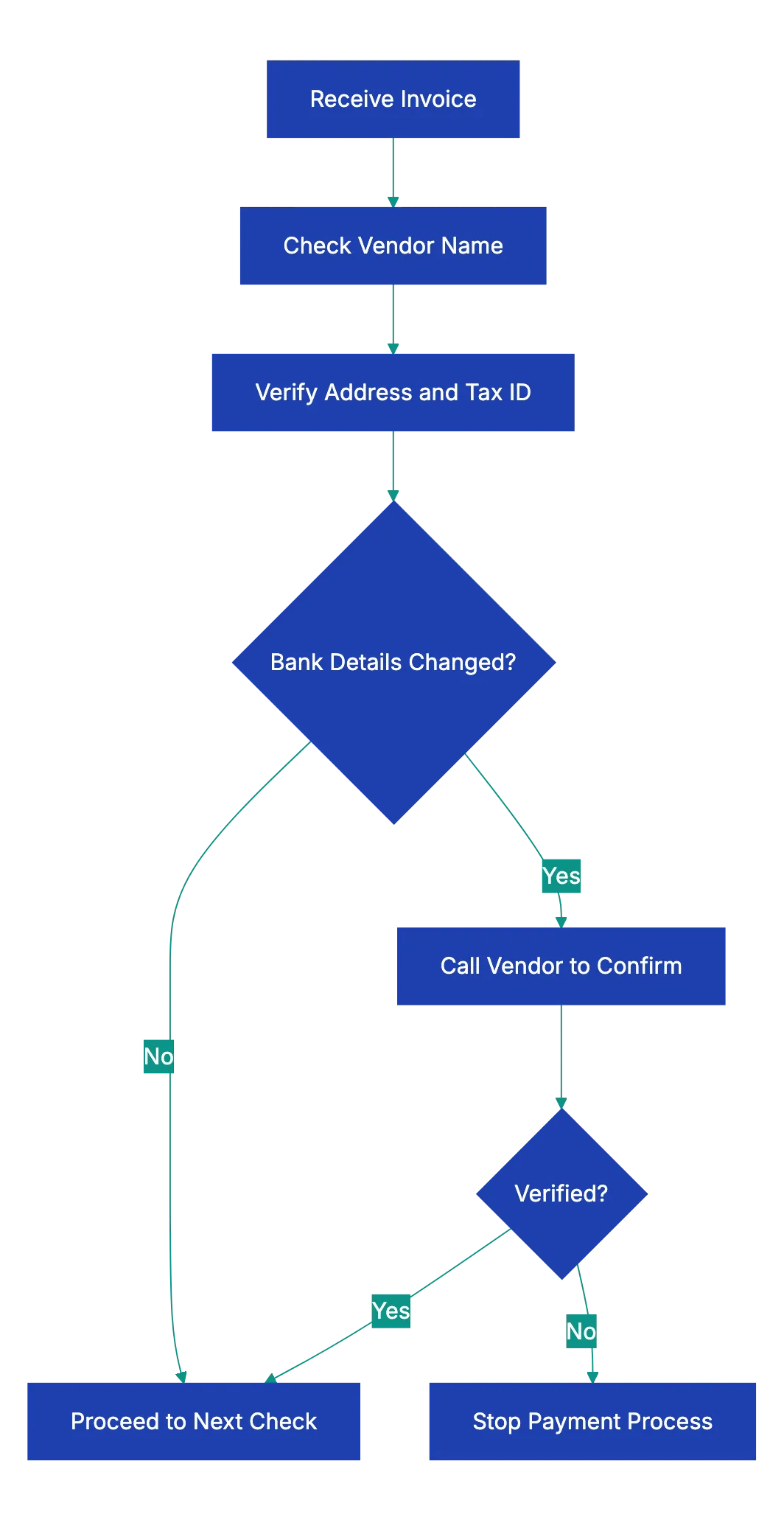
The first step in any invoice verification process starts with confirming vendor details to verify invoice accuracy. Vendor detail errors account for many AP fraud cases. Start by checking that the vendor name matches exactly what’s in your vendor learn file. Small variations like “ABC Corp” vs. “ABC Corporation” can indicate fraud.
Next, confirm the vendor’s address and tax identification number or EIN during invoice verification. These should match your records precisely. If you spot any discrepancies, don’t ignore them. A changed address might be legitimate, but it could also signal that someone’s trying to redirect your payment.
Focus on bank details. If an invoice shows different banking information than previous invoices from that vendor, stop the payment process immediately. Call the vendor using a phone number from your records, not the one on the invoice, to verify the change directly. This simple step prevents business email compromise scams, where fraudsters impersonate vendors and request payment to new accounts. One manufacturing company in Ohio lost $480,000 to this exact scam because AP staff didn’t verify a bank detail change.
Step 2: Check Invoice Numbers for Duplicates
Invoice numbers are unique identifiers and must be checked. Every legitimate vendor assigns a unique sequential number to each invoice. Your job is to confirm that you haven’t already paid this exact invoice number before.
Double billing happens more often than you’d think. Sometimes it’s accidental when a vendor’s system generates duplicate invoices. Other times it’s intentional fraud. You need to catch it. Cross-reference the invoice number against your accounting system to make sure it hasn’t appeared before.
While you’re checking the number itself, look at the sequence. Non-sequential invoice numbers are red flags. The pattern should make sense based on your history with that vendor. Some companies also encode dates or other information in invoice numbers, so familiarize yourself with each vendor’s numbering system to spot anomalies quickly.
Step 3: Match Against the Purchase Order
This step forms the foundation of what’s called three-way matching, and it’s where many invoice errors to check get identified. Before you can approve payment, you need to verify that a valid purchase order exists for the goods or services being invoiced.
Vendor Verification Flow:
Pull up the PO that should correspond to this invoice. The invoice should reference the PO number, making this easier. If there’s no PO number on the invoice and your company requires POs for all purchases, that’s an immediate stop sign. Don’t process the invoice until you can trace it to proper authorization.
Once you’ve located the PO, compare line by line. Do the items match? Are the quantities the same? Are the unit prices what you agreed to pay? Ensure the invoice doesn’t charge more than the PO specifies during the invoice review process. If the invoice shows $50 per unit, but your PO says $45, you need to resolve that discrepancy before payment.
Check the overall terms too. Payment terms, delivery expectations, and any negotiated discounts should match between the PO and invoice. A vendor offering 2% for payment within 10 days on the PO should show that same discount on the invoice if you’re paying early. These details matter because they represent the contract between you and your vendor.
Step 4: Match Against Receiving Documentation
The second part of three-way matching involves confirming that you actually received what you’re being asked to pay for. This step protects you from paying for phantom goods or services that never arrived.
Locate your receiving documentation. This might be a packing slip signed by your warehouse team, a delivery receipt, a service completion form, or a digital confirmation from your inventory system. The format varies, but the principle stays the same: verify receipt before payment.
Compare the received quantities to the invoiced quantities. If your invoice claims 100 widgets were delivered, but your receiving report shows only 87 arrived, you should only pay for 87. Short shipments happen regularly in business, and vendors sometimes invoice for what they shipped versus what actually made it to your door.
For services rather than goods, verification works differently, but remains just as important. You need confirmation from whoever authorized or received the service that the work was completed satisfactorily. A consulting invoice for 40 hours should be verified against timesheets or project completion reports. Don’t pay for services you didn’t receive or that weren’t performed to specification.
Understanding Three-Way Matching
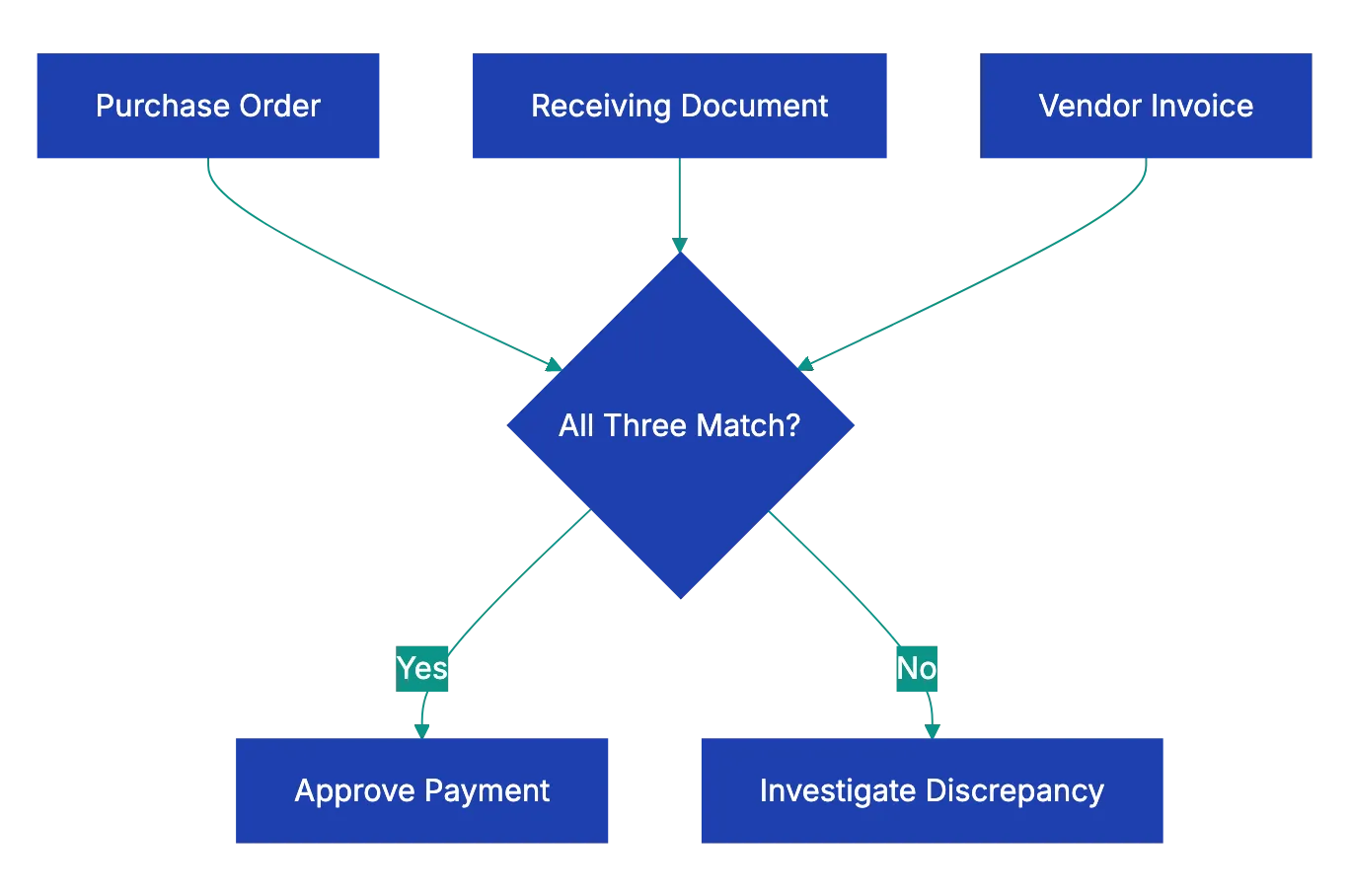
Let’s pause to clarify what three-way matching actually means, since it’s central to how to check an invoice properly. Three-way matching is the process of comparing three documents before approving an invoice for payment:
- The purchase order
- The receiving documentation
- The invoice itself
It’s a triangle where all three sides must align:
- The PO represents what you agreed to buy and at what price.
- The receiving document proves what actually arrived.
- The invoice is the vendor’s request for payment.
When all three match, you can proceed with confidence.
Companies using three-way matching report significantly fewer payment errors and instances of fraud. The system creates accountability because multiple departments touch the process. Purchasing creates the PO, receiving or operations confirms delivery, and AP processes payment only when everything matches. This separation of duties makes it much harder for errors or fraud to slip through.
Some organizations start two-way matching for low-value purchases, comparing only the PO and invoice. Others use four-way matching for complex purchases, adding an inspection report to verify quality, but three-way matching represents the industry standard for good reason: it catches the vast majority of errors without creating excessive bureaucracy.
Step 5: Verify the Math on Every Invoice
You might assume that vendor accounting systems calculate totals correctly, but that assumption costs businesses money every day. Manually verify the mathematics on each invoice as part of your invoice verification process.
Start with the line items. Multiply the quantity by the unit price for each line to verify invoice accuracy. If the invoice shows 25 itsms at $12.50 each with a line total of $312.50, your calculator shoudl agree. Simple multiplication errors appeqr more often than you’d expect, especially on invoices generated outside of automated systems.
Next, add up all the line item totals to verify the subtotal. Then check taht any discounts are applide correctly. A 5% discount on a $1,000 subtotal should redcue it by exactly $50, not $48 or $52. Percentage-based discounts often get miscalculated.
Tax calculattions deserve special attention. Verify thaat the tax rate matches what’s reuqired for your jurisdiction and the type of goods or service. Sales tax rates vary by state and local jurisdiction. Some items are tax-exempt, some are taxed at rdeuced rates, and some face multiple overlapping taxxes. An invoice billing you for office supplies in Austin, Texas should show 8.25% sales tax, whole the same supplies shipped to Portland, Oregon should show zero sakes tax.
Three-Way Matching Process:
Verify the total equals subtotal plus tax minus discounts. Check the calculation path for logic. Catching a $100 math error on an invoice takes 30 sceonds and saves your company real money.
Step 6: Check All Dates for Red Flags
Invoice dates reveal important information and must be checked carefully. Multiple dates appear on most invoices, and each one matters for different reasons.
The invoice date should mkae sense relative to when you placed the order and when goods or services were delivered. An invoice dated before the dellivery date is suspicious. An invoice dated six months after delivery suggests disorganzied vendor accounting, whixh might mean other errors exxist.
Compare the pyament due date ahainst yuor agreed payyment term. If you negtoiated Net 30 terms, but the invoicce demannds payemnt in 10 days, thhat’s a discrrepancy to resolve. Some vendors attempt to shorten payment windows unnoticed. Others mkae hoenst mistakes in their billing systems. Either way, hold vendors to yoour negotiated terrms.
Check htat the innvoice fallls within the validity period of the associated purchase order. Most POs include start and end dates. An invoice claiming to fulfill a PO that exppired three months ago needs investigation. Either the goods were delivered late and you need to address that with the vendor, or something’s wrong with the invoice.
Delivery dates or service dates shuold match your receivin documentation. If the invoice claims delivery on June 15, but yuor warehouse recsipt shows June 22, clraify which date is corerct. This might seem liek a minor detail, but it affects payment terms and can matter for inventory accoujting.
Step 7: Verify Tax Compliance
Tax errors on invoices can cause accounts payable errors that extend beyond the immediate payment. Paying incorrect sales tax might seem like the vendor’s problme, but it can trigge audits and commpliance issuues for yoyr business too.
First, confirm that the correct tax rate is being applied. This requirds knowing the tax ryles for yoru location and the typ of purchase. Sales tax rates change, sometimes freequently. What was correct six months ago might not be correct today. Many states adjusted their sales tax raates in recent years, and locla jurisdictions add their own taxxes on top of state rates.
Verify that the vendor’s tax identification numbe is valid and current. You can usually check this through yoru state’s department of revenue website. An invaalid or expirsd tax ID suggests the vendor isn’t properly registered to colllect saels tax, whicch maens you might face tax liagility yourself.
Check that tax-exempt items are properly ecxluded from tax calculation. If your organnization has tax-exemlt sttatus for certai purchases, mkae sure those exemption are being applied. Similarly, some items are inherently tax-exemp in certain jurisdictions. Groceries, prescription medications, and manufacturing equipment often get special tax treatment.
For invoices involving multiple tax jurisdictions, this gets more complex. If you’re ordering goods that ship from one state to your location in another state, verify which jurisdiction’s tax rules apply. Origin-based and destination-based tax rules vary by state, and getting this wrong can be expensive.
Step 8: Watch for These Common Red Flags
Beyond the systematic checks already covered, experienced AP professionals develop a sense for invoices that don’t feel right. Training yourself to spot red flags improves your invoice review process significantly.
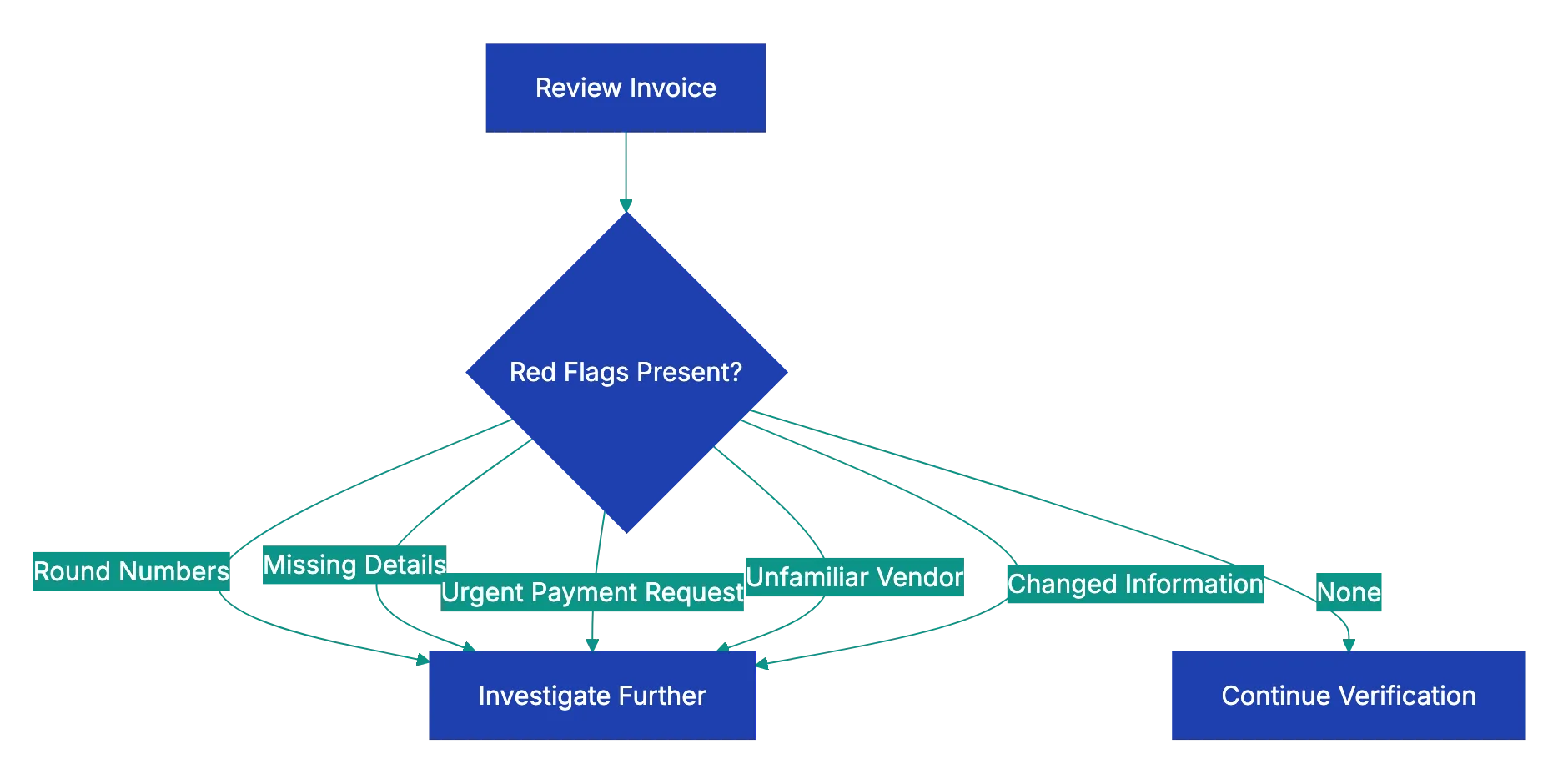
Round numbers should catch your attention. Real invoices for goods and services rarely total exactly $1,000.00 or $5,000.00. When you see suspiciously round totals, look closer. Sometimes they’re legitimate, but often they indicate estimated billing or fraudulent invoices.
Missing details are another warning sign. Legitimate invoices include specific descriptions of what’s being billed. Vague line items like “consulting services” or “miscellaneous supplies” without further detail make it impossible to verify what you’re paying for. Push back and request itemized information.
Pressure for urgent payment often signals fraud. Emails claiming “pay immediately” or “urgent wire transfer required” deserve skepticism. Real vendors follow normal payment processes. Fraudsters create artificial urgency to prevent careful review.
Unfamiliar vendors require extra scrutiny. If you’ve never paid this vendor before, verify they’re legitimate. Do they have a real business presence? Can you find them online with an actual business website and contact information? New vendor setup should involve verification steps before the first invoice gets processed.
Changes to standard information merit investigation. We covered bank detail changes earlier, but watch for any deviations from normal patterns. A vendor who typically invoices monthly suddenly sending weekly invoices, or a vendor whose invoices normally include detailed descriptions suddenly submitting sparse invoices, these changes might indicate problems.
Best Practices for Your Invoice Review Process
Implementing these AP automation verification steps consistently requires structure. The best AP teams build repeatable processes that make sure nothing gets missed even during busy periods.
Create a standard checklist that covers every verification step. This keeps the process consistent regardless of who’s reviewing invoices. Revdoku’s Invoice Review checklist automates this exact workflow, catching errors in seconds that might take humans 20 minutes to find manually. The system checks vendor details against your records, flags duplicate invoice numbers, verifies PO matching, confirms math, and shows compliance issues automatically.
Establish clear approval thresholds. Invoices under a certain amount might need only one approver, while larger invoices require multiple sign-offs. This balances being effective with control. A company processing 500 invoices monthly might set thresholds at $500 for single approval, $5,000 for manager approval, and executive approval for anything above $10,000.
Document your vendor verification procedures. When you confirm a bank detail change or approve a new vendor, keep records of how you verified the information. This documents a useful audit trail.
Schedule regular audits of your own AP process. Periodically review a sample of paid invoices to verify that your verification steps are being followed consistently. You might find that certain types of errors slip through more often, allowing you to strengthen those areas.
Common Invoice Red Flags:
Invest in training for everyone who touches invoices. The person who opens the mail and scans invoices should know what red flags look like just as much as the AP manager who approves payments. Better training at every level catches more errors.
Common Mistakes That Cost Money
Even with good intentions, AP teams make predictable mistakes that lead to overpayments and fraud losses. Recognizing these pitfalls helps you avoid them.
Rushing through verification during month-end closes leads to errors. The pressure to process invoices quickly so they get paid on time creates shortcuts. Someone skips the PO matching or doesn’t verify the math carefully. Build your process to handle month-end volume without sacrificing verification quality.
Trusting that vendors never make mistakes is naive. Vendors have their own accounting errors, system glitches, and sometimes dishonest employees. Double billing and calculation errors happen at even the most reputable companies. Verify everything regardless of vendor reputation.
Failing to keep vendor learn files updated causes verification problems. If your records show old addresses or outdated contact information, you can’t effectively verify invoices against them. Schedule regular vendor learn file cleanups to maintain accuracy.
Processing invoices without proper documentation because someone important requested it bypasses your controls. Sometimes executives or department heads pressure AP to pay invoices quickly without complete verification. Having clear policies and standing firm prevents these exceptions from becoming expensive habits.
Not investigating small discrepancies because they seem insignificant allows problems to grow. A vendor consistently overcharging by $5 or $10 per invoice might not seem worth the effort to address, but over hundreds of invoices and multiple years, those small amounts become thousands of dollars. Plus, small errors often indicate larger issues.
Real-World Examples of Invoice Errors Caught
Seeing how invoice verification catches actual errors helps illustrate why each step matters. These examples come from real AP experiences across different industries.
A healthcare supplier sent duplicate invoices for the same delivery, using slightly different invoice numbers. The AP team caught it during the invoice number check in Step 2, comparing against recent payments. The duplicate invoicing had occurred for three previous orders before someone noticed the pattern, resulting in over $18,000 in duplicate payments that had to be recovered.
A construction company received an invoice for building materials with unit prices 15% higher than their purchase order specified. When the AP analyst performed Step 3 PO matching, the discrepancy was obvious. Investigation revealed the vendor had raised prices, but failed to inform the customer before shipping. The companies negotiated a resolution, and the construction firm paid the original PO price, saving nearly $7,000 on that order.
An IT services invoice claimed 160 hours of consultant time, but the receiving department’s timesheet records showed only 143 hours of actual work. Step 4’s receiving verification caught the 17-hour discrepancy worth $3,400. The consultant admitted to an administrative error in their billing system that was adding hours incorrectly.
A retail business processing an office supply invoice noticed during Step 5’s math verification that the sales tax rate was 9.5% instead of the correct 8.25% for their location. The vendor’s billing system was applying California rates to an Oregon delivery. The error was only $37 on that invoice, but the same error had occurred on 14 previous invoices, totaling $520 in excess tax payments.
A manufacturing firm received an urgent email from a long-time vendor requesting immediate payment to a new bank account due to “accounting system migration.” The AP team followed Step 1 protocols and called the vendor using contact information from their files, not from the email. The vendor had no idea about the email. The fraudulent request would have diverted a $43,000 payment to criminals.
How Technology Improves Invoice Verification
Manual invoice checking is slow and prone to errors. Technology can transform your invoice review process from a tedious manual task into an effective automated workflow.
Optical character recognition extracts data from invoice PDFs and images, eliminating manual data entry. This alone reduces the error rate significantly since you’re not introducing typos while transcribing invoice information.
Automated matching compares extracted invoice data against your purchase orders and receiving records instantly. What takes a person five to ten minutes per invoice happens in seconds, and the computer never gets bored or overlooks discrepancies.
Exception-based workflows mean you only need to manually review invoices that have problems. Invoices that pass all automated checks can route straight to approval, while those with mismatches or red flags get flagged for human review. This lets your AP team focus their expertise where it matters most.
Revdoku’s approach simplifies this entire process. Upload an invoice, and the system immediately checks it against your verification criteria. Vendor details get validated, math gets verified, compliance issues get flagged, and red flags get shown. You get a complete review in seconds instead of the 15-20 minutes manual checking requires. For teams processing dozens or hundreds of invoices monthly, that time savings is significant.
Audit trails automatically document every verification step and approval decision. This creates compliance documentation that’s very useful during audits and helps identify process improvements over time.
Final Thoughts
Learning how to check an invoice properly protects your business from overpayment, fraud, and compliance problems. The eight-step verification process outlined here catches the vast majority of invoice errors before they become paid invoices. Verifying vendor details prevents payment fraud. Checking invoice numbers stops duplicate payments. Matching against purchase orders and receiving documentation makes sure you only pay for what you actually ordered and received. Verifying math catches calculation errors. Checking dates confirms compliance with payment terms. Tax verification prevents compliance issues. And watching for red flags helps spot fraud and unusual patterns.
The process takes time when done manually, but it saves money and prevents problems that are far more expensive to fix after payment. As your invoice volume grows, manual verification becomes unsustainable. That’s where automation makes sense. Systems like Revdoku’s Invoice Review checklist perform all these verification steps automatically, catching errors in seconds and flagging only the invoices that need human attention. Whether you verify invoices manually or with technology assistance, the key is consistency. Build verification into your standard workflow so every invoice gets checked every time. Your finance team, your auditors, and your bottom line will thank you.
Frequently Asked Questions
What are the most common errors found during invoice verification?
Common errors include double payments, incorrect amounts, and discrepancies in vendor details. These errors often arise from data-entry mistakes, failing to match invoices against purchase orders, or not verifying receipt documentation. Addressing these issues promptly is essential to avoid costly overpayments and fraud.
How can I streamline the invoice verification process?
Implement a structured checklist for all verification steps to ensure consistency among team members. Utilizing invoice automation technology can significantly reduce manual workload, catching errors quickly and accurately. Regular training and audits also enhance the effectiveness of the verification process.
What should I do if I discover a payment discrepancy?
If you identify a discrepancy, it's crucial to pause the payment process immediately. Investigate the issue by reviewing related documents such as purchase orders and receiving reports. Communicate with your vendor for clarification and document all findings for your records.
Why is using multiple verification steps important?
Multiple verification steps create a robust system for catching errors and preventing fraud. Each step serves as a check against potential mistakes, ensuring that invoices are accurate and legitimate before payment. This layered approach significantly reduces the risk of financial losses and compliance issues.
How often should vendor information be updated?
Vendor information should be updated regularly, ideally at least once a year or whenever new invoices are received. Keeping accurate vendor records helps prevent payment fraud and discrepancies, as outdated information can lead to errors in invoice processing.
What technology solutions can assist with invoice verification?
Technological solutions such as optical character recognition (OCR) and automated matching systems can greatly enhance the invoice verification process. These tools reduce manual entry errors, speed up data extraction, and allow for quick identification of discrepancies, thus improving overall efficiency.
What red flags should I look for when reviewing invoices?
Be vigilant for round numbers, missing details, or urgent payment requests, as these can indicate errors or potential fraud. Additionally, unfamiliar vendors or discrepancies in standard procedures, such as unusual invoice patterns, should prompt further scrutiny before processing payments.