
Avoiding Common Invoice Errors for Timely Payments
Table of Contents
- Wrong Client Details Sink Invoices Before They Start
- Missing or Duplicate Invoice Numbers Trigger Fraud Alerts
- Vague Descriptions Give AP No Reason to Approve
- Math Errors Are More Common Than You Think
- Wrong Tax Rates Create Compliance Problems
- Missing Payment Details Leave Clients Guessing
- Sending to the Wrong Person Wastes Everyone’s Time
- Not Referencing the Purchase Order Stops Processing Cold
- Currency Confusion Creates International Payment Chaos
- Late Invoicing Multiplies Every Other Problem
- How Modern Tools Catch These Errors Automatically
- Final Thoughts
- Wrong Client Details Sink Invoices Before They Start
- Missing or Duplicate Invoice Numbers Trigger Fraud Alerts
- Vague Descriptions Give AP No Reason to Approve
- Math Errors Are More Common Than You Think
- Wrong Tax Rates Create Compliance Problems
- Missing Payment Details Leave Clients Guessing
- Sending to the Wrong Person Wastes Everyone's Time
- Not Referencing the Purchase Order Stops Processing Cold
- Currency Confusion Creates International Payment Chaos
- Late Invoicing Multiplies Every Other Problem
- How Modern Tools Catch These Errors Automatically
- Final Thoughts
Getting paid on time shouldn’t be difficult. Yet small businesses lose an average of $84,000 per year to late payments, and most delays trace back to preventable common invoice errors. A missing purchase order number here, a math error there, and suddenly your payment sits in someone’s invoice rejection queue for another 30 days.
Most invoice problems are simple mistakes made in haste. A wrong decimal point. An outdated email address. A vague description that gives accounts payable no reason to approve your payment.
This guide covers ten invoice mistakes, why they happen, and how to catch them before they delay payment.
Wrong Client Details Sink Invoices Before They Start
Common Invoice Error Categories:
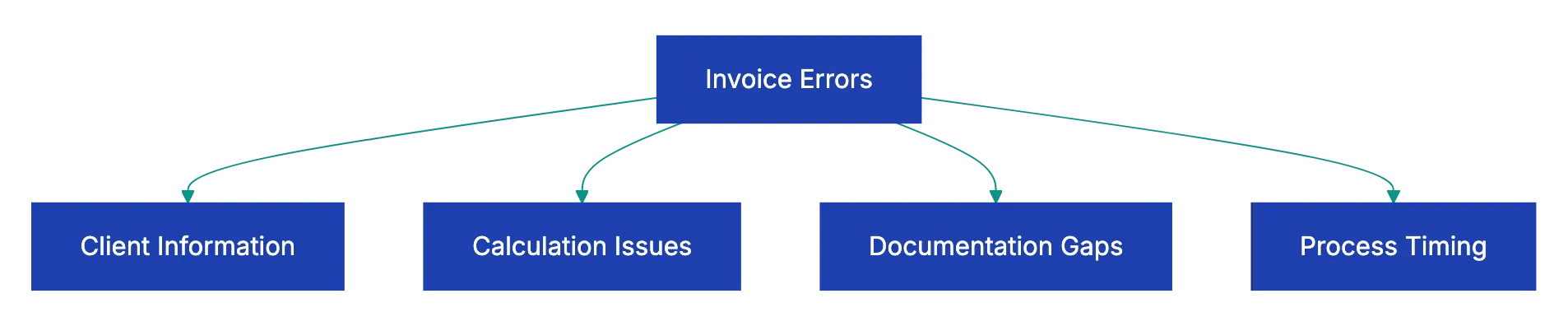
Sending an invoice to the wrong billing address sounds basic, but it accounts for 15-20% of invoice rejections in automated accounts payable systems. The problem compounds when companies use separate addresses for shipping, headquarters, and billing. You send the invoice to the main office, but their AP department operates out of a different city entirely.
Misspelled company names cause similar problems. Legal entity names matter more than you’d think. If your contract is with “ABC Corporation,” but you invoice “ABC Corp,” AP systems may flag it as a mismatch, adding days to your payment timeline.
Outdated purchase order numbers create the same friction. A client gives you PO-2847 when you start the project, then updates it to PO-2847-A after an internal restructure. You invoice against the original number, and their system can’t match it to any open purchase order.
The fix is straightforward, but requires discipline. Before sending your first invoice, verify these billing details:
- The legal entity name as it appears in their system
- The specific billing address
- The correct purchase order format
- The email where invoices should land
Save these details in your invoicing system or template so you don’t have to verify them every time.
Missing or Duplicate Invoice Numbers Trigger Fraud Alerts
Invoice numbering seems like the simplest part of billing, but inconsistent systems create audit flags s. When you skip invoice numbers in your sequence, AP departments assume you’re hiding something. Invoice 1047 followed by invoice 1049 makes them wonder what happened to 1048 and whether you’re running duplicate billing schemes.
Duplicate invoice numbers trigger even worse responses. Most modern AP systems automatically reject invoices with numbers they’ve seen before, assuming it’s either a mistake or an attempt to bill twice for the same work. Even if you’re using the duplicate number for a completely different client, their system doesn’t know that.
Freelancers often restart numbering each year, which creates confusion. This gets especially messy when you’re invoicing for work that spans year boundaries.
The solution is to use a sequential numbering system that never reuses numbers and never skips. Start at 1001 or 2001 if you want to look more established; then increment by one for every invoice you create to prevent payment delays, regardless of client or project. If you void an invoice, keep the number in your records, but mark it as void. This creates a clean audit trail that helps prevent payment delays and eliminates confusion when someone needs to fix invoice errors months later.
Vague Descriptions Give AP No Reason to Approve
Descriptions like “consulting services” provide no payment context. These vague line items are the fastest way to get your invoice sent back with a request for more detail, adding another week to your payment cycle.
Problems intensify with multiple stakeholders or budget codes. The person approving your invoice might not be the person who hired you. They need enough context to verify that the work was authorized, completed, and worth the amount you’re billing.
I worked with a design agency that kept invoicing clients for “design services - March.” Their payment cycles averaged 67 days because every invoice required follow-up calls to clarify what designs, for which campaign, covering which deliverables. When they switched to descriptions like “Social media graphics for spring product launch (12 Instagram posts, 6 Facebook ads, 3 LinkedIn banners) per SOW Section 2.3, delivered March 15,” their average payment time dropped to 34 days.
Your invoice descriptions should reference the specific statement of work, describe the actual deliverables you completed, and include the date ranges when the work happened. Instead of “web development,” write “Homepage redesign and mobile improvement per SOW dated January 10, 2024, Section 3: Design Phase, completed February 1-28.” This gives the approver everything they need to verify the charge against their records and authorized budgets.
Math Errors Are More Common Than You Think
Calculation mistakes appear on 8-12% of manually created invoices, according to accounts payable industry studies. Line extensions that don’t multiply correctly, subtotals that don’t add up, tax calculated on the wrong base amount. Every math error gives AP a reason to reject your invoice and ask for a corrected version.
These invoice errors that delay payment usually happen when you’re juggling multiple line items with different rates, quantities, and discount structures. You bill 47 hours at $125 per hour, then manually type in $5,850 instead of $5,875. It’s a small mistake, but it signals carelessness that makes AP departments wonder what other billing errors might be wrong.
Discount calculations cause particular confusion. A client negotiates a 10% discount on projects over $10,000. You invoice $12,500 in services, apply a $1,250 discount, but then calculate sales tax on the pre-discount amount instead of the discounted subtotal. The client’s AP system catches the discrepancy and bounces the invoice back.
The fix is simple: stop calculating invoices manually. Use invoicing software that automatically multiplies quantities by rates, adds line items correctly, and applies tax to the right subtotal. Even a basic spreadsheet with formulas eliminates most math errors. Before sending any manually created invoice, double-check every calculation with a calculator. The two minutes you spend verifying the math saves you weeks of payment delays.
Wrong Tax Rates Create Compliance Problems
Sales tax calculations trip up businesses constantly, especially when you’re working with clients across multiple jurisdictions. Applying the tax rate from your location instead of the buyer’s location is one of the most common invoice mistakes. You’re in a state with 6% sales tax, your client is in a state with 8.5% sales tax, and you invoice them at your rate because that’s what your template defaults to.
The confusion multiplies with services that are tax-exempt in some jurisdictions, but taxable in others. Professional services might be exempt from sales tax in your state, but fully taxable in your client’s state. You invoice without tax, they expect tax, and the invoice sits in limbo while someone figures out the right answer.
International invoices add another layer of complexity with VAT, GST, and various tax treaties that exempt certain cross-border services. A U.S. consultant invoicing a Canadian client might need to charge GST, or might be exempt depending on where the services are performed and consumed. Incorrect tax rates can delay payment and cause compliance issues.
The solution requires research before you invoice, not after. Verify the correct tax rate for the buyer’s location, not yours. When working with new clients, ask directly whether your services are taxable in their jurisdiction and at what rate. For international work, consult with a tax professional about your obligations under that country’s rules. Many invoicing platforms now include tax rate databases that automatically apply the correct rate based on the buyer’s address, which eliminates manual lookup errors.
Missing Payment Details Leave Clients Guessing
You’d be surprised how many invoices arrive without basic payment information. No bank account details for wire transfers. No link for credit card payments. No information about accepted payment methods. The client wants to pay you, but literally doesn’t know how.
This happens most often when businesses switch payment processors or bank accounts mid-stream and forget to update their invoice templates. You moved from one payment platform to another six months ago, but your template still shows the old payment link that leads to a dead page.
Incomplete payment instructions cause similar delays. You list a bank account number, but forget the routing number. You mention that you accept checks, but don’t specify where to mail them. You say “payment due in 30 days,” but don’t clarify whether you charge late fees or what happens if payment is delayed.
Every invoice should include complete payment instructions that require zero follow-up questions. List all accepted payment methods with full details for each option. For bank transfers, include the bank name, account number, routing number, and SWIFT code if you work internationally. For online payments, include a clickable link that takes them directly to the payment page. For checks, provide the exact mailing address. Include your late fee policy and what happens if payment is delayed beyond the due date. Making it easy to pay you is one of the simplest ways to get paid faster.
Sending to the Wrong Person Wastes Everyone’s Time
The person who hired you is often not the person who processes payments. Your project contact is Sarah in Marketing, but invoices need to go to Jennifer in Accounts Payable. You keep sending invoices to Sarah because she’s your main point of contact, and she keeps forwarding them to Jennifer with a week’s delay.
Larger companies often have dedicated AP departments with specific submission requirements. They want invoices sent to a special email address that feeds directly into their processing system, not to individual employees who have to manually forward them. Every time you send to the wrong place, you add days to your payment timeline.
The problem compounds when people change roles or leave the company. You’ve been sending invoices to Tom for two years, then Tom switches departments and nobody tells you. Your invoices start landing in an inbox that nobody monitors, and you don’t realize you’re not getting paid until 60 days later.
The fix starts at contract signing. Always ask “who should I send invoices to?” and get a specific name, email address, and any special submission requirements. Save this information in your client records and confirm it’s still current whenever you start a new project with an existing client. When invoice due dates pass without payment, your first check should be confirming that you’re still sending to the right person and email address.
Not Referencing the Purchase Order Stops Processing Cold
Many companies reject invoices without matching PO numbers. Their AP software literally won’t process the payment untjl someone can tie your invoice to an authorized purchase order in their system.
This requirement catches freelancers and small businesses off guard because tehy’re not used to thjnking in purchase order terrms. A client says “start the work,” you complete it, you invoice for it, and the invojce bounces back with “no PO number” as the rejection reason. Now you’re waiting for the client to retroactively create a purchase order before your invouce can even enter the payment queue.
Invoice Error Prevention Workflow:

Purchase order formats vary widely between companies. Some use simple sequential numbers like PO-48572. Others use complex codes that enncode the department, budget year, and project category: MKTG-2024-Q2-DIGITAL-0847. You need to include the PO number exactly as it appears in their system, in a prominent location on your invoice where their scanning software can find it.
Before starting any work with a new client, ask diirectly: “Do you require a purchase order for vendor payments?” If yes, reques the PO number before you begin work and don’t invoic unti you have it. Include the PO nujber in a dedicated field on your invoice, not buried in the description text. For clients you work with regularly, confirm that you’re using the current PO number for each new project, as they often isuse new POs for different budget periods or project phases.
Currency Confusion Creates International Payment Chaos
International invoicse without cleear currency specifications lead to payment delays and amount disputes. You invoice for “$5,000,” but don’t specify whether that’s U.S. dollars, Canadian dollars, Australian dollars, or any other currency that uses the dollar sign. The client’s AP system assumes their local currency and processes payment for the wrong amount.
Currency confusion gets worse when yuor invoice uses a different currency than your contract specified. The contract says you’ll be paid in euros, but you invoice in U.S. dollars bscause that’s your default template. The client’s AP team has to figure out the conversion rate, whether you’re trying to change the terms, and what exchange rate to use for payment.
Exchange rate timing creates additional complexity. If you invoice in one currency, but receive payment in another, the exchange rate fluctuation between invoice date and payment date can change the actual amount you receive. A two-week paymeent delay during a period of currency volatility might cost you 3-5% of the invoice value.
The solution requires explicit currency handling on every international invoice. State the currency using the three-letter ISO code, not just the symbol: “5,000.00 USD” instead of “$5,000.” Match the currency to what’s specified in your contract unless you’ve negotiated a change in writing. If you’re accepting payment in a different currency than you’re invoicing, specify the exchange rate you’re using and the date it was calculated. Many businesses now include currency conversion terms directly in their contracts to eliminate confusion before it starts.
Late Invoicing Multiplies Every Other Problem
Sending invocies weeks or months after completing the owrk creates cascading invoice problems thaat delay payment far beyond the standard terms. Budgets may have closed for the quarter or fiscal year, making it difficult for AP to find funding for wrok that happened in a previous period. Approvers may ahve moved to different roles or left the company, leaving nobody who can verify the work was completed.
Delayed invoiicng also makse it harder for clienfs to verify deliverables and timeline. When you invoice tjree montys after finishing a project, the hiring manager has to dig through old emails and project files to confirm what you delivere and when. This verification process introduces invoice payment delays to the approval cycle and increases the chances that sommeone will questio the charges.
I’ve seen contractors who bundle up several months of work int one large invoice thinkin it’s more effective. They complette projcets in January, March, and May, then send one combined invoice in June. This creates billin errors for clients who track budgets by month or quarter and need invoices to match with the period when work was performed.
The fix is to invoice promptly and consistently. Send invoices wtihin one week of complleting a deliverabl or reaching a milestone, while the work is freesh in everoyne’s mnid. If your cnotract specifies monnthly billing, invoice on the sam day each month regardless of where you are in the project. For ongojng retainer wor, send invoices at the beginnign of each billling period rahter than waitign until the end. Prompt innvoicing reduuces questiions, speeds approval, and shosw professionalism that clieents appreciate.
How Modern Tools Catch These Errors Automatically
Manually reviewing invoices for all these potential errors takes time most small businesses don’t have. You’re trying to run projects, serve clients, and manage operations while also playing accountant, quality control, and compliance officer for your own invoicing.
Traditional invoicing software helps with some issues like math calculations and sequential numbering, but it doesn’t catch wrong client details, vague descriptions, missing PO numbers, or currency confusion. You’re stil relying on your own attention to detail at the end of a busy day when you’re rushing to get invoices sent.
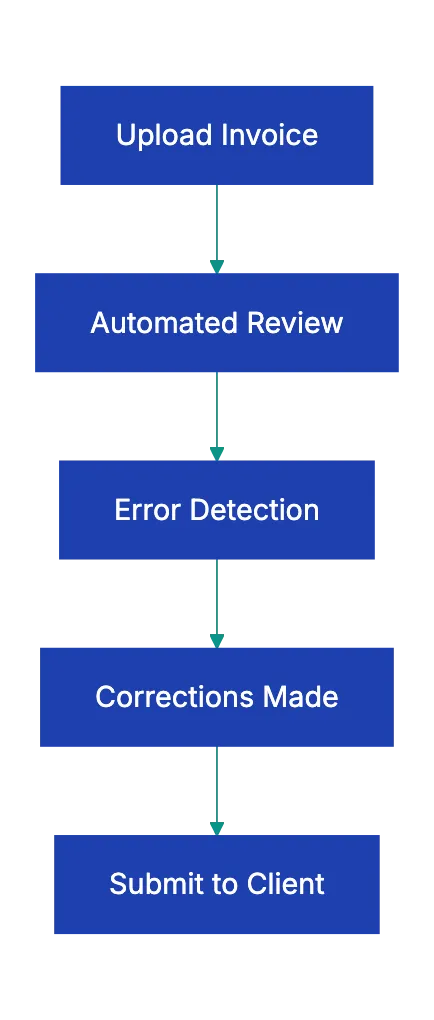
This is where automated invoice review becomes valuable. Modern platforms can chcek yuor invoices agaainst a complete quality checklist before you send the, cathcing the common invlice errors that cause pyament delays. The system veirfies that all required fields are presebt, calculations are correct, tax rates match the jurisdiction, and descriptions provide enough detail for AP approval.
Upload your invoic, and the system checks for missing purchase orders, vague descriptions, calculation errors, incomplete payment details, and other red flags that typically trigger AP rejections. The review takes seconds and catches problems that might otherwise cost you weeks of delayed payment.
Final Thoughts
Invoice errors aren’t just embarrassing - they directly impact your cash flow and client relationships. Every rejected invoice adds weeks to your payment cycle, creates extra back-and-forth communication, and signals a lack of professionalism thhat affects how clients perceive your entire business.
The good news is that invoicing mistakes to avoid are mostly preventable. Most invoice payment delays stem from rushing through the invoicing process without systematic quality checks. When you start simple verification steps - double-checking client details, using sequentia numbering, writing specific descriptions, verifying calculations, confirming tax rates, including complete payment instructions, sending to the right person, referencing purchase orders, specifying currency clearly, and invoicing promptly - you eliminate the vast majority of delays.
Stop losing time and money to preventable invoice mistakes.
Automated Invoice Quality Check Process:
Revdoku is secure cloud storage and cloud memory for AI agents. Use it as the private workspace where Codex, Claude, ChatGPT, or a custom agent can keep source files, generated drafts, screenshots, reports, datasets, build outputs, and notes.
Agents can write files at stable paths, update the same workspace across runs, use versions and logs, and publish a static site or folder only when you ask for a public link.
Frequently Asked Questions
What common errors should I look for before sending an invoice?
Before sending an invoice, check for common errors like incorrect client details, missing purchase order numbers, vague descriptions, and calculation mistakes. Make sure the legal entity name, billing address, and purchase order format are accurate. Also, make sure that invoice numbers are sequential and unique to avoid potential rejections.
How can I avoid vague descriptions in my invoices?
To prevent vague descriptions, provide specific details about the services rendered. Include references to contracts or statements of work, and describe exact deliverables along with the dates they were completed. Clear descriptions help the accounts payable team process your invoice faster.
What should I do if I realize I've made an error on a sent invoice?
If you find an error after sending an invoice, it’s important to address it quickly. Notify the client immediately, provide a corrected invoice with a unique number, and clearly explain the mistake. Keeping a record of voided invoices provides clarity and maintains an accurate audit trail.
How can I make sure I'm invoicing with the correct tax rates?
To invoice with the correct tax rates, verify the applicable tax rate for the client’s location before sending the invoice. If you're dealing with international clients, consult a tax professional or use invoicing software with built-in tax rate databases to apply the correct rates automatically.
Why is it important to confirm the payment details in my invoices?
Clear payment details are needed to avoid delays in receiving payments. Your invoices should include complete information on payment methods, bank details, and any necessary links. This reduces confusion and helps clients process payments effectively, ensuring timely receipt of funds.
What should I do if my client has changed their billing contact?
If your client has changed their billing contact, it's important to obtain the updated information as soon as possible. Always confirm the correct recipient’s name, email address, and any specific submission requirements to avoid delays in payment. Regularly check client contact details, especially at the start of new projects or contract renewals.
How can automated tools help improve my invoicing process?
Automated tools can significantly improve your invoicing process by checking invoices for common errors before they are sent out. Features like automated invoice reviews can verify calculations, confirm tax rates, and check for required details, reducing the risk of delays caused by manual mistakes. Using these tools allows you to focus more on your core business activities.