
10 Top Vibe Coding Tools in 2026
Table of Contents
- Quick Answer
- How To Pick Vibe Coding Tools
- SaaS App Builders And AI App Builders With Sign-Up And Sign-In
- AI Coding Agents, General Coding Tools, And Static Hosting
- Simple HTML Prototype Tools
- Drawing And Design Prototypes
- Best Workflows By Goal
- Launch Checklist Before You Trust An AI-Built App
- Final Thoughts
- Quick Answer
- How To Pick Vibe Coding Tools
- SaaS App Builders And AI App Builders With Sign-Up And Sign-In
- AI Coding Agents, General Coding Tools, And Static Hosting
- Simple HTML Prototype Tools
- Drawing And Design Prototypes
- Best Workflows By Goal
- Launch Checklist Before You Trust An AI-Built App
- Final Thoughts
Quick Answer
Vibe coding tools now span several categories. In 2026, the right choice depends on whether you need a real SaaS app with users, a coding agent for an existing repository, a quick HTML prototype, or a visual mockup for a stakeholder review.
Practical short list, checked against official product docs on May 27, 2026.
| # | Tool | Best for | Watch out for |
|---|---|---|---|
| 1 | Lovable | Full-stack web apps with Supabase-backed auth, data, storage, and server functions | You still need to review row-level security, permissions, secrets, and billing flows before launch |
| 2 | Base44 | All-in-one app building where database, account systems, permissions, and hosting are handled for you | Great for speed, but evaluate portability and production security before using it for sensitive data |
| 3 | Firebase Studio | Google-native app prototypes that can add Firebase Authentication and Cloud Firestore | Auth and database are added during iteration, not necessarily in the first blueprint |
| 4 | Bolt.new | Browser-based full-stack prototypes with hosting, domains, databases, auth, and Supabase options | Confirm which database/auth layer you are using before you build too far |
| 5 | Replit Agent | Cloud IDE plus agent workflow with built-in database, auth, deployment, and third-party integrations | Replit Auth uses Replit accounts unless you choose another auth path such as Clerk or custom login |
| 6 | ChatGPT + Codex | Planning, coding, refactors, reviews, prototypes, and visual mockups | Strong as a general system, but production apps still need tests, permissions, and human review |
| 7 | Claude + Claude Code | Codebase work, terminal workflows, HTML artifacts, and design prototypes | Excellent for iteration, but keep scope tight and verify the diff |
| 8 | GitHub Pages | Hosting static HTML/CSS/JS prototypes, docs, and simple marketing pages | It is static hosting, not a backend for accounts, payments, or private user data |
| 9 | Google Stitch | High-fidelity UI design from natural language, images, text, or code context | Treat it as design/prototype tooling, not a full SaaS backend |
| 10 | Figma Make | Figma-native functional prototypes, web apps, and interactive UI | Best if your team already uses Figma and needs design-system continuity |
This list is grouped, not purely ranked. A founder building a login-based SaaS should start with Lovable, Base44, Firebase Studio, Bolt, or Replit. A developer working in an existing repo should start with ChatGPT Codex, Claude Code, or GitHub Copilot. A product manager sketching an idea should use Claude Artifacts, ChatGPT Canvas, Claude Design, Stitch, or Figma Make. Tools like ChatGPT and Claude appear in multiple workflows because they are general systems, not single-purpose app builders.
How To Pick Vibe Coding Tools
Start with the riskiest part of the product.
If your app needs sign-up, private data, team invites, or payments, you need more than a pretty front end. You need authentication, authorization, database rules, email flows, secrets, backups, and deployment. That points you toward a SaaS app builder or a developer-controlled stack.
If you only need to show a workflow to a client, investor, or internal team, you may not need a backend. A Claude Artifact, ChatGPT Canvas prototype, Google Stitch design, or Figma Make prototype can be faster and easier to throw away.
If you already have a repository, avoid no-code or SaaS app builders unless you are replacing the old product. Use AI coding agents that can read the codebase, make diffs, run tests, and respect your project structure. Codex, Claude Code, and GitHub Copilot fit that job better than one-shot app builders.
Tool Selection Map:
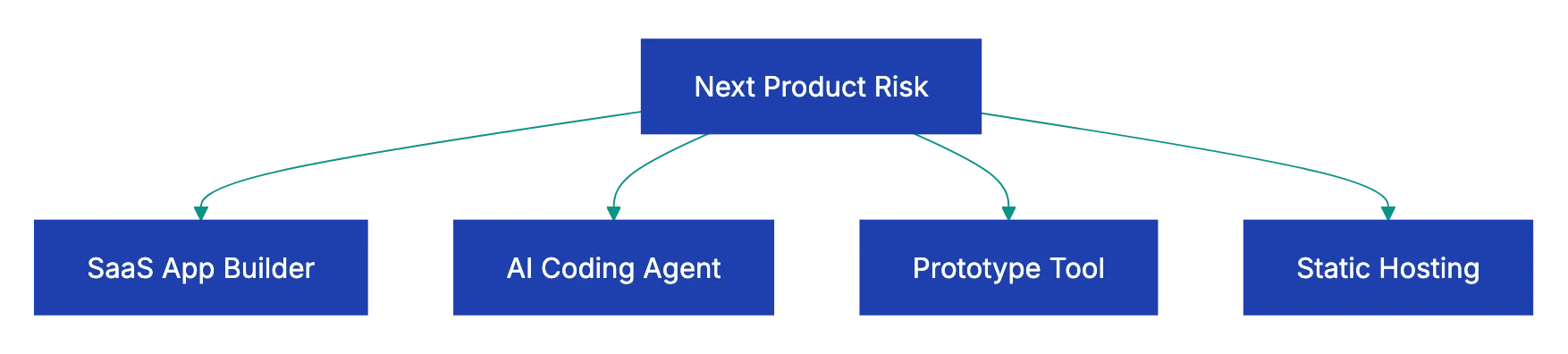
Simple rule: use AI app builders for a first app, AI coding agents for real codebases, prototype tools to clarify the product, and GitHub Pages for static results.
SaaS App Builders And AI App Builders With Sign-Up And Sign-In
This is what vibe coding tools usually means: describe an app, get a working product, then keep asking for changes. For SaaS ideas, the question is not whether the first screen looks good. It is whether users, roles, private data, and deployment are handled safely.
Lovable is a strong first stop for founders who want a web app with real accounts. Lovable’s Supabase integration connects front-end work with a PostgreSQL database, authentication, file storage, real-time updates, and edge functions. The docs show prompts like adding login and wiring signup forms to Supabase Auth. That suits SaaS dashboards, marketplaces, internal tools, client portals, and apps where users need their own data.
Authentication And Authorization Boundary:
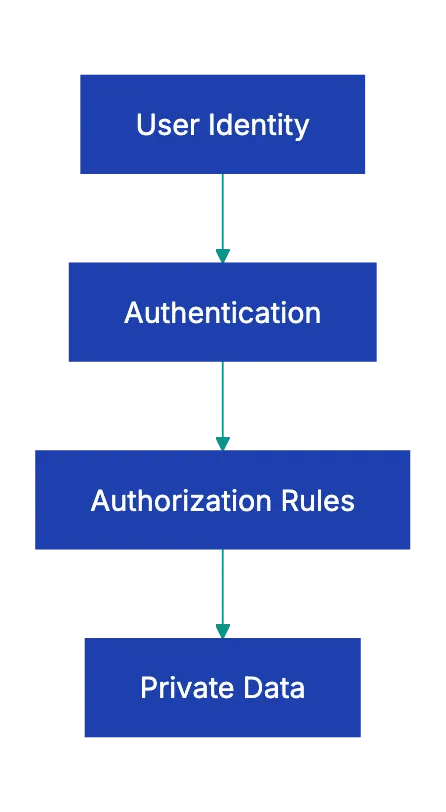
The main caution is security. Supabase gives you serious backend power, but review row-level security, storage permissions, API keys, and edge functions. Authentication identifies the user. Authorization limits the user to the right rows and actions. Do not confuse those two.
Base44 is the all-in-one AI app builder answer. Its docs describe a builder that handles app design, data storage, account and login systems, user permissions, and hosting. Its login docs let you configure email/password, Google, Microsoft, Facebook, and other sign-in methods. This helps non-technical operators ship quickly without handling the plumbing.
Use Base44 when you want speed without assembling Supabase, hosting, email, and permissions yourself. Be more careful when the app will hold sensitive customer data, financial records, health information, or anything regulated. Ask where the data lives, how export works, how permissions are enforced, and what happens if you need to migrate.
Firebase Studio is the Google-native AI app builder option. The App Prototyping agent can generate an app, show a preview, then add Firebase Authentication and Cloud Firestore during iteration. That matters because Firebase has mature auth, databases, hosting, functions, monitoring, and Google Cloud integration.
Use Firebase Studio when you expect to build on Firebase, need Google accounts or Google Cloud services, or want a prototype that can grow into a Firebase project. Auth and Firestore are added during iteration. Ask for them clearly, then inspect the generated rules and data model before inviting users.
Bolt.new is a browser-based full-stack builder that has moved from simple prompt-to-code into a broader app-building platform. Bolt Cloud includes hosting, custom domains, databases, authentication, server functions, file storage, secrets, analytics, and Stripe integration. Bolt also supports Supabase as a database/auth option.
Use Bolt for fast JavaScript/TypeScript prototypes that run in the browser and deploy without local setup. It suits web apps, dashboards, landing pages, and prototypes where you want to inspect and edit code. Before launch, confirm whether your project uses Bolt Database, Supabase, or another service; that choice affects data ownership, auth behavior, and migration.
Replit Agent sits between app builder and developer environment. You can describe an app, let the agent build it, inspect, run, deploy, and iterate in a cloud IDE. Replit’s own product page mentions built-in Database and User authentication, while Replit Auth docs describe adding authentication with a single Agent prompt.
Use Replit when you want more control than no-code, with less setup than local development. It is good for founders, operators, students, and engineers who want to keep code visible. The caveat is identity. Replit Auth uses Replit accounts and Replit-branded login unless you use another path such as Clerk Auth or custom OAuth. That may work for internal tools and prototypes, but not for a branded customer SaaS.
AI Coding Agents, General Coding Tools, And Static Hosting
Once the app exists, the hard work shifts to maintenance. You need to change code safely, explain files, add tests, update dependencies, and deploy. Here, general coding agents beat prompt-to-app tools.
ChatGPT + Codex is the OpenAI stack for AI coding agents and code work. Codex is positioned as a coding agent that helps build and ship with AI, including routine pull requests, refactors, migrations, and harder engineering tasks. ChatGPT helps with product thinking, debugging explanations, architecture tradeoffs, copywriting, and requirements cleanup. Canvas adds an editing surface where ChatGPT can render React/HTML in a sandbox, make inline code suggestions, and export code files.
Use ChatGPT for ideas, specs, edge cases, and visual exploration.
Use ChatGPT Codex for repository work that needs a real diff, tests, and a task-oriented coding flow. Keep tasks small enough to review: “add password reset to the auth flow” is better than “finish the whole SaaS.”
Claude + Claude Code is the Anthropic stack for AI coding agents. Claude Code can work from terminal, VS Code, desktop, web, and other surfaces. It can edit files, run commands, and manage a project from the command line. Claude Artifacts are another strength: Claude can show single-page HTML websites, SVGs, diagrams, or interactive React components beside the chat. Claude Design adds a chat-and-canvas workflow for designs, prototypes, presentations, and export to standalone HTML or Claude Code.
Use Claude for multi-file reasoning or quick visual prototypes. Claude Artifacts are excellent for small calculators, dashboards, flows, forms, and interactive demos. Claude Design is better for polished mockups or interactive prototypes before production code.
GitHub Pages is not a coding agent, but it belongs in the vibe coding workflow because many prototypes are just static files. GitHub Pages hosts HTML, CSS, and JavaScript straight from a GitHub repository and can optionally run a build process. It can use a github.io domain or a custom domain.
Use GitHub Pages for landing pages, documentation, HTML prototypes, calculators, demos, and design explorations without private accounts. Do not use it as the backend for a SaaS app. If users need accounts, payments, private data, or server-side secrets, you need a real backend.
A note on GitHub Copilot: if your team already standardizes on GitHub, Copilot is a natural addition. GitHub’s docs describe a Copilot cloud agent that can research a repo, plan work, change code on a branch, and open a pull request, plus agent mode inside IDEs. Treat it as part of the GitHub development workflow, not a separate app builder.
Simple HTML Prototype Tools
Sometimes the best prototype is one HTML file that shows the flow clearly.
Use Claude Artifacts when you want the side-panel experience: ask Claude to build a single-page tool, dashboard, onboarding flow, calculator, or SVG diagram, then iterate while the preview stays visible. Anthropic’s docs describe artifacts as standalone content, including single-page HTML websites and interactive React components, shown in a dedicated window separate from the main conversation. This matches what many people mean by asking Claude to show HTML as a side panel.
Use ChatGPT Canvas when you want a similar edit-and-preview workflow inside ChatGPT. Canvas can render React/HTML code in a sandbox, lets you directly edit text or code, gives inline suggestions, and supports export. It helps when you already use ChatGPT for product thinking and want the prototype near the conversation.
Use GitHub Pages when the prototype is ready to share outside the AI tool. Export the HTML/CSS/JS, put it in a repository, and publish it. This gives stakeholders a stable URL. The limitation remains: static prototypes can feel real, but they do not enforce authentication, authorization, payment, or database rules.
Drawing And Design Prototypes
Design prototypes differ from code prototypes. They answer different questions: Does the flow work? Is the hierarchy clear? Does the product feel credible? Can stakeholders understand it before engineering starts?
Claude Design is now the most direct Anthropic answer among AI prototype tools for this use case. It is in research preview for Pro, Max, Team, and Enterprise plans. The workflow pairs chat and canvas: describe what you want, review what Claude generates, iterate with chat and inline comments, then export or hand off. It can use uploaded screenshots, assets, existing design files, or a codebase as context.
Use Claude Design for dashboards, onboarding flows, landing pages, internal tools, presentations, and microsites. It helps when a PM or founder needs something more visual than a requirements doc, but lighter than a full Figma process.
ChatGPT Images and Canvas are useful for drawing-style prototypes. ChatGPT can help create interface sketches, marketing mockups, diagrams, icons, product cards, and visual alternatives. Canvas then helps turn simple HTML or React ideas into editable prototypes. Use this to judge visual direction before committing to a front-end stack.
Google Stitch is Google’s design-first tool. Google describes Stitch as an AI-native software design canvas that turns natural language into high-fidelity UI designs. It can take ideas in the form of images, text, or code context and supports design-system concepts such as DESIGN.md. Stitch differs from Firebase Studio. Firebase Studio fits app prototyping with Firebase services; Stitch fits UI direction and design exploration.
Figma Make is the best fit when your team already lives in Figma. Figma describes it as an AI-driven, prompt-to-code tool for functional prototypes, web apps, and interactive UI. The advantage is workflow continuity: product, design, and engineering stay close to existing design systems, components, and review habits.
Best Workflows By Goal
| Goal | Start with | Then use | Why |
|---|---|---|---|
| Launch a simple SaaS MVP with users | Lovable, Base44, Firebase Studio, Bolt, or Replit | Revdoku checklist, then Codex or Claude Code for cleanup | You need auth, data, permissions, deployment, and a review loop |
| Build a Google-native app | Firebase Studio | Firebase console, then Codex or Claude Code | You can add Firebase Auth and Firestore, then inspect rules and code |
| Create a static demo for stakeholders | Claude Artifacts or ChatGPT Canvas | GitHub Pages | Fastest path from idea to shareable URL |
| Look at product UI before coding | Claude Design, Google Stitch, Figma Make, or ChatGPT Images | Claude Code or Codex | Design first, setup second |
| Improve an existing repository | Codex, Claude Code, or GitHub Copilot | CI tests and code review | Existing systems need diffs, tests, and repository context |
| Build an internal tool fast | Replit Agent, Base44, or Lovable | Manual permission review | Internal tools still need access control and data boundaries |
Combined Workflow Pattern:

The best workflow usually combines tools. A good pattern: design the flow in Claude Design, Stitch, Figma Make, or ChatGPT; build the first app in Lovable, Base44, Firebase Studio, Bolt, or Replit; then use Codex or Claude Code for bugs, tests, edge cases, and production hardening.
Launch Checklist Before You Trust An AI-Built App
Vibe coding speeds up the first version. It does not remove review. Before adding real users or data to an AI-built app, check these items.
Copy this checklist into Revdoku and use it to review the generated app, product spec, or launch notes.
AI-Built App Launch Review

You are a senior product engineer and security reviewer. Review the app, repo, product spec, or generated documentation for launch risks. Be direct and specific.

- Identify the authentication system. Confirm how users sign up, sign in, reset passwords, and sign out. Flag any unclear or missing auth flow.
- Identify the authorization model. List every user role and what each role can read, create, update, delete, export, or invite. Flag any action that appears public by accident.
- Check database access rules. For Supabase, review row-level security. For Firebase, review Firestore rules. For any built-in database, identify where permissions are configured.
- Check secrets and API keys. Flag any key, token, webhook secret, or private credential exposed in client-side code, public repos, screenshots, or logs.
- Review payment and billing flows. Confirm webhook verification, subscription status handling, failed payment behavior, and account downgrade behavior.
- Review data export and deletion. Confirm users can export or delete relevant personal data if the product promises that ability.
- Check error states. Identify what happens when auth fails, payment fails, an API rate limit is hit, or the database is unavailable.
- Check logging and monitoring. Confirm the app records useful errors without storing passwords, tokens, private documents, or sensitive personal data in logs.
- Check deployment and rollback. Identify how the app is deployed, how changes are rolled back, and who has production access.
- Check legal and compliance gaps. Flag missing privacy policy, terms, cookie notice, consent language, data processing terms, or regulated-data warnings.
- Check accessibility basics. Review keyboard navigation, focus states, contrast, labels, form errors, and mobile layout.
- List the top five launch blockers and the top five fixes to complete before inviting real users.
Launch Review States:
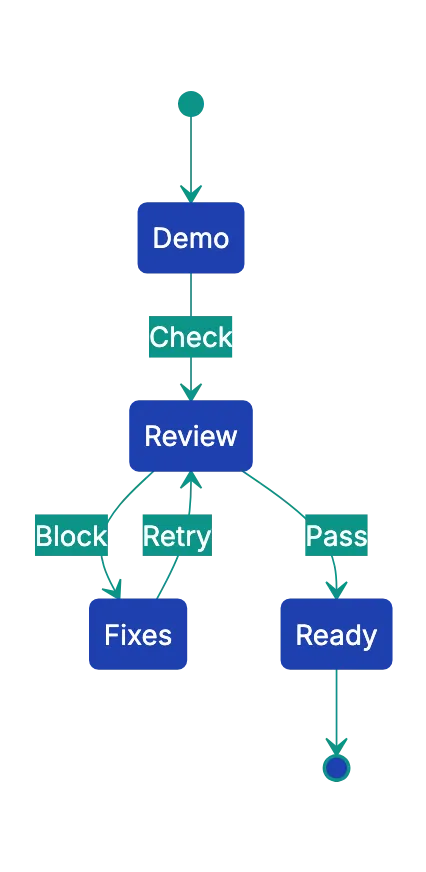
This separates a fun demo from a credible app. The first version can come from a prompt. The launch decision needs a checklist.
Final Thoughts
The best vibe coding tool in 2026 depends on the task.
For SaaS apps with sign-up, start with Lovable, Base44, Firebase Studio, Bolt, or Replit. For general coding, use ChatGPT Codex, Claude Code, and GitHub Copilot if your team is already in GitHub. For simple HTML prototypes, Claude Artifacts and ChatGPT Canvas beat a full app builder. For drawing and design prototypes, Claude Design, ChatGPT Images, Google Stitch, and Figma Make help you look at the product before you write production code. For static hosting, GitHub Pages remains one of the simplest ways to share a working prototype.
The mistake is treating these tools as interchangeable. They are not. AI app builders create products, AI coding agents change repositories, prototype tools clarify interfaces, and hosting tools publish files. Pick the tool based on the next risk to reduce.
Before you ship, run the generated app, spec, or checklist through Revdoku. AI can create a convincing first draft quickly, but structured review catches missing permissions, unclear auth flows, weak data rules, and launch blockers a polished demo can hide.
Publish & Update Websites
For FREE, right from your AI app:
Forms with notifications, analytics, and your own domain included.
Review the prompt
Join 100+ people who recently signed up
Frequently Asked Questions
What is the best vibe coding tool for launching a SaaS MVP?
Start with a tool that can handle accounts, private data, permissions, and deployment, such as Lovable, Base44, Firebase Studio, Bolt, or Replit. The right choice depends on whether you want an all-in-one builder, a Firebase-based stack, Supabase support, or more control over the code. Before inviting users, review auth, database rules, secrets, billing, and deployment settings.
Can I use a prototype tool instead of a full app builder?
Yes, if your goal is to explain a workflow, test a design, or get stakeholder feedback. Claude Artifacts, ChatGPT Canvas, Google Stitch, Claude Design, and Figma Make are useful before you commit to production code. They are not a substitute for backend logic when users, payments, private data, or permissions are involved.
Should I use an AI app builder for an existing codebase?
Usually, no. If you already have a repository, use a coding agent that can read the project, make targeted diffs, run tests, and fit the existing structure. Codex, Claude Code, and GitHub Copilot are better suited for maintenance, refactors, bug fixes, and production changes.
What is the biggest risk with AI-built apps?
The biggest risk is assuming a polished demo is production-ready. AI tools can generate screens and workflows quickly, but they may miss authorization rules, secure storage, webhook handling, edge cases, or compliance requirements. Treat the first version as a draft that needs technical and security review.
How do I check whether authentication and permissions are safe?
First, identify how users sign up, sign in, reset passwords, and sign out. Then confirm what each user role can read, create, update, delete, export, or invite. Pay special attention to Supabase row-level security, Firebase rules, built-in permission settings, and any action that should not be public.
When is GitHub Pages enough for a project?
GitHub Pages is enough for static sites, documentation, landing pages, calculators, simple demos, and HTML prototypes. It is not enough for private accounts, paid subscriptions, server-side secrets, or database-backed user data. Use it when you need a stable public URL for files that can safely run in the browser.
How should I combine multiple vibe coding tools in one workflow?
A practical workflow is to design the product first, build the first working version second, and harden the code last. For example, use a design or prototype tool to clarify the interface, an app builder to create the MVP, and a coding agent to fix bugs, add tests, and review edge cases. This keeps each tool focused on the job it handles best.