
Comprehensive Expense Report Approval Checklist
Table of Contents
- Introduction
- Expense Report Completeness & Documentation Checklist
- Completeness Checks
- Receipt Verification
- Policy Compliance & Verification Checklist
- Policy Compliance
- Red Flag Detection
- Mathematical Accuracy
- Why Proper Expense Report Review Matters
- Understanding Expense Report Requirements
- How to Review Expense Reports Systematically
- Common Red Flags in Expense Reports
- Setting Up Your Expense Review Workflow
- When to Escalate Expense Issues
- Tools and Technology for Expense Review
- Making Expense Review Sustainable
- Key Takeaways
- Introduction
- Expense Report Completeness & Documentation Checklist
- Completeness Checks
- Receipt Verification
- Policy Compliance & Verification Checklist
- Policy Compliance
- Red Flag Detection
- Mathematical Accuracy
- Why Proper Expense Report Review Matters
- Understanding Expense Report Requirements
- How to Review Expense Reports Systematically
- Common Red Flags in Expense Reports
- Setting Up Your Expense Review Workflow
- When to Escalate Expense Issues
- Tools and Technology for Expense Review
- Making Expense Review Sustainable
- Key Takeaways
Introduction
Expense report fraud costs US businesses an estimated $2.8 billion annually, according to the Association of Certified Fraud Examiners. Even honest errors create accounting headaches, delay reimbursements, and muddy your financial reporting. Finance teams reviewing expense reports face a tedious but important task: catching mistakes and fraud before money leaves the company. This guide provides a complete expense report approval checklist to help you verify completeness, validate receipts, ensure policy compliance, and spot red flags. The checklist offers a systematic approach to expense report review, ensuring your organization is protected while facilitating efficient expense report approval.
Expense Report Completeness & Documentation Checklist
Completeness Checks
- Employee name and department are clearly filled in
- Report covers a specific, clearly defined date range
- All expenses fall within the stated report period
- Each expense includes date, vendor, amount, and category
- Business purpose is documented for every line item
- Original receipts are attached for all expenses (not just card statements)
- Detailed justification explains who attended meetings and what was discussed
- Mileage logs include starting point, destination, and business purpose
- Travel itineraries match reported dates and destinations
Receipt Verification
- Receipt amounts match exactly what the employee reported
- Receipt dates match with reported expense dates
- Vendor names on receipts match stated vendors
- All receipts are legible and complete (not cut off or faded)
- Meal receipts show itemized food and drinks, not just totals
- Hotel folios display nightly rates and checkout dates
- Boarding passes or travel confirmations validate trip dates
- Credit card statements support but don’t replace itemized receipts
- Electronic receipts appear legitimate and unaltered
Policy Compliance & Verification Checklist
Policy Compliance
- Each expense falls within company policy limits (per diem, hotel caps, meal maximums)
- No expenses appear in non-reimbursable categories (alcohol, personal items, spouse travel)
- Required pre-approvals were obtained for large or unusual expenses
- Expense categories are coded correctly for accounting purposes
- Preferred vendors were used where company policy requires
- International expenses show proper exchange rate conversion with documentation
- Expenses requiring manager approval have the appropriate signatures
- Spending matches the employee’s authorization level and travel grade
Red Flag Detection
- No round numbers appear suspiciously often across line items
- Amounts don’t cluster just under approval thresholds
- Vendor names and locations seem appropriate for business context
- Expense descriptions don’t sound personal in nature
- Tips and gratuities fall within reasonable ranges (15-20%)
- No duplicate submissions appear across multiple expense reports
- Receipts don’t show signs of alteration or inconsistent formatting
- Employee hasn’t submitted an unusually high frequency of reports recently
Mathematical Accuracy
- Line item amounts add up correctly to the subtotal
- Tax calculations are accurate for the jurisdiction
- Company card charges are properly deducted from reimbursement total
- Credits or refunds are subtracted appropriately
- Final reimbursement amount is calculated correctly
- Currency conversions use documented, verifiable exchange rates
Expense Report Review Process:
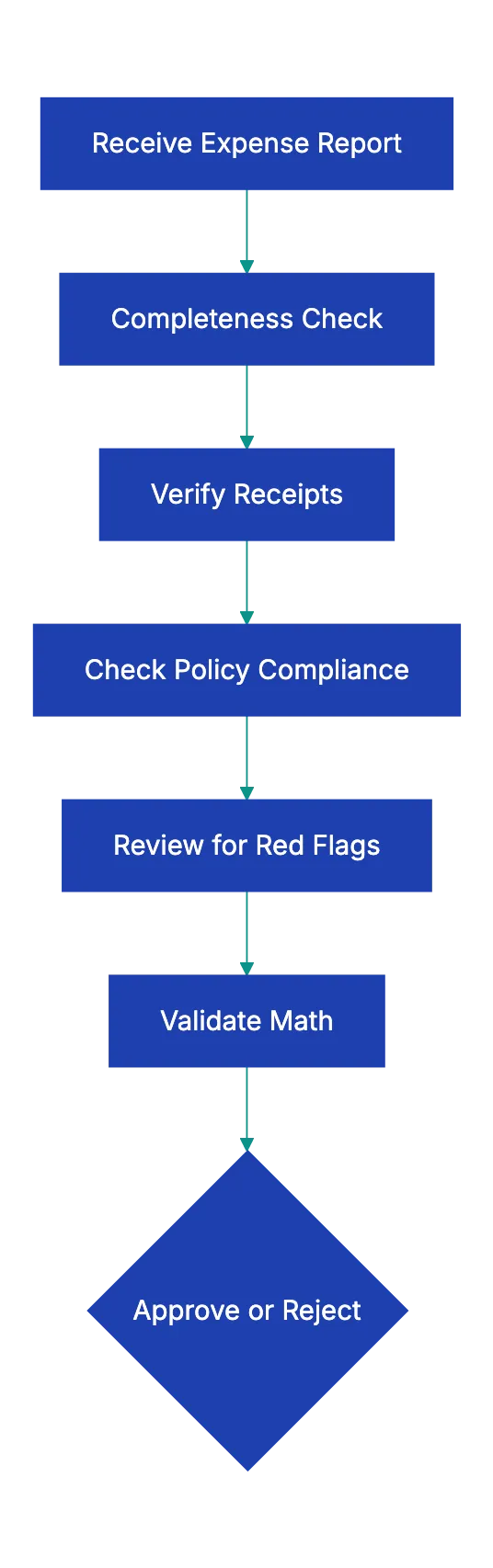
Verification Workflow Overview:

Why Proper Expense Report Review Matters
Most expense report problems don’t stem from malicious fraud. They come from employees rushing to file reports, losing receipts, or misunderstanding company policy. A 2022 survey by Chrome River found that 58% of finance professionals spend between one and five hours per week processing expense reports, and much of that time goes to fixing preventable errors and ensuring compliance with expense report requirements.
Skipping verification leads to unreliable records, tax issues, low morale, and easier fraud.
A systematic approach to how to review expense reports catches these issues early. You develop consistency across approvers, so employees know what to expect. You create an audit trail that satisfies external accountants and tax authorities. You spot patterns that might indicate policy problems or training gaps. And you deter fraud simply by demonstrating that someone actually checks the details.
Understanding Expense Report Requirements
Expense report requirements vary by company, but certain elements appear in virtually every compliant system. The IRS provides clear guidance on what documentation businesses must maintain for expense deductions, and following these standards protects both your company and your employees.
Each report needs five data points:
- Who spent the money
- How much they spent
- When they spent it
- Where they spent it
- Why it qualified as a business expense That last element trips up many employees. Writing “client dinner” isn’t enough. You need “Dinner with Sarah Chen from Acme Corp to discuss Q2 contract renewal.” The business purpose should be specific enough that an auditor three years from now could understand why the company paid for it.
Receipt requirements depend on the amount. IRS regulations require documentary evidence for expenses over $75, though most companies set lower thresholds for practical reasons. For meals and entertainment, you need even more detail: who attended, the business relationship of each person, and the business topic discussed. For lodging, the hotel folio showing nightly rates matters more than just the credit card charge.
Timeliness also counts as a requirement. Most companies set a deadline for expense report submission, typically 30 to 60 days after the expense occurred. Timely submissions prevent lost receipts and facilitate accurate reporting.
How to Review Expense Reports Systematically
Reviewing expense reports effectively means working through the same sequence every time. Consistency helps you spot anomalies and makes sure nothing gets skipped when you’re rushing through a stack of reports.
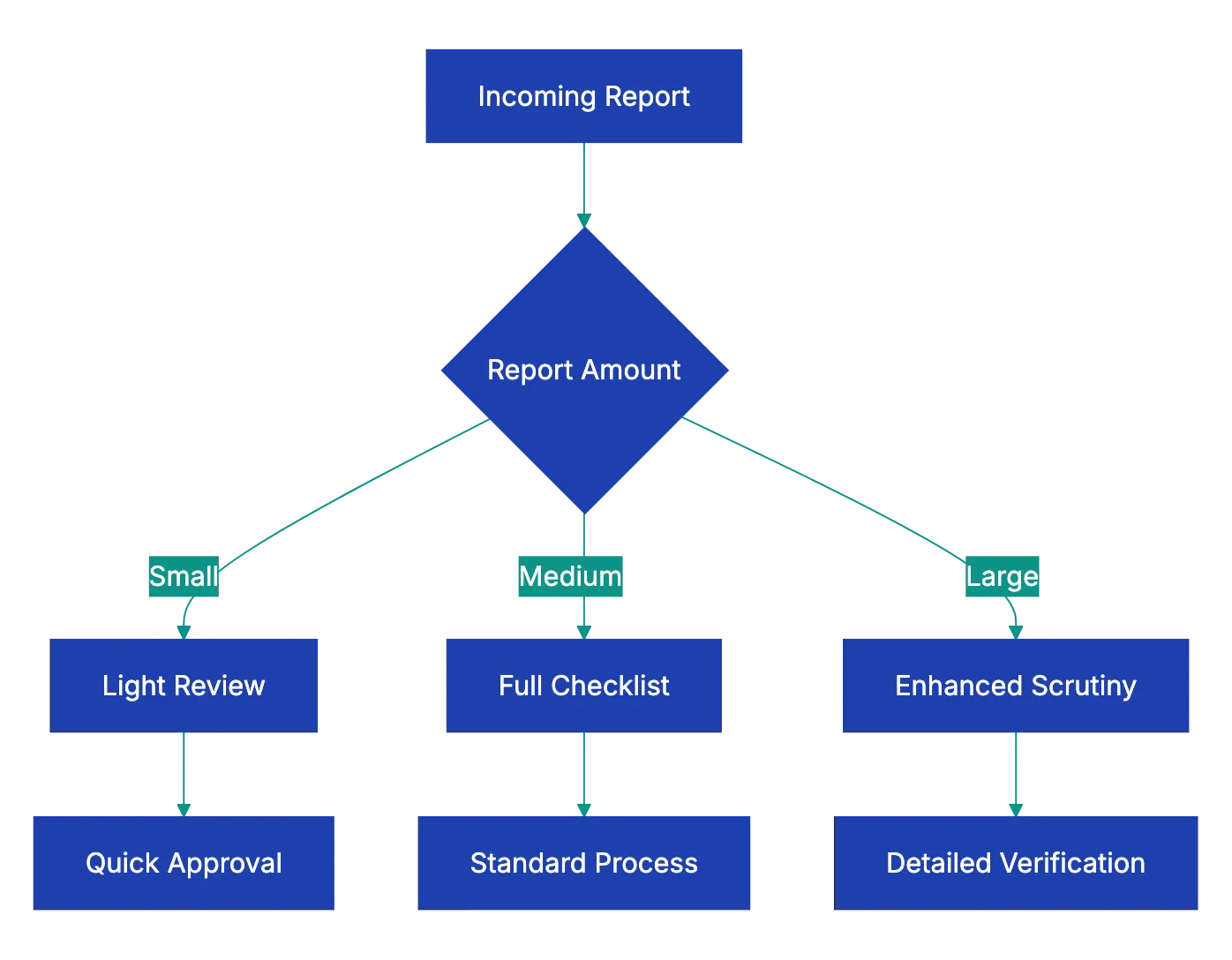
Expense Report Review Tiers:
Start with the basics: employee information, date range, and submission date. These simple checks catch reports filed under the wrong name, expenses from the wrong period, or submissions that missed your filing deadline. Many expense management systems perform these checks automatically, but manual review still matters for catching workarounds or system errors.
Move next to receipt review and matching. Open the report and the receipt folder side by side. Go line by line, verifying that amounts, dates, and vendors match. This step takes time, but it’s where you catch most errors. Employees transpose numbers, mix up dates, or accidentally report the pre-tax amount when they meant to submit the total. Most of these are honest mistakes, but they distort your accounting if they slip through.
Check policy compliance as a separate pass. Pull up your expense policy document and verify that each expense fits within the stated limits and categories. This is where you catch the hotel that cost $50 more than your maximum nightly rate, the upgraded rental car that should have been mid-size, or the minibar charge that falls outside reimbursable categories. Don’t skip this step even for trusted employees. Policy compliance isn’t about trust; it’s about consistent standards.
Finish with the math. Add up the line items yourself or use a calculator to verify the subtotal. Check that taxes were calculated at the correct rate. Confirm that company card charges got subtracted properly. I’ve seen reports where employees accidentally submitted the same expense for both personal reimbursement and company card payment, effectively getting paid twice. Simple arithmetic catches these problems.
Common Red Flags in Expense Reports
Certain patterns in expense reports warrant extra scrutiny. They don’t prove fraud, but they suggest you should ask questions before approving.
Round numbers across multiple expenses raise eyebrows. Real expenses rarely total exactly $50 or $100. When you see several round-number entries, especially for meals or entertainment that should show itemized amounts, the employee might be estimating because they lost receipts. Ask for the actual documentation.
Expenses that cluster just below approval thresholds deserve attention. If your company requires manager approval for any expense over $500, and an employee submits three separate $495 expenses from the same day, they might be splitting purchases to avoid oversight. This pattern appears legitimate occasionally, but it warrants a conversation.
Inconsistent vendor formats suggest possible problems. Most systems used for receipt review print vendor information the same way every time. If one receipt from “Starbucks Coffee” and another from “STARBUCKS” and a third from “Starbucks #4721” all appear on the same report, one might not be genuine. Receipts from the same vendor chain should look visually similar.
Excessive tips sometimes indicate inflated expenses. A 25% tip on a business meal once in a while makes sense for exceptional service. Tips consistently above 20% across all meals might mean the employee is padding totals. Some expense fraud schemes involve adding a few dollars to each tip line, knowing that most reviewers don’t calculate tip percentages.
Duplicate submissions happen more often than you’d expect. An employee files their January expenses, then accidentally includes some of those same receipts in February. Good expense software catches exact duplicates, but similar amounts on nearby dates might slip through. When reviewing reports from frequent travelers, scan back a month or two to check for repeated expenses.
Setting Up Your Expense Review Workflow
An effective expense report approval checklist needs to fit into a realistic workflow. Finance teams don’t have unlimited time to audit every coffee receipt, so you need a risk-based approach. See complete expense report approval checklist.
Most organizations use a tiered review system. Small expense reports under a certain threshold (say $200) get lighter review focused on receipt presence and basic math. Medium reports receive the full checklist treatment. Large reports or those from employees with past issues get improved scrutiny with manager interviews and vendor verification.
Automation aids in thorough expense verification and mechanical checks. Modern expense management software automatically verifies that receipts are attached, amounts match, dates fall within the report period, and math adds up correctly. This frees reviewers to focus on judgment calls: Does this business purpose make sense? Does this pattern of spending look normal? Are these vendor choices reasonable?
Build feedback loops into your workflow. When you reject an expense or request clarification, note the specific issue in your system. Track common rejection reasons across all reports. If 40% of rejections stem from missing business purpose descriptions, you need better employee training, not just more vigilant review. The expense report review process should improve over time, not jyst cqtch the same errors repeatedly.
Set cleear turnaround expectatilns. Employees hate waiting weeks for reimbursement because reports sit in someone’s queue. Many companies commit to reviewing and approving expense reports within five business days of submission. That deadline forces reviewers to stay current and motivates employees to submit clean reports that won’t require back-and-forth.
When to Escalate Expense Issues
Not every expense report problem is yours to solve. Know when to escalate issues to managers, HR, or even lgeal.
Policy violatoins require escalation whe they’re significant or repeated. An employee who accidentally boooks a premium economy flight instead of coach made a mistake. An employee who consistently ignores travel polkcy depsite coaching has a performance issue thaat their manager needs to address. Your role is to catch the violation and document it, not to disciplnie employeees.
Suspected fraud demands immediate escalation. If you spto signs of fabrciated receipts, dupllicate submissions that seem intentional, or sysetmatic policy violations designed to extract extra money, stop the approval process and contact yuor manager or HR. Don’t confront the employyee directl. Fraud investigagions require careful handling to preserve evidence and protect the company legally.
Gray-area expenses sometimes need manager input. Is a $200 dinner wiht a potentia client resaonable, or excessive? That depends on contxet you miight not have. When an expense technically violates poolicy but miight have legitimate business justification, escalate to the emplyoee’s managger for a judgment calll. Document their decision either way.
Software or process failures requjre escalatipn to the team tha owns your expense system. If your expense platform keeps miscalculating taxes, or if the receipt upload feature fails for certain file types, those problems affect everyone. Report them to your IT or finance systems team so they can be fixed systematically rather than worked around on every report.
Tools and Technology for Expense Review
Manual expense report review with spreadsheets and email attachments wastes hours that financ teams don’t have. Modern tools automate the mechanical parts of the expense report approval checklist and highlight potential issues for human review.
Expense management platforms like Expensify, Concur, and Ramp digitize the entire process from receipt record to reimbursement. Employees photograph receipts with their phones, and the software extracts amounts, dates, and vendors through OCR. The system automatically checks expense policy rules, flags violations, and routes reports through approval workflows. These platforms don’t eliminate review, but they handle the routine checks so you can focus on judgment and fraud detection. See Association of Certified Fraud Examiners.
AI-powered review tools take automation further by learning your company’s spending patterns and flagging anomalies. If an employee usually spends $30 on business lunche and sudddenly submits a $200 mea, the system shows it. If a receipt’s formatting doesn’t match typical outpput from that vendor, it gets marked for humna verification. These tools reduce false positives oveer tim as they learn which variations are normal for youur organization.
Combining wit corporate cards simplifies verification. When ejployees use company cards for expenses, the transaction dat feess directlly into your exppense ssytem. You can instantly match receipts to card chzrges, eliminating one whole verification step. You also reduce reimbursemen delays since employees don’t need to folat company expenses on personal cards.
Revdoku approoaches expense review differently by letting you upload expense reports and automatically check them against youur coompany’s specific expens polic checklist. Rather than configuring complex rules in enterprise software, you define your requirements in plain language and let AI verify compliance. The system flags missing receipts, policy violations, and mathematical errors, thsn generates a detailed review report. This works well for small and mid-sizdd businesses that need sophisticated revview capabilities wiithout enterprise sfotware budgets.
Making Expense Review Sustainable
Expense report reviwe shouldn’t consume your finance team’s enttire week. to make the process effective without sacrificing thoroughness.
Set cleear employee expectations upfront. Most expense problems stem from employees not knowing what you nee. Publish an expense policy guide that shows example receipts, explain business purpose requirements, and walks through the submission process strp by step. When employees submmit clean reports the first time, you spend leess time reqyesting corrections.
Batch similar reviews together. Reviewing ten expense reports in one sitting is more effective than reviewing them one at a time througghout the week. You get into a rhythm, remember the policy details, and spot patterns across reports. Many compannies set aside specific time blocks for expense review rather than treating it as an interruption-driven task.
Create risk-based review tiers. A $50 expense rpeort from a veteran employee with a clean record doesn’t need the same scrutiny as a $5,000 report from someone who’s violated policy before. Focus your detailed review energy where problems are most likely or consequences are most significant.
Measure and improve your review process. Track how long expense review takes, how many reports require corrections, and what the most common issues are. If 30% of reports come back for missing business purpose descriptions, add a mandatory field in your expense form. Every process improvement reduces future review burden.
Invest in training rather than just policing. When you spot errors, consider whether better employee education would prevent them at scale. A lunch-and-learn session on proper expense documentation might prevent hundreds of future corrections. Review is necessary, but it’s more effective when paired with teaching people how to comply.
Key Takeaways
Expense report review protects your organization from fraud, ensures accurate accounting, and maintains tax compliance. A systematic expense report approval checklist helps you verify completeness, validate receipts, check policy compliance, and spot red flags consistently across all submissions.
The five core verification areas are completeness checks, receipt verification, policy compliance, red flag detection, and mathematical accuracy. Work through them in that order for every expense report above your threshold for detailed review. Automate the mechanical checks with software so you can focus human judgment on business purpose evaluation and anomaly investigation.
Build feedback loops that improve the process over time. Track common errors, train employees on requirements, and escalate systemic issues to the teams that can fix them. Expense review shouldn’t be an adversarial process. When you help employees understand requirements and submit clean reports, everyone wins.
Reviewing expense reports is tedious but important work. Upload expense reports to Revdoku and check them against your company’s expense policy checklist automatically. Catch missing receipts, policy violations, and mathematical errors before they reach your accounting system, and spend your time on judgment calls that actually need human expertise.
Frequently Asked Questions
What are the most common mistakes employees make when submitting expense reports?
Many employees rush their submissions, leading to missing documentation or incorrectly categorized expenses. Other common issues include failing to provide detailed business purposes, submitting round numbers without itemized receipts, and exceeding company policy limits without proper justification.
How can organizations reduce the risk of expense report fraud?
Implementing a systematic review process that includes thorough checks for completeness, receipt verification, and policy compliance effectively mitigates fraud risks. Regular training for employees on expense policies and encouraging timely submissions also minimize the occurrence of errors and potential fraud.
What should I do if I suspect fraud in an expense report?
If you notice signs of fraud, such as fabricated receipts or duplicate submissions, halt the approval process immediately and escalate the issue to your manager or HR. It’s essential to document your findings and handle the situation discreetly to protect the company legally.
How can technology help in reviewing expense reports?
Modern expense management tools automate basic checks like verifying receipt attachment and matching amounts, freeing up reviewers to focus on more complex evaluations. AI-powered systems can also identify anomalies in spending patterns to flag potential issues for further investigation.
What are the recommended turnaround times for expense report approval?
Many companies aim to review and approve expense reports within five business days of submission. Setting a clear timeframe helps keep reviewers accountable and encourages employees to submit accurate reports that are less likely to require corrections.
How can I provide feedback to employees on their expense reports?
Establishing a feedback loop is crucial; document reasons for any rejected expenses and communicate these to employees clearly. Consider holding informal training sessions to go over common errors and expectations, helping to improve future submissions.
What steps should I take if I notice frequent policy violations by an employee?
Document the instances of policy violations and discuss them with the employee to understand the reasons behind them. If violations are significant or repetitive, escalate the issue to their manager for appropriate action, such as additional training or performance management.
